
كيف يعمل نظام التحكم في الدخول من سلسلة i6x مع هاتف PortSIP البرمجي؟

مقدمة

نظرة عامة

PortSIP Softphone هو هاتف برمجي SIP يبدأ أو يستقبل المكالمات عبر Wi‑Fi أو 4G/LTE. وهو يدعم مرمّزات الفيديو H.264 و VP8. باستخدام منتجاتنا، يمكنك استخدام مكالمات فيديو 1080P، ومكالمات صوتية عالية الدقة، وفتح الباب عن بُعد بلمسة واحدة داخل التطبيق. يوضح هذا المستند طريقة استخدام PortSIP UC مع المنتج. وبعد اكتمال الإعداد، يمكنك تنفيذ هذه الوظائف على PortSIP.

الطرازات المناسبة

جميع منتجات شركتنا.

التحضير المسبق

1. جهاز منتج واحد (يُستخدم i61 هنا كمثال)، ومحول PoE واحد (أو مصدر طاقة DC)، وخادم SIP واحد، وهاتف محمول واحد مثبت عليه PortSIP Softphone. قم بتوصيل الجهاز بالمحول.
2. وفقًا لمخطط التوصيل، قم بتوصيل i61 وخادم SIP والموجه اللاسلكي والكمبيوتر بالمحول.
3. أنشئ حسابي SIP على خادم SIP، أحدهما لـ i61 والآخر للطرف البرمجي المحمول.
4. قم بتوصيل الهاتف المحمول بالموجه اللاسلكي، وتأكد من أن الشبكة بين i61 وخادم SIP والهاتف المحمول تعمل بشكل طبيعي.
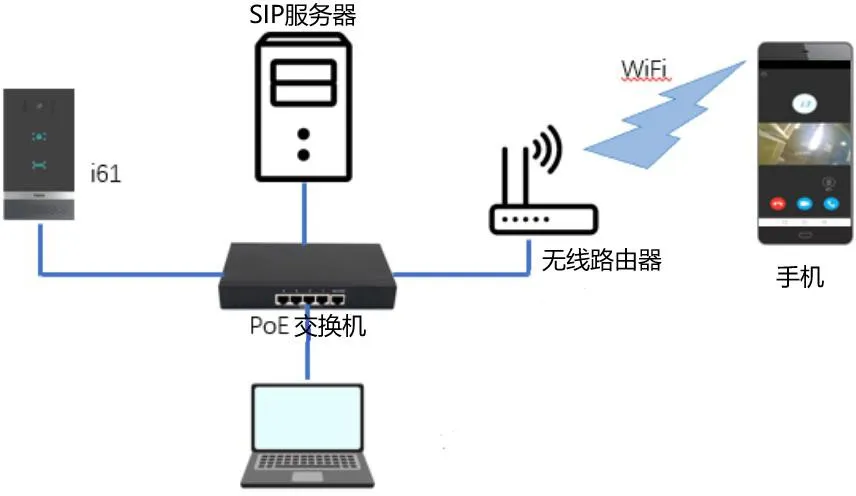
مخطط توصيل الجهاز

مخطط توصيل الجهاز

طريقة الإعداد

سنأخذ i61 مثالًا لشرح إعداد استخدام PortSIP UC لتحقيق مكالمات فيديو 1080P، ومكالمات صوتية عالية الدقة، وفتح الباب عن بُعد بلمسة واحدة. قبل البدء، يرجى الإعداد وفق قسم “التسجيل” أدناه.

التسجيل

2.1.1. تسجيل i61 على خادم SIP
1. في صفحة الويب للهاتف الخط--صفحة SIP، تفعيل تسجيل الامتداد: محدد
اسم المستخدم: الامتداد المخصص من خادم SIP. اسم العرض: يمكن تخصيصه حسب الحاجة
مصادقة المستخدم: الامتداد المخصص من خادم SIP
كلمة مرور المصادقة: كلمة المرور المقابلة للامتداد المخصص من خادم SIP. عنوان الخادم: عنوان خادم SIP
منفذ الخادم: منفذ خادم SIP
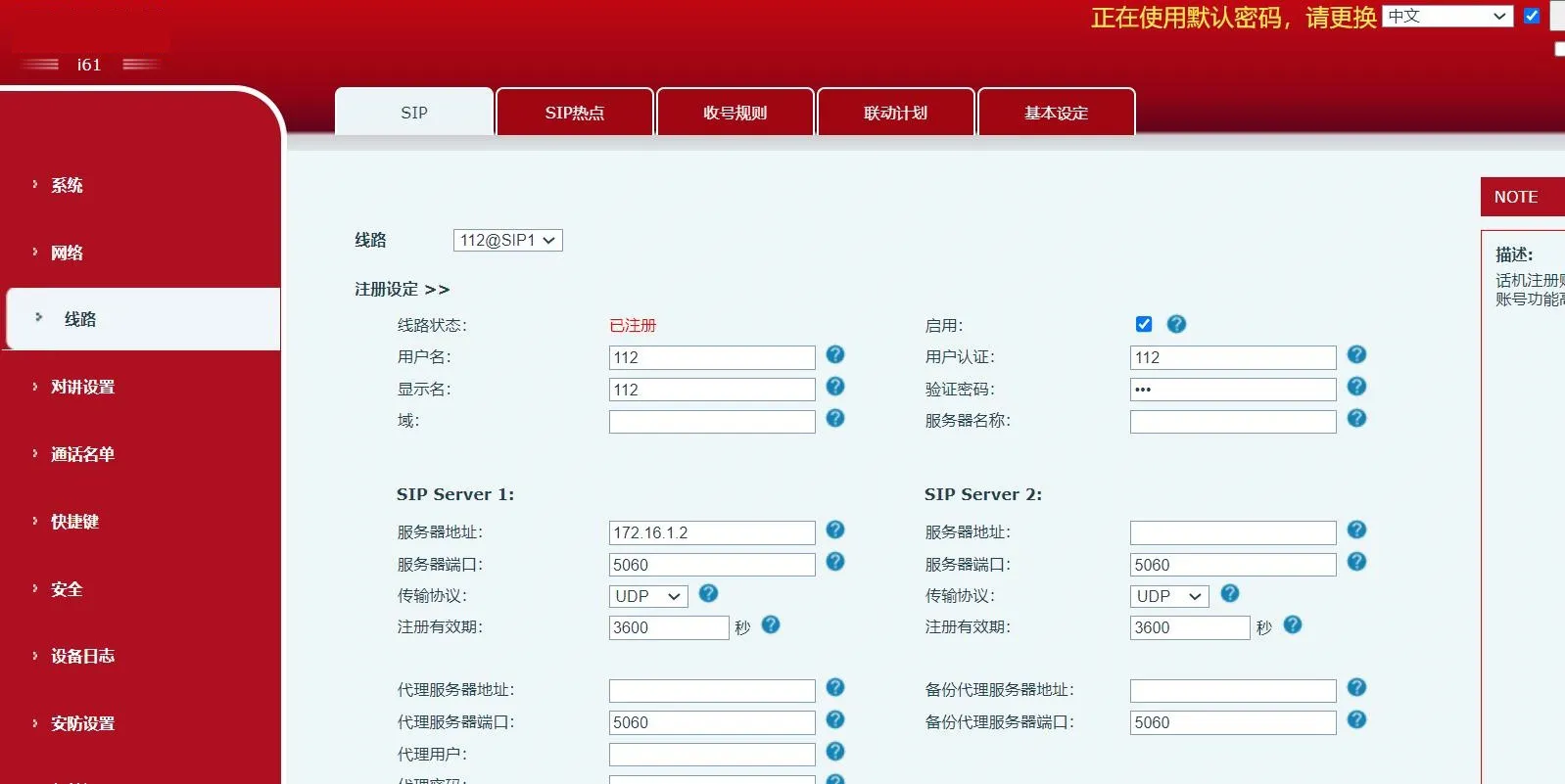
مخطط تسجيل التحكم في الدخول على خادم SIP
2. انقر زر “إرسال
2.1.2. تسجيل خادم SIP على الهاتف المحمول
1. افتح برنامج PortSIP، وأدخل اسم المستخدم وكلمة المرور وعنوان الخادم
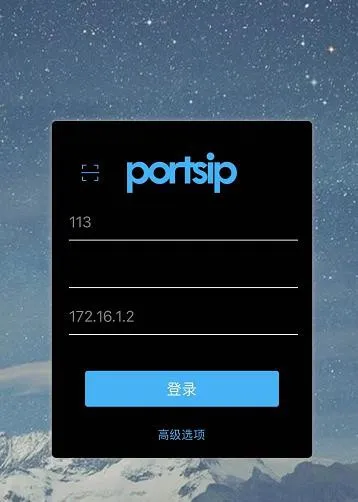
واجهة تسجيل دخول مستخدم خادم SIP على الهاتف
2. انقر زر “تسجيل الدخول”
2.2. إضافة جهة اتصال
في صفحة “جهات الاتصال” داخل التطبيق، انقر الأيقونة في الزاوية العلوية اليمنى. في الصفحة التالية، أدخل رقم SIP الخاص بـ i61 ثم طبّق.
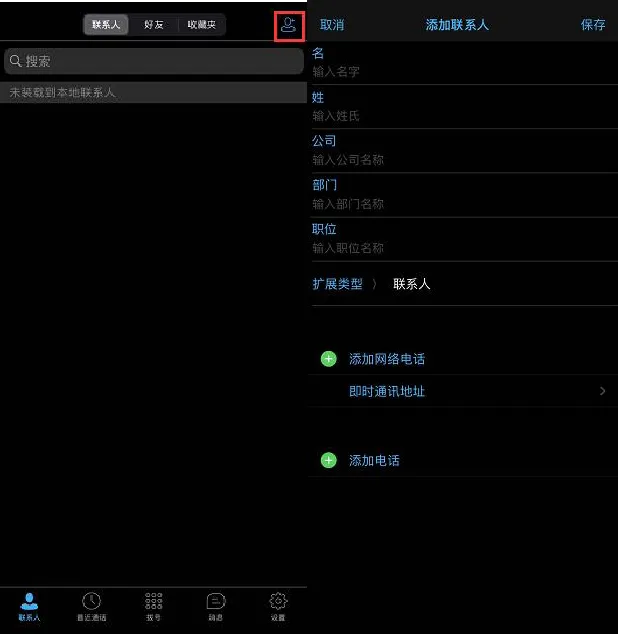
مخطط إنشاء جهة اتصال جديدة

مكالمات الصوت والفيديو

2.3.1. إعداد الاتصال بلمسة واحدة على i61
1. إعداد زر الاختصار
النوع: زر ذاكرة
الاسم: اسم مخصص
القيمة: رقم الامتداد المسجل على الهاتف البرمجي المحمول
النوع الفرعي: اختر “اتصال سريع”
الخط: اختر الامتداد المسجل على i61
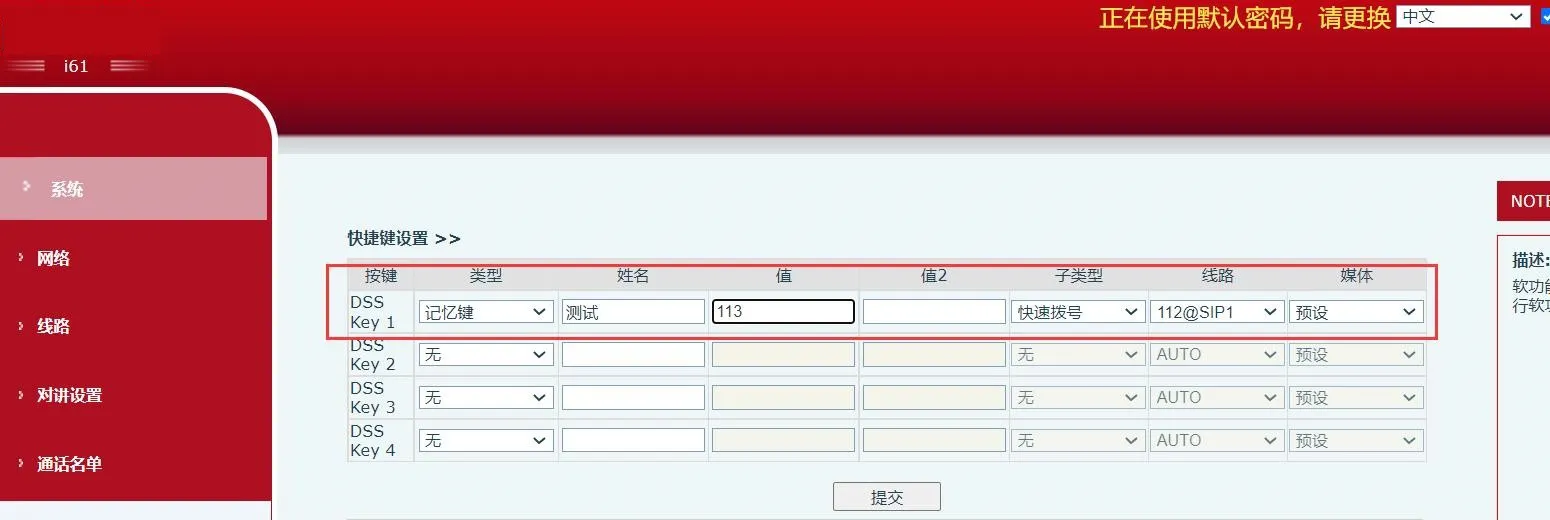
مخطط إعداد زر الاختصار للتحكم في الدخول
2. انقر زر “إرسال”
3. اضغط زر الاختصار على لوحة i61 لإجراء الاتصال
2.3.2. إجراء اتصال صادر عبر PortSIP Softphone
ادخل إلى صفحة “الاتصال” في التطبيق، وأدخل رقم SIP الخاص بـ i61، ثم انقر أيقونة الاتصال.
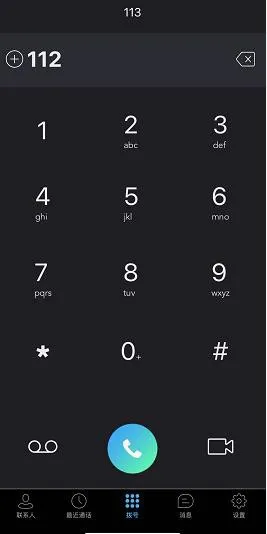
واجهة الاتصال الصادر في PortSIP Softphone
أو يمكنك الدخول إلى صفحة “جهات الاتصال” في التطبيق، والنقر على جهة الاتصال التي تريد الاتصال بها، ثم اختيار وضع الاتصال.

فتح الباب عن بُعد

1. اضبط كلمة المرور عن بُعد على i61:
النوع: اختر “عن بُعد”
كلمة المرور: أدخل كلمة المرور عن بُعد
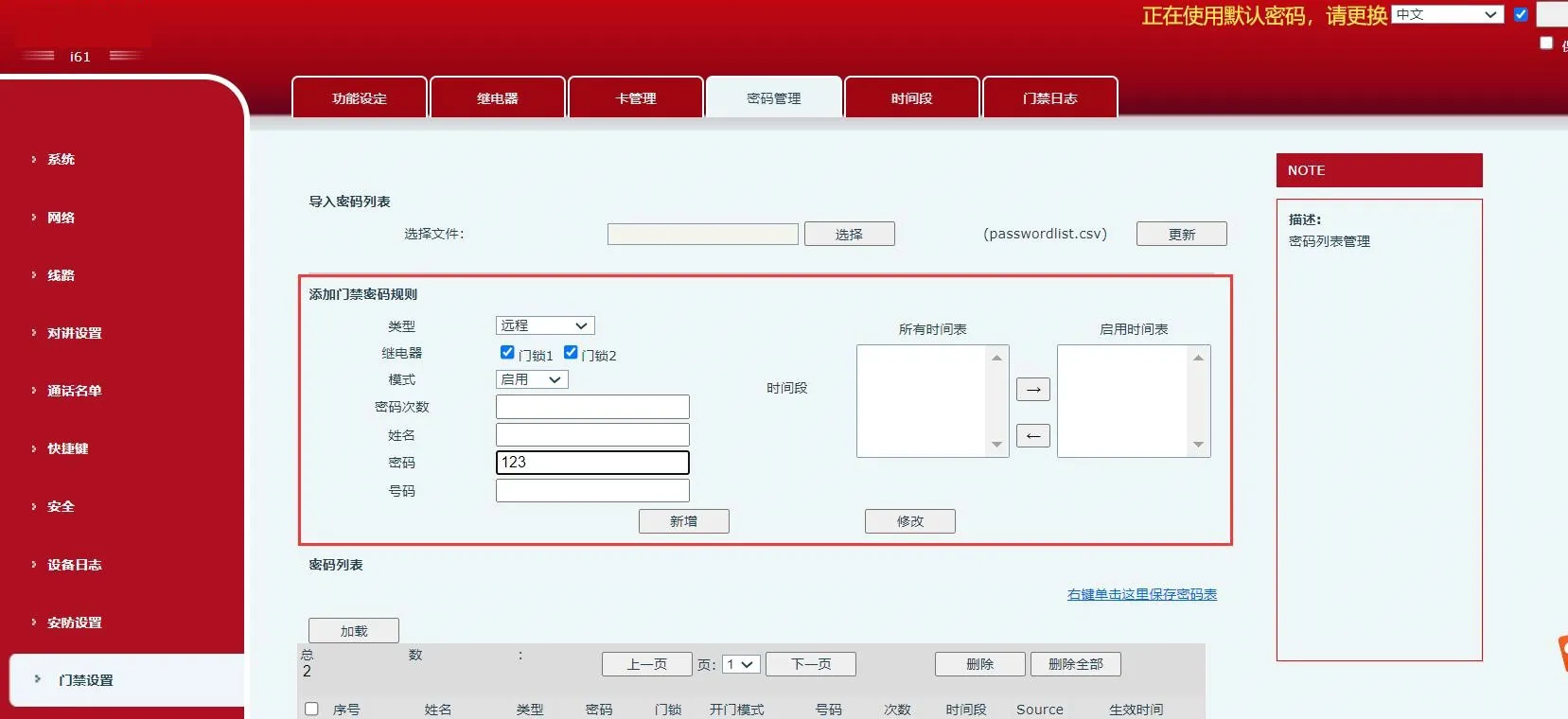
إعدادات معلمات فتح الباب عن بُعد للتحكم في الدخول
2. انقر “إرسال”
3. على الهاتف البرمجي، اختر نوع امتداد i61 كـ “تحكم في الدخول”، وأدخل كلمة المرور عن بُعد في “كلمة مرور فتح الباب”
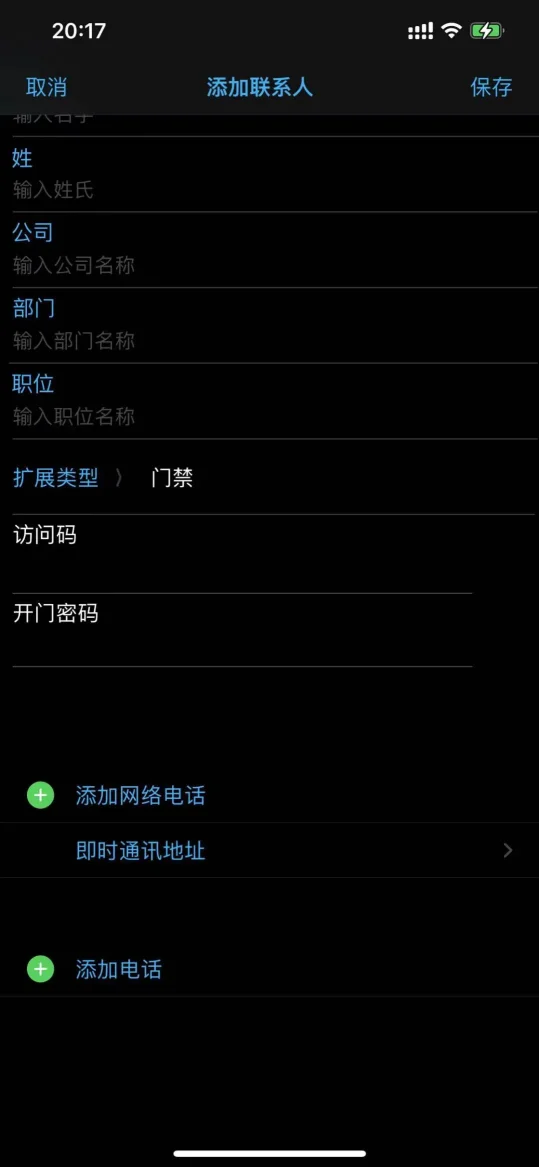
واجهة فتح الباب عن بُعد
4. أثناء المكالمة، انقر أيقونة “فتح الباب” أو انتقل إلى “لوحة الاتصال” وأدخل كلمة المرور للتحكم عن بُعد لفتح الباب.
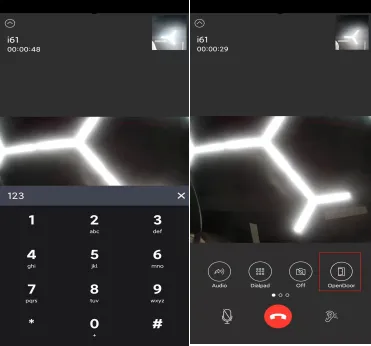

مخطط عملية فتح الباب عن بُعد أثناء المكالمة

كتالوج
خدمة العملاء الهاتف
We use cookie to improve your online experience. By continuing to browse this website, you agree to our use of cookie.

Cookies

This Cookie Policy explains how we use cookies and similar technologies when you access or use our website and related services. Please read this Policy together with our Terms and Conditions and Privacy Policy so that you understand how we collect, use, and protect information.

By continuing to access or use our Services, you acknowledge that cookies and similar technologies may be used as described in this Policy, subject to applicable law and your available choices.

Updates to This Cookie Policy

We may revise this Cookie Policy from time to time to reflect changes in legal requirements, technology, or our business practices. When we make updates, the revised version will be posted on this page and will become effective from the date of publication unless otherwise required by law.

Where required, we will provide additional notice or request your consent before applying material changes that affect your rights or choices.

What Are Cookies?

Cookies are small text files placed on your device when you visit a website or interact with certain online content. They help websites recognize your browser or device, remember your preferences, support essential functionality, and improve the overall user experience.

In this Cookie Policy, the term “cookies” also includes similar technologies such as pixels, tags, web beacons, and other tracking tools that perform comparable functions.

Why We Use Cookies

We use cookies to help our website function properly, remember user preferences, enhance website performance, understand how visitors interact with our pages, and support security, analytics, and marketing activities where permitted by law.

We use cookies to keep our website functional, secure, efficient, and more relevant to your browsing experience.

Categories of Cookies We Use

Strictly Necessary Cookies

These cookies are essential for the operation of the website and cannot be disabled in our systems where they are required to provide the service you request. They are typically set in response to actions such as setting privacy preferences, signing in, or submitting forms.

Without these cookies, certain parts of the website may not function correctly.

Functional Cookies

Functional cookies enable enhanced features and personalization, such as remembering your preferences, language settings, or previously selected options. These cookies may be set by us or by third-party providers whose services are integrated into our website.

If you disable these cookies, some services or features may not work as intended.

Performance and Analytics Cookies

These cookies help us understand how visitors use our website by collecting information such as traffic sources, page visits, navigation behavior, and general interaction patterns. In many cases, this information is aggregated and does not directly identify individual users.

We use this information to improve website performance, usability, and content relevance.

Targeting and Advertising Cookies

These cookies may be placed by our advertising or marketing partners to help deliver more relevant ads and measure the effectiveness of campaigns. They may use information about your browsing activity across different websites and services to build a profile of your interests.

These cookies generally do not store directly identifying personal information, but they may identify your browser or device.

First-Party and Third-Party Cookies

Some cookies are set directly by our website and are referred to as first-party cookies. Other cookies are set by third-party services, such as analytics providers, embedded content providers, or advertising partners, and are referred to as third-party cookies.

Third-party providers may use their own cookies in accordance with their own privacy and cookie policies.

Information Collected Through Cookies

Depending on the type of cookie used, the information collected may include browser type, device type, IP address, referring website, pages viewed, time spent on pages, clickstream behavior, and general usage patterns.

This information helps us maintain the website, improve performance, enhance security, and provide a better user experience.

Your Cookie Choices

You can control or disable cookies through your browser settings and, where available, through our cookie consent or preference management tools. Depending on your location, you may also have the right to accept or reject certain categories of cookies, especially those used for analytics, personalization, or advertising purposes.

Please note that blocking or deleting certain cookies may affect the availability, functionality, or performance of some parts of the website.

Restricting cookies may limit certain features and reduce the quality of your experience on the website.

Cookies in Mobile Applications

Where our mobile applications use cookie-like technologies, they are generally limited to those required for core functionality, security, and service delivery. Disabling these essential technologies may affect the normal operation of the application.

We do not use essential mobile application cookies to store unnecessary personal information.

How to Manage Cookies

Most web browsers allow you to manage cookies through browser settings. You can usually choose to block, delete, or receive alerts before cookies are stored. Because browser controls vary, please refer to your browser provider’s support documentation for details on how to manage cookie settings.

Contact Us

If you have any questions about this Cookie Policy or our use of cookies and similar technologies, please contact us at support@becke.cc .