
دليل مفاتيح الاختصار لهواتف SIP الداخلية، ويغطي Memory Key وLine وEvent Key وDTMF وURL وBLF List والبث المتعدد وAction URL لطرازات i51W وi52W وi53W وi56A.
يشرح هذا المستند بالتفصيل تعريف واستخدام مفاتيح الاختصار القابلة للتهيئة في هواتف السلسلة i الداخلية.
ينطبق هذا الدليل على جميع هواتف السلسلة i الداخلية، بما في ذلك i51W وi52W وi53W وi56A.
① هاتف داخلي من السلسلة i، مع مفتاح PoE أو مزود طاقة DC لتوفير الشبكة والطاقة للجهاز؛
② كمبيوتر اختبار متصل بالمفتاح نفسه، مع ضمان اتصال الشبكة بين الكمبيوتر والهاتف الداخلي.
مفتاح PoE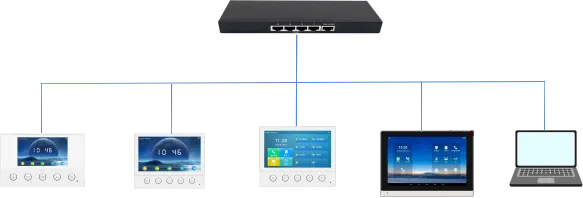
i51W i52W i53W i56A الكمبيوتر
وفقًا للوظيفة، يمكن تقسيم مفاتيح الاختصار إلى الفئات الرئيسية التالية:
Memory Key
Line
Event Key
DTMF
URL
BLF List Key
MCAST Paging/MCAST Listening
Action URL
XML Browser
Application
ملاحظة: قد تختلف الفئات المتاحة حسب الطراز والحل النظامي. لا تتضمن i51W/i52W/i53W فئتي XML Browser وApplication، ولا تتضمن i51W/i52W فئتي MCAST Listening وBLF List Key.
حسب الوظيفة المحددة، يمكن تقسيم Memory Key إلى الأنواع الفرعية التالية:
1. None
2. BLF related configuration
3. Presence
4. Voice Mail
5. Speed Dial
6. Intercom
7. Call Park
8. Call Forward
لأن i51W وi52W لا يحتويان على شاشة لمس، تختلف الأنواع الفرعية لـ Memory Key وEvent Key عن i53W وi56A. يمكن تعريف Memory Key فقط كـ Speed Dial أو Intercom، ويمكن تعريف Event Key فقط كـ Do-not-disturb وHandfree وOK وEnd وIntercom.
3.1.1. BLF related configuration
وصف الوظيفة: تُستخدم هذه الوظيفة لتنفيذ عملية BLF can indicate the status of a subscribed extension and can pick up the call w بسرعة ضمن خطوط SIP أو المكالمات أو جهات الاتصال أو وظائف الخدمة.
عناصر التهيئة: النوع: Memory Key
القيمة: BLF related configuration / DSS value
الخط: SIP account used for outgoing calls or subscription
النوع الفرعي: BLF related configuration
رقم الالتقاط: optional server pickup code
طريقة الاستخدام: تُستخدم هذه الوظيفة لتنفيذ عملية Press the configured key in standby, ringing or call status to execute the assig بسرعة ضمن خطوط SIP أو المكالمات أو جهات الاتصال أو وظائف الخدمة.
3.1.2. Presence
وصف الوظيفة: تُستخدم هذه الوظيفة لتنفيذ عملية Presence shows line status through the indicator and can also show whether the o بسرعة ضمن خطوط SIP أو المكالمات أو جهات الاتصال أو وظائف الخدمة.
عناصر التهيئة: النوع: Memory Key
القيمة: Presence / DSS value
الخط: SIP account used for outgoing calls or subscription
النوع الفرعي: Presence
رقم الالتقاط: optional server pickup code
طريقة الاستخدام: تُستخدم هذه الوظيفة لتنفيذ عملية Press the configured key in standby, ringing or call status to execute the assig بسرعة ضمن خطوط SIP أو المكالمات أو جهات الاتصال أو وظائف الخدمة.
3.1.3. Voice Mail
وصف الوظيفة: تُستخدم هذه الوظيفة لتنفيذ عملية Voice Mail is used to listen to messages بسرعة ضمن خطوط SIP أو المكالمات أو جهات الاتصال أو وظائف الخدمة.
عناصر التهيئة: النوع: Memory Key
القيمة: Voice Mail / DSS value
الخط: SIP account used for outgoing calls or subscription
النوع الفرعي: Voice Mail
طريقة الاستخدام: تُستخدم هذه الوظيفة لتنفيذ عملية Press the configured key in standby, ringing or call status to execute the assig بسرعة ضمن خطوط SIP أو المكالمات أو جهات الاتصال أو وظائف الخدمة.
3.1.4. Speed Dial
وصف الوظيفة: تُستخدم هذه الوظيفة لتنفيذ عملية Speed Dial is used for frequently dialed or hard-to-remember numbers بسرعة ضمن خطوط SIP أو المكالمات أو جهات الاتصال أو وظائف الخدمة.
عناصر التهيئة: النوع: Memory Key
القيمة: Speed Dial / DSS value
الخط: SIP account used for outgoing calls or subscription
النوع الفرعي: Speed Dial
طريقة الاستخدام: تُستخدم هذه الوظيفة لتنفيذ عملية Press the configured key in standby, ringing or call status to execute the assig بسرعة ضمن خطوط SIP أو المكالمات أو جهات الاتصال أو وظائف الخدمة.
3.1.5. Intercom
وصف الوظيفة: تُستخدم هذه الوظيفة لتنفيذ عملية Intercom enables automatic answering and direct conversation with the configured بسرعة ضمن خطوط SIP أو المكالمات أو جهات الاتصال أو وظائف الخدمة.
عناصر التهيئة: النوع: Memory Key
القيمة: Intercom / DSS value
الخط: SIP account used for outgoing calls or subscription
النوع الفرعي: Intercom
طريقة الاستخدام: تُستخدم هذه الوظيفة لتنفيذ عملية Press the configured key in standby, ringing or call status to execute the assig بسرعة ضمن خطوط SIP أو المكالمات أو جهات الاتصال أو وظائف الخدمة.
3.1.6. Call Park
وصف الوظيفة: تُستخدم هذه الوظيفة لتنفيذ عملية Call Park temporarily parks a call on the server, so the user can retrieve the c بسرعة ضمن خطوط SIP أو المكالمات أو جهات الاتصال أو وظائف الخدمة.
عناصر التهيئة: النوع: Memory Key
القيمة: Call Park / DSS value
الخط: SIP account used for outgoing calls or subscription
النوع الفرعي: Call Park
طريقة الاستخدام: تُستخدم هذه الوظيفة لتنفيذ عملية Press the configured key in standby, ringing or call status to execute the assig بسرعة ضمن خطوط SIP أو المكالمات أو جهات الاتصال أو وظائف الخدمة.
3.1.7. Call Forward
وصف الوظيفة: تُستخدم هذه الوظيفة لتنفيذ عملية Call Forward transfers an incoming call to the configured destination number wit بسرعة ضمن خطوط SIP أو المكالمات أو جهات الاتصال أو وظائف الخدمة.
عناصر التهيئة: النوع: Memory Key
القيمة: Call Forward / DSS value
الخط: SIP account used for outgoing calls or subscription
النوع الفرعي: Call Forward
طريقة الاستخدام: تُستخدم هذه الوظيفة لتنفيذ عملية Press the configured key in standby, ringing or call status to execute the assig بسرعة ضمن خطوط SIP أو المكالمات أو جهات الاتصال أو وظائف الخدمة.
اضغط مفتاح Line. إذا لم يكن الخط مسجلًا، يدخل الهاتف وضع إعداد الخط. إذا كان الخط مسجلًا، يدخل وضع الاتصال لإدخال رقم وإجراء مكالمة.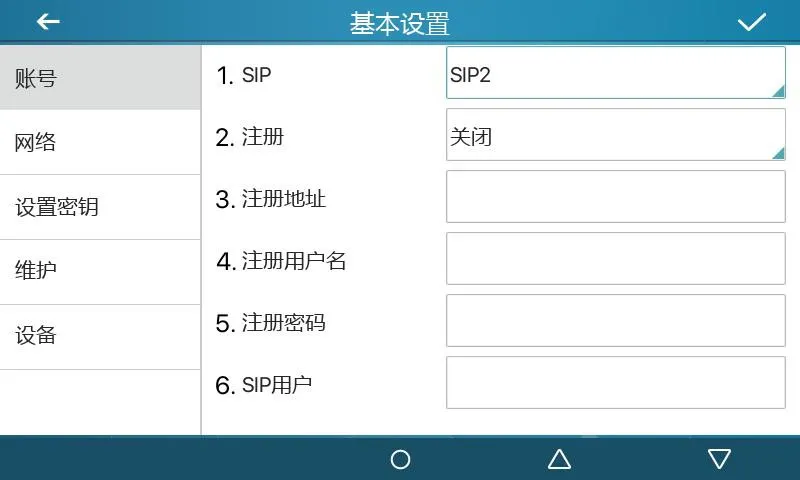
الشكل 1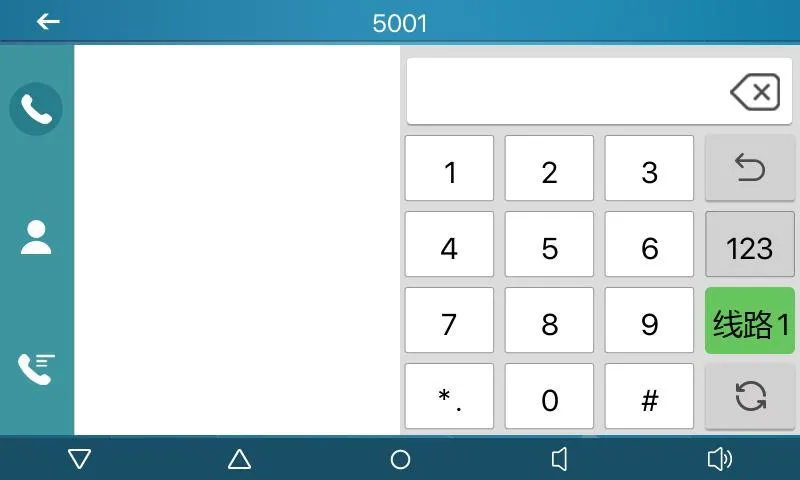
الشكل 2
وصف الوظيفة: يتم ضبط المفتاح كمفتاح وظيفة مخصص من خلال النوع الفرعي. تختلف الوظائف وطرق التشغيل حسب كل نوع فرعي.
عناصر التهيئة: النوع: Event Key
النوع الفرعي: selected function type
طريقة الاستخدام:
3.3.1 None:
لا توجد وظيفة.
3.3.2 Voice Mail:
تُستخدم هذه الوظيفة لتنفيذ عملية Checks voice mail information for all SIP lines and can call the mailbox of the بسرعة ضمن خطوط SIP أو المكالمات أو جهات الاتصال أو وظائف الخدمة.
3.3.3 Do-not-disturb:
تُستخدم هذه الوظيفة لتنفيذ عملية Enables do-not-disturb for the whole device or for a selected SIP line بسرعة ضمن خطوط SIP أو المكالمات أو جهات الاتصال أو وظائف الخدمة.
3.3.4 Call Hold:
تُستخدم هذه الوظيفة لتنفيذ عملية Places the current call on hold like a physical Hold key بسرعة ضمن خطوط SIP أو المكالمات أو جهات الاتصال أو وظائف الخدمة.
3.3.5 Transfer:
تُستخدم هذه الوظيفة لتنفيذ عملية Transfers the current call like a Transfer key or Xfer softkey بسرعة ضمن خطوط SIP أو المكالمات أو جهات الاتصال أو وظائف الخدمة.
3.3.6 Phonebook:
تُستخدم هذه الوظيفة لتنفيذ عملية Opens the contact directory بسرعة ضمن خطوط SIP أو المكالمات أو جهات الاتصال أو وظائف الخدمة.
3.3.7 Redial:
تُستخدم هذه الوظيفة لتنفيذ عملية Redials the last outgoing number using the previous line بسرعة ضمن خطوط SIP أو المكالمات أو جهات الاتصال أو وظائف الخدمة.
3.3.8 Pick up:
تُستخدم هذه الوظيفة لتنفيذ عملية Answers an incoming call that is ringing on another phone after the ringing phon بسرعة ضمن خطوط SIP أو المكالمات أو جهات الاتصال أو وظائف الخدمة.
3.3.9 Join:
تُستخدم هذه الوظيفة لتنفيذ عملية Allows the test phone to join an existing call after entering the target phone n بسرعة ضمن خطوط SIP أو المكالمات أو جهات الاتصال أو وظائف الخدمة.
3.3.10 Call Forward:
تُستخدم هذه الوظيفة لتنفيذ عملية Opens call forwarding settings in standby mode بسرعة ضمن خطوط SIP أو المكالمات أو جهات الاتصال أو وظائف الخدمة.
3.3.11 Call Logs:
تُستخدم هذه الوظيفة لتنفيذ عملية Opens call history and call record information بسرعة ضمن خطوط SIP أو المكالمات أو جهات الاتصال أو وظائف الخدمة.
3.3.12 Flash:
تُستخدم هذه الوظيفة لتنفيذ عملية Holds the current call and opens a new dialing state with dial tone بسرعة ضمن خطوط SIP أو المكالمات أو جهات الاتصال أو وظائف الخدمة.
3.3.13 Memo:
تُستخدم هذه الوظيفة لتنفيذ عملية Opens the memo application for note management بسرعة ضمن خطوط SIP أو المكالمات أو جهات الاتصال أو وظائف الخدمة.
3.3.14 Headset:
تُستخدم هذه الوظيفة لتنفيذ عملية Works like the physical headset key for answering and hanging up calls بسرعة ضمن خطوط SIP أو المكالمات أو جهات الاتصال أو وظائف الخدمة.
3.3.15 Release:
تُستخدم هذه الوظيفة لتنفيذ عملية Exits the LCD menu or hangs up all calls and returns to standby بسرعة ضمن خطوط SIP أو المكالمات أو جهات الاتصال أو وظائف الخدمة.
3.3.16 Lock phone:
تُستخدم هذه الوظيفة لتنفيذ عملية Locks the phone from standby mode بسرعة ضمن خطوط SIP أو المكالمات أو جهات الاتصال أو وظائف الخدمة.
3.3.17 SMS:
تُستخدم هذه الوظيفة لتنفيذ عملية Opens the SMS interface for sending, receiving and browsing messages بسرعة ضمن خطوط SIP أو المكالمات أو جهات الاتصال أو وظائف الخدمة.
3.3.18 Call Back:
تُستخدم هذه الوظيفة لتنفيذ عملية Calls back the last incoming number after off-hook بسرعة ضمن خطوط SIP أو المكالمات أو جهات الاتصال أو وظائف الخدمة.
3.3.19 Hide DTMF:
تُستخدم هذه الوظيفة لتنفيذ عملية Opens the setting mode for DTMF hidden display بسرعة ضمن خطوط SIP أو المكالمات أو جهات الاتصال أو وظائف الخدمة.
3.3.20 Intercom:
تُستخدم هذه الوظيفة لتنفيذ عملية Enables Intercom mode and automatic answering when no other call is active بسرعة ضمن خطوط SIP أو المكالمات أو جهات الاتصال أو وظائف الخدمة.
3.3.21 Group Listening:
تُستخدم هذه الوظيفة لتنفيذ عملية Enables group listening during handset or headset calls; audio is played, while بسرعة ضمن خطوط SIP أو المكالمات أو جهات الاتصال أو وظائف الخدمة.
3.3.22 Prefix:
تُستخدم هذه الوظيفة لتنفيذ عملية Adds the configured outside-line prefix after off-hook, so users do not need to بسرعة ضمن خطوط SIP أو المكالمات أو جهات الاتصال أو وظائف الخدمة.
3.3.23 Hot Desking:
تُستخدم هذه الوظيفة لتنفيذ عملية Clears all SIP configurations after the configured DSS key is pressed and OK is بسرعة ضمن خطوط SIP أو المكالمات أو جهات الاتصال أو وظائف الخدمة.
3.3.24 Agent:
تُستخدم هذه الوظيفة لتنفيذ عملية Opens the Agent interface بسرعة ضمن خطوط SIP أو المكالمات أو جهات الاتصال أو وظائف الخدمة.
3.3.25 End:
تُستخدم هذه الوظيفة لتنفيذ عملية Performs the End function on the call interface بسرعة ضمن خطوط SIP أو المكالمات أو جهات الاتصال أو وظائف الخدمة.
3.3.26 Disposition:
تُستخدم هذه الوظيفة لتنفيذ عملية Broadsoft Call Center function that sends Disposition Code Info during and after بسرعة ضمن خطوط SIP أو المكالمات أو جهات الاتصال أو وظائف الخدمة.
3.3.27 Escalate:
تُستخدم هذه الوظيفة لتنفيذ عملية Broadsoft Call Center function that sends SIP Info and selects a Supervisor auto بسرعة ضمن خطوط SIP أو المكالمات أو جهات الاتصال أو وظائف الخدمة.
3.3.28 Trace:
تُستخدم هذه الوظيفة لتنفيذ عملية Broadsoft function similar to Disposition, supporting information sending during بسرعة ضمن خطوط SIP أو المكالمات أو جهات الاتصال أو وظائف الخدمة.
3.3.29 Handfree:
تُستخدم هذه الوظيفة لتنفيذ عملية Enters hands-free mode بسرعة ضمن خطوط SIP أو المكالمات أو جهات الاتصال أو وظائف الخدمة.
3.3.30 Answer Key:
تُستخدم هذه الوظيفة لتنفيذ عملية Answers the incoming call بسرعة ضمن خطوط SIP أو المكالمات أو جهات الاتصال أو وظائف الخدمة.
3.3.31 Private Hold:
تُستخدم هذه الوظيفة لتنفيذ عملية Broadsoft function that prevents other users from retrieving the held call بسرعة ضمن خطوط SIP أو المكالمات أو جهات الاتصال أو وظائف الخدمة.
3.3.32 Local Contacts:
تُستخدم هذه الوظيفة لتنفيذ عملية Opens the local contacts interface بسرعة ضمن خطوط SIP أو المكالمات أو جهات الاتصال أو وظائف الخدمة.
3.3.33 LDAP Group:
تُستخدم هذه الوظيفة لتنفيذ عملية Accesses the LDAP network phonebook when LDAP phonebook is enabled بسرعة ضمن خطوط SIP أو المكالمات أو جهات الاتصال أو وظائف الخدمة.
3.3.34 XML Group:
تُستخدم هذه الوظيفة لتنفيذ عملية Accesses the selected XML network phonebook when XML phonebook is enabled بسرعة ضمن خطوط SIP أو المكالمات أو جهات الاتصال أو وظائف الخدمة.
3.3.35 Broadsoft Group:
تُستخدم هذه الوظيفة لتنفيذ عملية Accesses the Broadsoft network phonebook when it is enabled بسرعة ضمن خطوط SIP أو المكالمات أو جهات الاتصال أو وظائف الخدمة.
3.3.36 Record:
تُستخدم هذه الوظيفة لتنفيذ عملية Starts call recording when the phone has been configured for recording بسرعة ضمن خطوط SIP أو المكالمات أو جهات الاتصال أو وظائف الخدمة.
3.3.37 Auto Headset:
تُستخدم هذه الوظيفة لتنفيذ عملية Enables or disables headset answering; the DSS key stays steady green بسرعة ضمن خطوط SIP أو المكالمات أو جهات الاتصال أو وظائف الخدمة.
وصف الوظيفة: يستخدم للاتصال الثانوي السريع دون حفظ التسلسل. أثناء المكالمة، اضغط هذا المفتاح لإرسال التسلسل المحدد إلى الطرف البعيد.
عناصر التهيئة: النوع: DTMF
القيمة: DTMF secondary dialing key sequence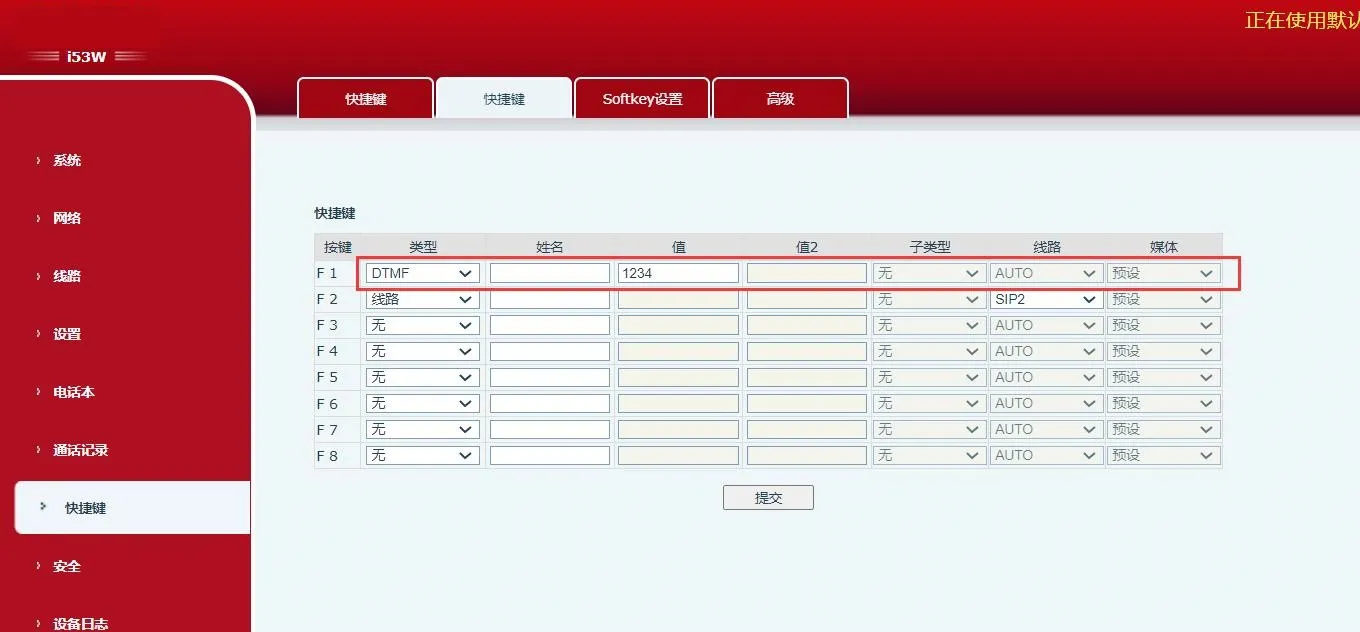 الشكل 3
وصف الوظيفة: اضغط هذا المفتاح للوصول مباشرة إلى URL البعيد المحدد عندما يكون صالحًا.
عناصر التهيئة: النوع: URL
القيمة: complete remote URL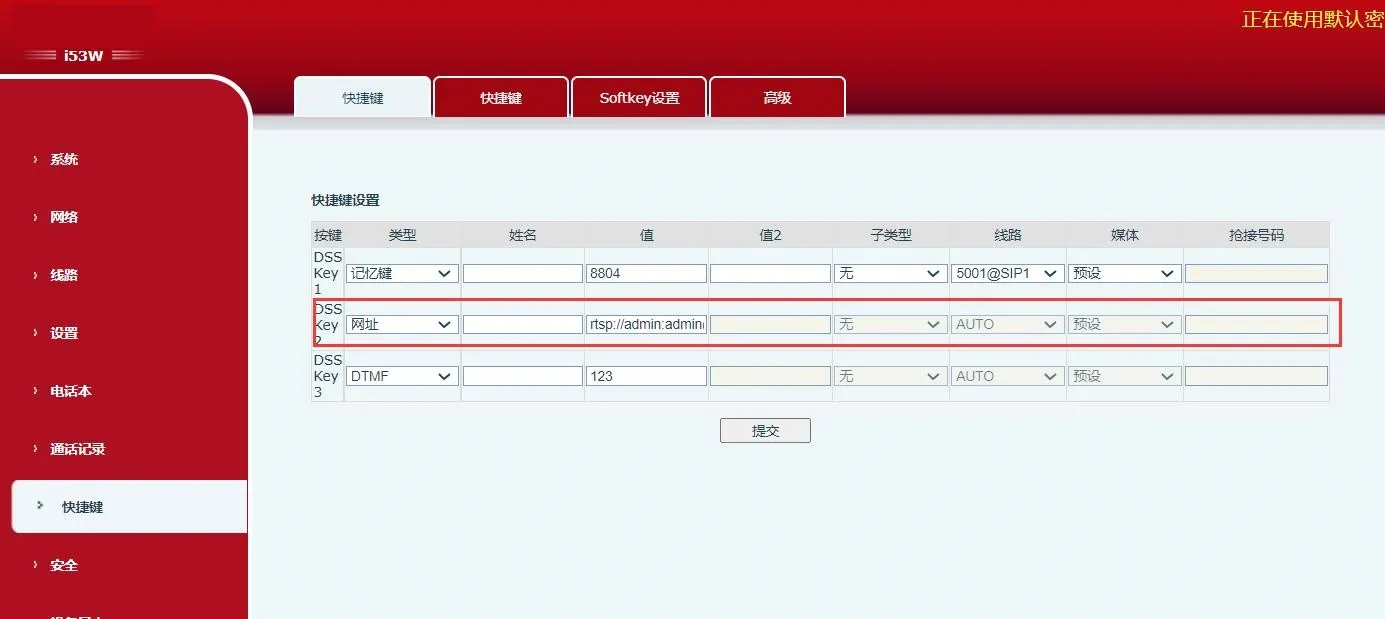 الشكل 4
وصف الوظيفة: تعمل هذه الوظيفة مع الخادم. يستخدم BLF التقليدي طلب Subscribe لكل رقم. تجمع BLF List Key الأرقام في الخادم، وتشترك عبر URL المجموعة، وتحلل رسائل Notify، وتعرض الحالة على LED الخاص بالمفتاح.
عناصر التهيئة: النوع: BLF List Key
طريقة الاستخدام: server automatically delivers subscribed number list to DSS keys.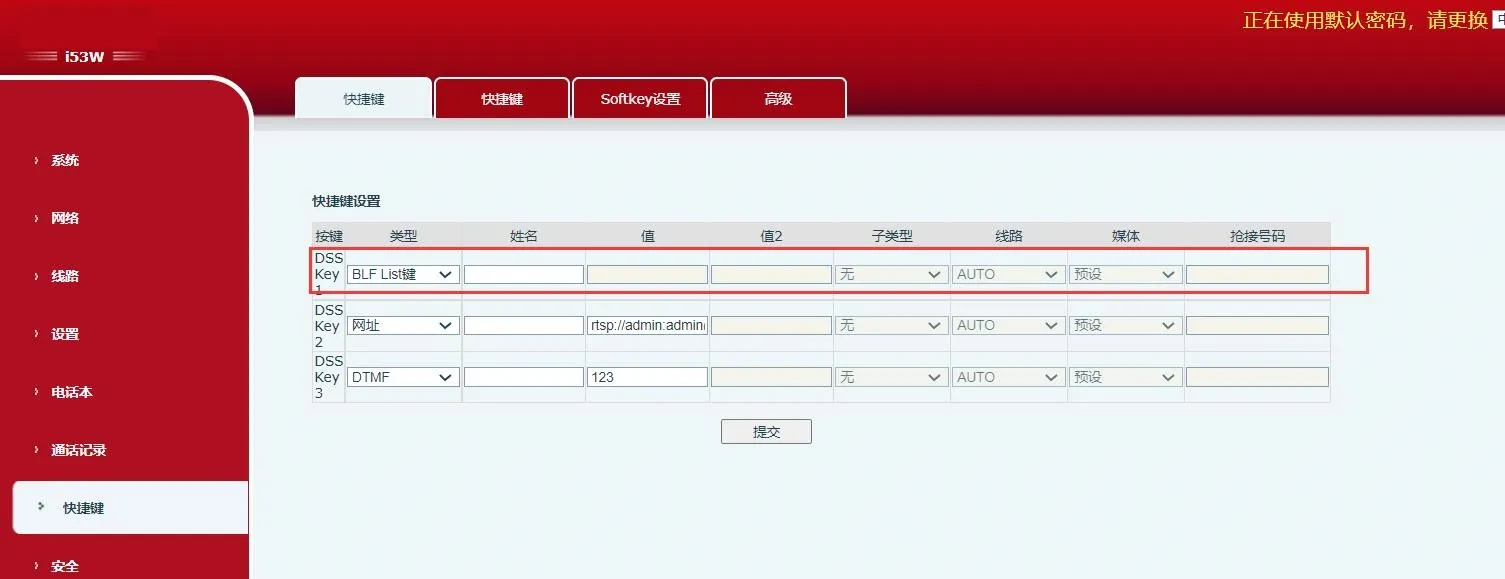 الشكل 5
وصف الوظيفة: بعد ضبط عنوان multicast وترميز الصوت، اضغط هذا المفتاح لإرسال تدفق RTP متعدد البث. اضغط مرة أخرى لإنهاء multicast وإغلاق المكالمة.
عناصر التهيئة: النوع: MCAST Paging / MCAST Listening
القيمة: multicast listening address and port
النوع الفرعي: RTP audio codec used by sender and receiver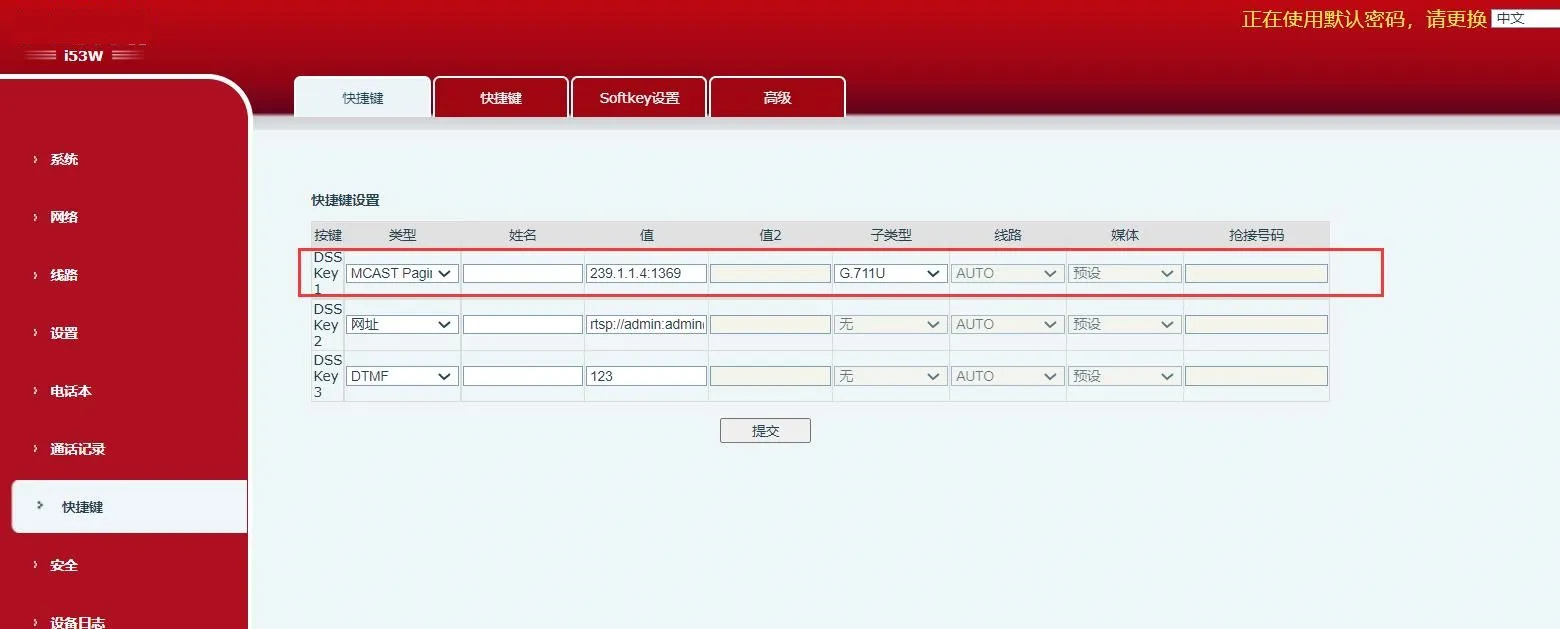
الشكل 6
وصف الوظيفة: يدعم URL المحدد متغيرات بصيغة ¥. عند ضغط مفتاح DSS، يرسل النظام طلب HTTP GET أو POST.
عناصر التهيئة: النوع: Action URL
القيمة: valid URL
النوع الفرعي: POST or GET