
دليل وظيفة SIP Server الأساسي والاحتياطي في الهواتف الصناعية، مع شرح failover وfailback والتسجيل وعناصر الإعداد وواجهة Web لضمان استمرار خدمة SIP بثبات.
تساعد آلية التكرار في SIP Server على ضمان موثوقية خدمة SIP واستمراريتها. ويعد استخدام خادم أساسي وخادم احتياطي أحد أساليب التكرار الشائعة. يتشارك الخادم الأساسي والخادم الاحتياطي حسابات المستخدمين ومعلومات Dialog بحسب طريقة تنفيذ حل التكرار، ومعلومات Registration، وبيانات خدمة أخرى. في الحالة الطبيعية، يتولى الخادم الأساسي جميع طلبات SIP وردودها. وعندما يتعطل الخادم الأساسي أو يكون قيد الصيانة أو يصبح غير قابل للوصول، ينتقل طرف SIP تلقائيا إلى الخادم الاحتياطي لطلب الخدمة، مما يحافظ على استمرارية الاستخدام. وبعد استعادة الخادم الأساسي، يمكن لطرف SIP الرجوع تلقائيا إلى الخادم الأساسي لطلب الخدمة.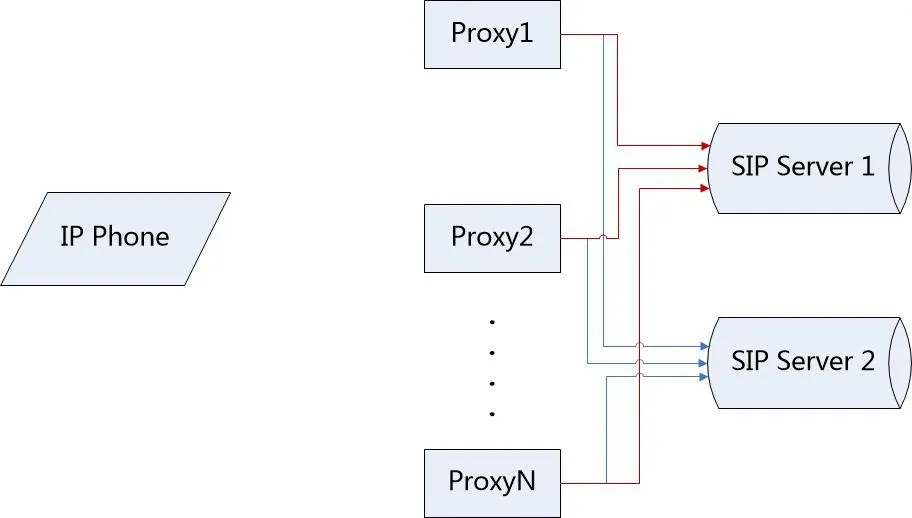
الشكل 1 SIP Server الأساسي والاحتياطي
Failover: آلية يتولى فيها الخادم الاحتياطي جميع الخدمات عندما يكون الخادم الأساسي غير متاح، من دون التأثير في استخدام العميل.
Failback: آلية يكتشف فيها الجهاز ما إذا كان الخادم الأساسي قد تعافى أثناء عمل الخادم الاحتياطي، وذلك للعودة بسرعة إلى الخادم الأساسي.
Server Unavailable: يطلب العميل التسجيل فيرد Server بالرمز 500/503، أو يستقبل UDP رسالة ICMP تفيد بأن العنوان الهدف غير قابل للوصول، أو تنتهي مهلة اتصال TCP.
Register Failback: عندما يكون الخادم الأساسي غير متاح ويسجل الهاتف على الخادم الاحتياطي، ينشئ الهاتف Register Dialog جديدا لاكتشاف ما إذا كان الخادم الأساسي قد تعافى. لهذه الوظيفة دورة فحص مستقلة وقابلة للضبط.
هذا المستند موجه إلى موظفي البحث والتطوير أو الاختبار الداخليين الذين يرغبون في فهم كيفية تحسين وظيفة Dial plan.
يتم تكوين معلومتي Server لخط SIP في الهاتف. يكون SIP Server1 هو الخادم الأساسي، ويكون SIP Server2 هو الخادم الاحتياطي.
يدعم الهاتف Failover لإشارات Register وInvite وBye. أما الإشارات الأخرى فلا تزال غير مدعومة حاليا.
2.2.1 Register Failover
شروط التشغيل: تسجيل يدوي / انتهاء مهلة التسجيل / انتهاء مهلة طلب Option أو Cancel
1) يرسل الهاتف إشارة Register إلى الخادم الأساسي.
2) يحاول الهاتف إرسال Register إلى الخادم الأساسي لعدد محدد من المرات في منتجات V3، أو لمدة محددة في منتجات V2.
3) عندما يكون الخادم الأساسي Unavailable، يرسل الهاتف إشارة Register إلى الخادم الاحتياطي.
4) يرد الخادم الاحتياطي بالرسالة 200 OK، ويتم تسجيل الهاتف بنجاح.
2.2.2 Invite Failover
شرط التشغيل: يقوم المستخدم بإجراء مكالمة
1) يتصل الهاتف A بالهاتف B.
2) يرسل الهاتف A طلب Invite إلى الخادم الأساسي.
3) يحاول الهاتف A إرسال Invite إلى الخادم الأساسي لعدد محدد من المرات في منتجات V3، أو لمدة محددة في منتجات V2.
4) عندما يكون الخادم الأساسي Unavailable، يرسل الهاتف Register إلى الخادم الاحتياطي.
5) يرد الخادم الاحتياطي على الهاتف بالرسالة 200 OK، ويتم تسجيل الهاتف على الخادم الاحتياطي بنجاح.
6) يرسل الهاتف طلب Invite إلى الخادم الاحتياطي.
7) يرد الخادم الاحتياطي بالرسالة 200 OK، ويتم إنشاء المكالمة بين الهاتفين A وB.
2.2.3 Bye Failover
شرط التشغيل: بعد أن ينشئ الهاتف مكالمة عبر الخادم الأساسي، يقوم الهاتف بإنهاء المكالمة
1) ينشئ الهاتف A مكالمة مع الهاتف B عبر الخادم الأساسي.
2) ينهي الهاتف A المكالمة.
3) يرسل الهاتف A طلب Bye إلى الخادم الأساسي.
4) يحاول الهاتف A إرسال Bye إلى الخادم الأساسي لعدد محدد من المرات في منتجات V3، أو لمدة محددة في منتجات V2.
5) عندما يكون الخادم الأساسي Unavailable، يرسل الهاتف Register إلى الخادم الاحتياطي.
6) يرد الخادم الاحتياطي على الهاتف بالرسالة 200 OK، ويتم تسجيل الهاتف على الخادم الاحتياطي بنجاح.
7) يرسل الهاتف رسالة Bye إلى الخادم الاحتياطي.
8) يرد الخادم الاحتياطي بالرسالة 200 OK، وتنتهي مكالمة الهاتف B.
2.2.4 فشل Failover
عندما تكون جميع الخوادم غير متاحة، يحاول الهاتف الوصول إلى كل خادم بالتتابع حسب أولوية الخادم الأساسي والخادم الاحتياطي، وذلك لعدد محدد من المرات في منتجات V3 أو لمدة محددة في منتجات V2. يستثنى الخادم الأخير من ذلك. ووفقا لمعيار RFC3261، يحاول SIP لمدة 64*T1، أي 32 ثانية. بعد ذلك يفشل طلب إشارة SIP الحالي ويتم إبلاغ المستخدم بالنتيجة.
يدعم الهاتف Register Failback المستقل. بعد نجاح تسجيل الهاتف على الخادم الاحتياطي، يرسل الهاتف Register مستقلا بشكل دوري إلى الخادم الأساسي لاكتشاف ما إذا كان الخادم الأساسي قد تعافى.
شرط التشغيل: انتهاء مؤقت Register Failback.
1) يتم تسجيل الهاتف بنجاح على الخادم الاحتياطي.
2) عند انتهاء مهلة Register Failback، يرسل الهاتف Register مستقلا إلى الخادم الأساسي.
3) يرد الخادم الأساسي بالرسالة 200 OK، وينتقل الهاتف إلى الخادم الأساسي.
عندما يظل الخادم الأساسي غير متاح، يعيد الهاتف إرسال Register وفقا لمعيار RFC3261 إلى أن تنتهي مهلة 64*T1، أي 32 ثانية. بعد انتهاء المهلة، يبدأ المؤقت مرة أخرى لفحص الخادم الأساسي بشكل دوري.
| اسم عنصر الإعداد | الوصف | القيمة | |
| SIPN | Register Addr: | عنوان الخادم الأساسي. | IP/اسم نطاق القيمة الافتراضية: فارغة |
| SIPN | Register Port: | منفذ خدمة الخادم الأساسي. | رقمية القيمة الافتراضية: 5060 |
| SIPN | Register TTL: | دورة تسجيل الخادم الأساسي. | رقمية القيمة الافتراضية: 3600 الوحدة: ثانية |
| SIPN | Transport: | بروتوكول نقل الخادم الأساسي: UDP أو TCP أو TLS. | 0: UDP 1: TCP 3: TLS القيمة الافتراضية: 0 |
| SIPN | Backup Addr: | عنوان الخادم الاحتياطي. | IP/اسم نطاق القيمة الافتراضية: فارغة |
| SIPN | Backup Port: | منفذ خدمة الخادم الاحتياطي. | رقمية القيمة الافتراضية: 5060 |
| SIPN | Backup TTL: | دورة تسجيل الخادم الاحتياطي. | رقمية القيمة الافتراضية: 3600 الوحدة: ثانية |
| SIPN | Backup Transport: | بروتوكول نقل الخادم الاحتياطي: UDP أو TCP أو TLS. | 0: UDP 1: TCP 3: TLS القيمة الافتراضية: 0 |
| SIPN | Enable Failback: | يتحكم فيما إذا كان الخط يفعّل وظيفة Register Failback. | 0/1 القيمة الافتراضية: 1 |
| SIPN Failback Interval: | الفاصل الزمني لاكتشاف ما إذا كان الخادم الأساسي أو Proxy قد تعافى بعد التسجيل على الخادم الاحتياطي أو Proxy. | رقمية القيمة الافتراضية: 1800 الوحدة: ثانية | |
| SIPN Signal Retry Counts: | عدد مرات إعادة إرسال SIP Request عندما يكون الخادم أو Proxy غير متاح، باستثناء آخر خادم أو Proxy حيث تكون المهلة 32 ثانية. | رقمية القيمة الافتراضية: 3 | |
يمكن للمستخدم تسجيل الدخول إلى Web server في الهاتف لتكوين الخادم الأساسي والخادم الاحتياطي.
1) انقر على علامة تبويب "الخط" واختر علامة SIP الفرعية، وهي الصفحة الافتراضية.
2) اختر الخط المراد تكوينه من القائمة المنسدلة "الخط" داخل الصفحة.
3) قم بتكوين معلومات تسجيل الخط.
4) قم بتكوين معلومات SIP Server1، وهو الخادم الأساسي، وSIP Server2، وهو الخادم الاحتياطي، كما هو موضح في الشكل 2.
5) انقر على "الإعدادات الأساسية" في الصفحة الحالية لتعيين عناصر الإعداد المتعلقة بـ Failback بين الأساسي والاحتياطي، كما هو موضح في الشكل 3.
6) انقر على زر "إرسال" في أسفل الصفحة حتى تصبح الإعدادات نافذة.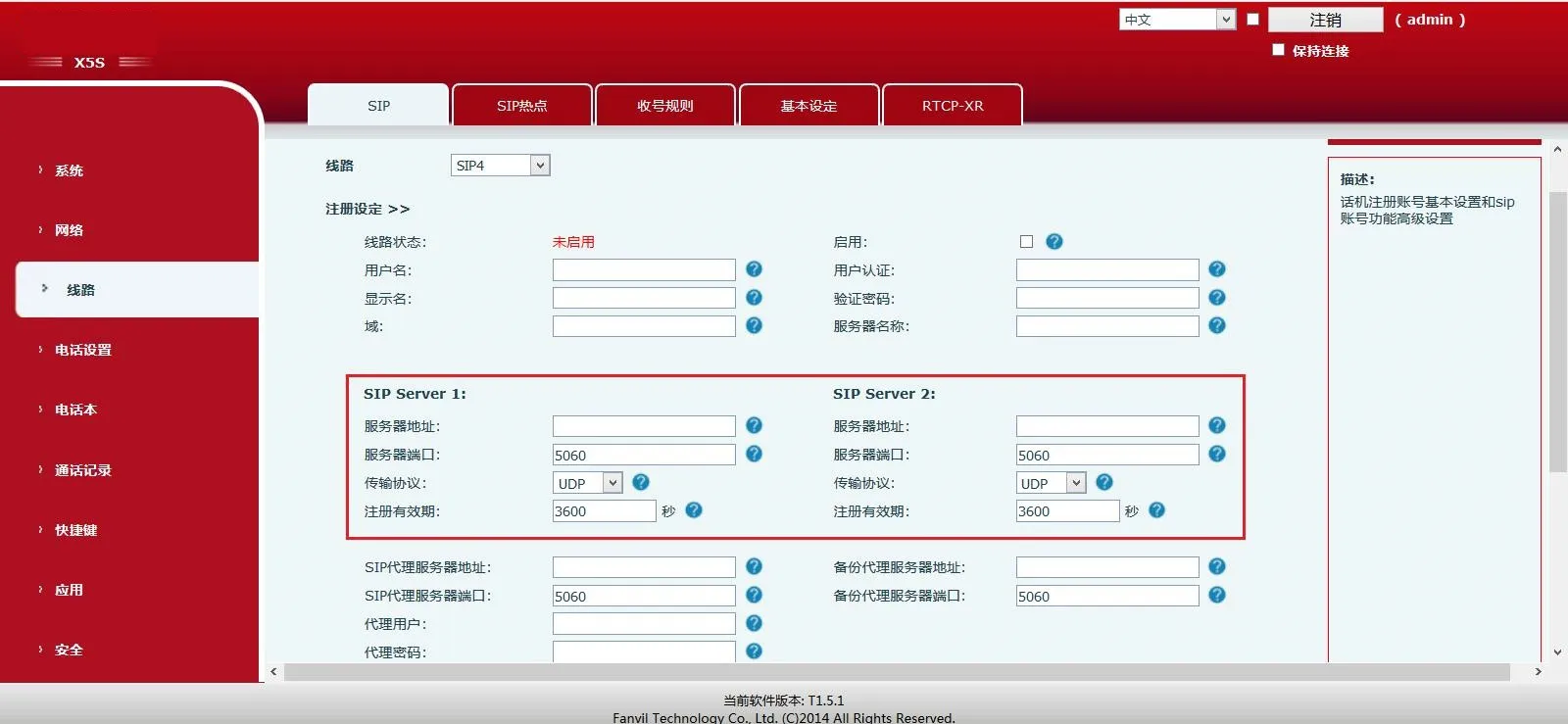
الشكل 2 إعداد SIP Server الأساسي والاحتياطي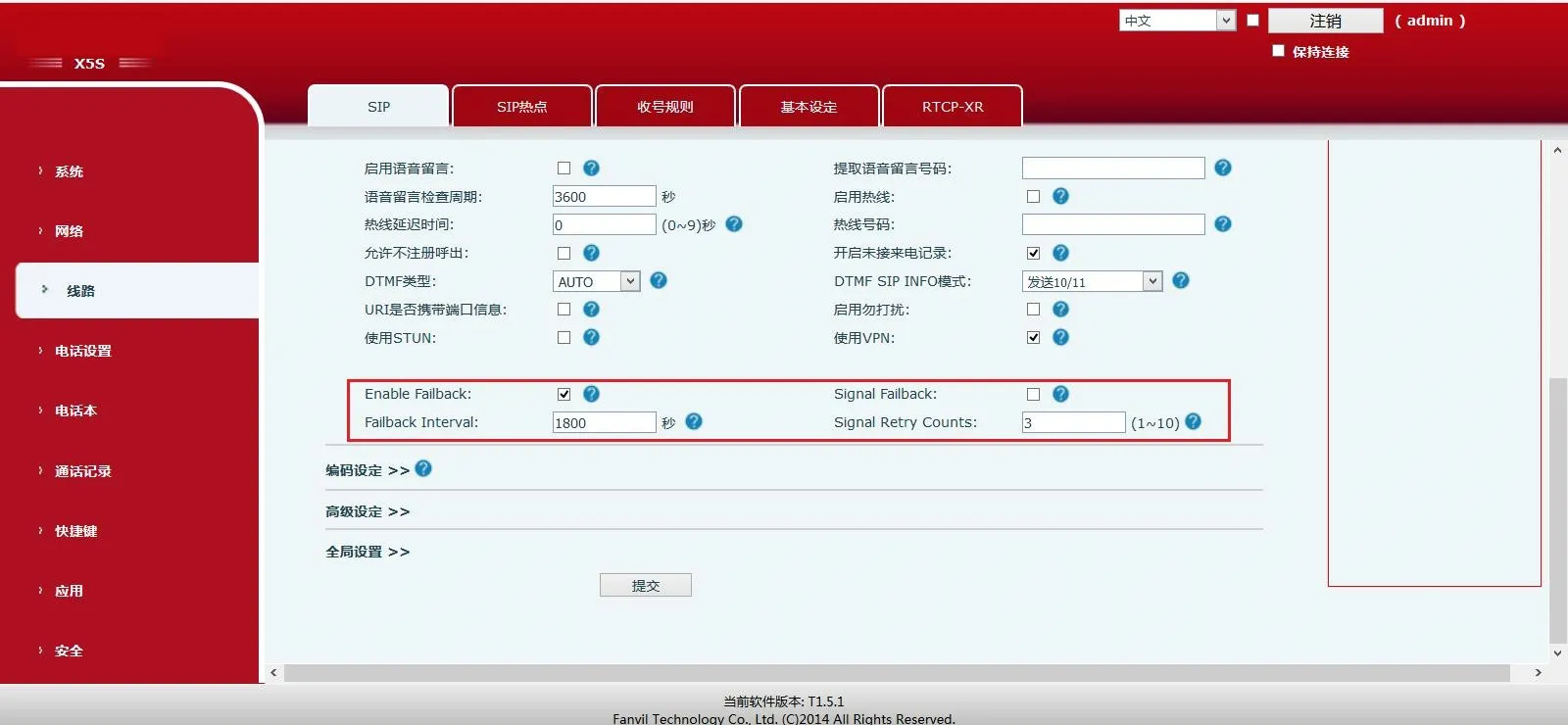
الشكل 3 إعداد SIP Failback الأساسي والاحتياطي