
شرح وظيفة تمييز نغمة المكالمة الواردة في هاتف SIP

دور alert-info

يحمل حقل alert-info في بروتوكول SIP معلومات نوع المكالمة. ومن خلال هذه المعلومات يستطيع الهاتف التعرف على فئة المكالمة الواردة وتشغيل نغمة مختلفة لكل نوع.

طريقة التكوين

حقل Alert-info مدعوم. تدعم منتجاتنا حاليًا صيغتين شائعتين من Alert-info، ومن بينها نوع النغمة المخصصة، وهو feature تمت إضافته في الربع الأول. يمكن الاطلاع على التفاصيل في الوصف التالي. ولا يتم دعم وظيفة تنزيل ملف wav من عنوان URL وتشغيله بشكل ديناميكي.

مصطلحات صيغة Bellcore-drX

هذه الصيغة مدعومة بالفعل في الإصدارات الحالية، ويكفي أن يرسل PBX قيمة alert-info المقابلة.
عندما تحتوي رسالة SIP Invite على حقل Alert-Info وتكون القيمة Bellcore-dr1، فهذا يعني أن الهاتف يحتاج إلى تشغيل النغمة الداخلية الأولى أثناء الرنين. وإذا كانت القيمة Bellcore-dr2، فهذا يعني تشغيل النغمة الثانية. أما الشكل 2-1 فيوضح حالة تشغيل النغمة الثالثة.
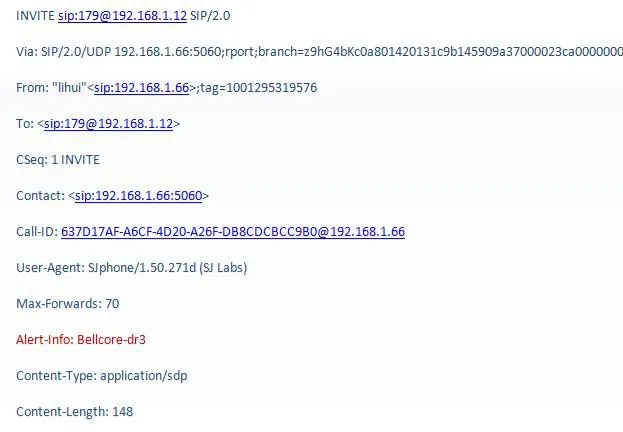
ملاحظة حقل مرجعي في رسالة SIP
            الشكل 2-1 حقل مرجعي في رسالة SIP
ملاحظة: صيغة Bellcore-drX، حيث تكون قيمة x من 1 إلى 5.

نوع النغمة المخصصة

على الرغم من أن صيغة Bellcore-drX يمكنها تحقيق الرنين المميز، فإنها ليست مرنة بما يكفي، كما أن المستخدم لا يستطيع اختيار النغمة، لأن الإعداد يتم بشكل موحد بواسطة مسؤول PBX. بالمقارنة، يكون نوع النغمة المخصصة أكثر مرونة. فحقل alert-info الذي يرسله الخادم لا يحمل معلومات نوع المكالمة فقط، بل إن النظام لا يربط هذه المعلومات بنوع نغمة ثابت، ويمكن للمستخدم اختيار نوع النغمة بنفسه.
كما هو موضح في الشكل 2-2، عندما تكون قيمة alert-info المرسلة من الخادم هي queue، يستطيع المستخدم ضبط نوع النغمة بنفسه من واجهة التكوين.
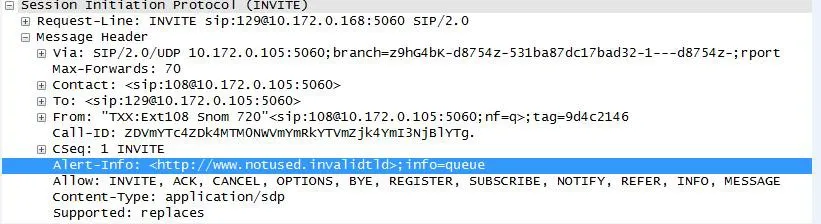
عرض تكوين نوع النغمة
            الشكل 2-2
في واجهة التكوين الموضحة في الشكل 2-3، يمكن للمستخدم معرفة نوع النغمة المقابل للقيمة queue.
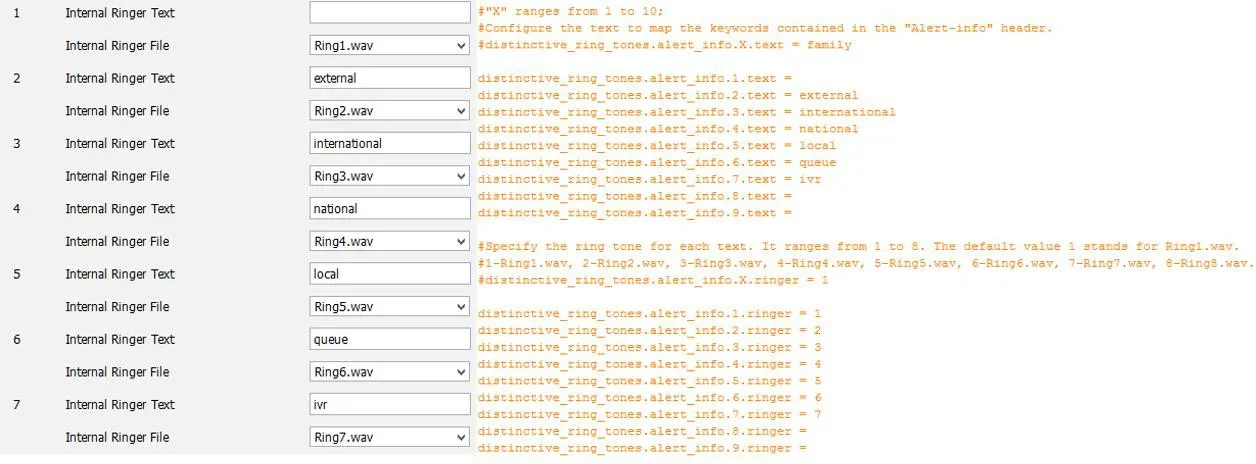
عرض نوع النغمة المقابل للقيمة queue
            الشكل 2-3   

اختبار وظيفة Alert-info في الهاتف

متطلبات الاختبار

1. أن يعمل الهاتف بشكل طبيعي.
2. أن يستطيع الهاتف تسجيل الدخول إلى صفحة web.
3. توفر أداة التقاط الحزم.
4. مسار السكربت: 172.16.1.9\test_group\using document\SIPP

خطوات اختبار هواتف سلسلة X

1. سجّل الدخول إلى صفحة WEB الخاصة بهاتف الاختبار عبر http://xxx.xxx.xxx.xxx/. بالنسبة إلى X3/4 انتقل إلى phone settings->audio، وبالنسبة إلى هواتف X5/6 انتقل إلى phone settings->Media Settings لضبط خاصية Alert-info وتحديد نوع النغمة. تكون قيمة value في Alert-info بالتسلسل music1-music10، ويمكن أيضًا أن تكون رقمًا.
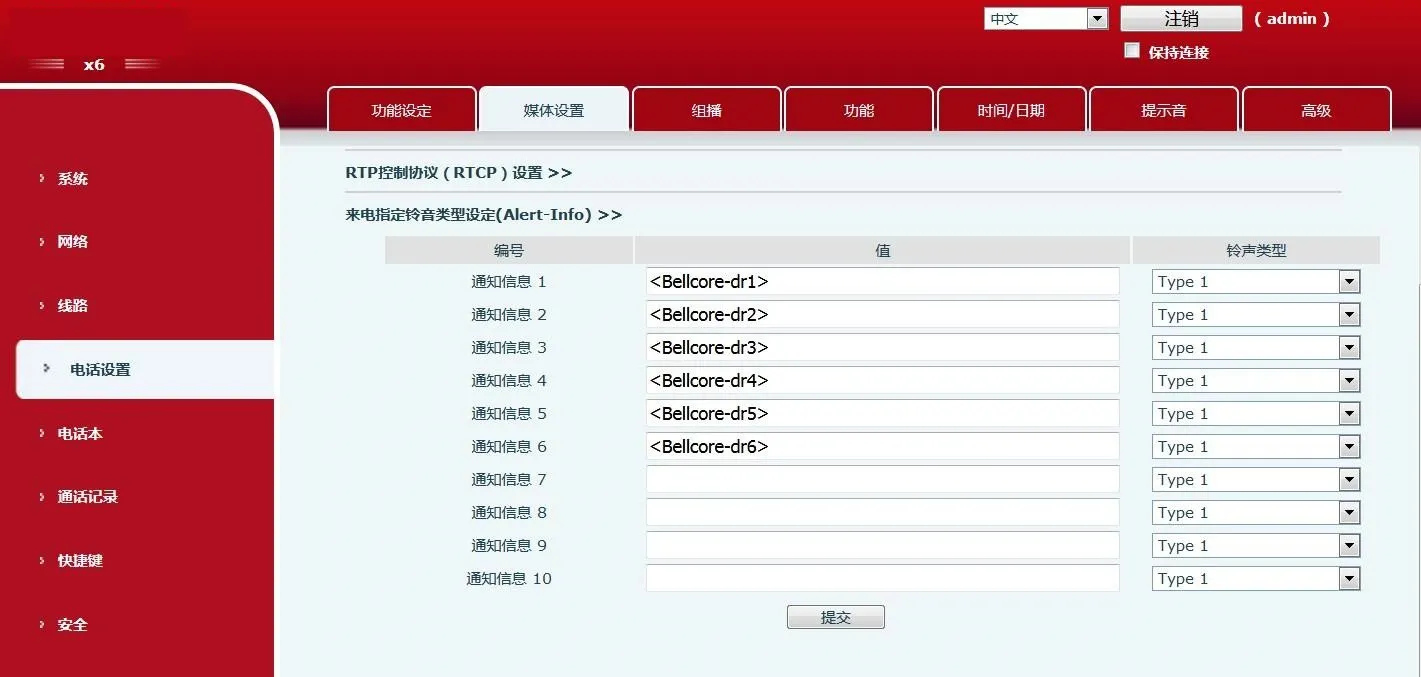
واجهة تكوين هاتف X6      واجهة تكوين هاتف X6
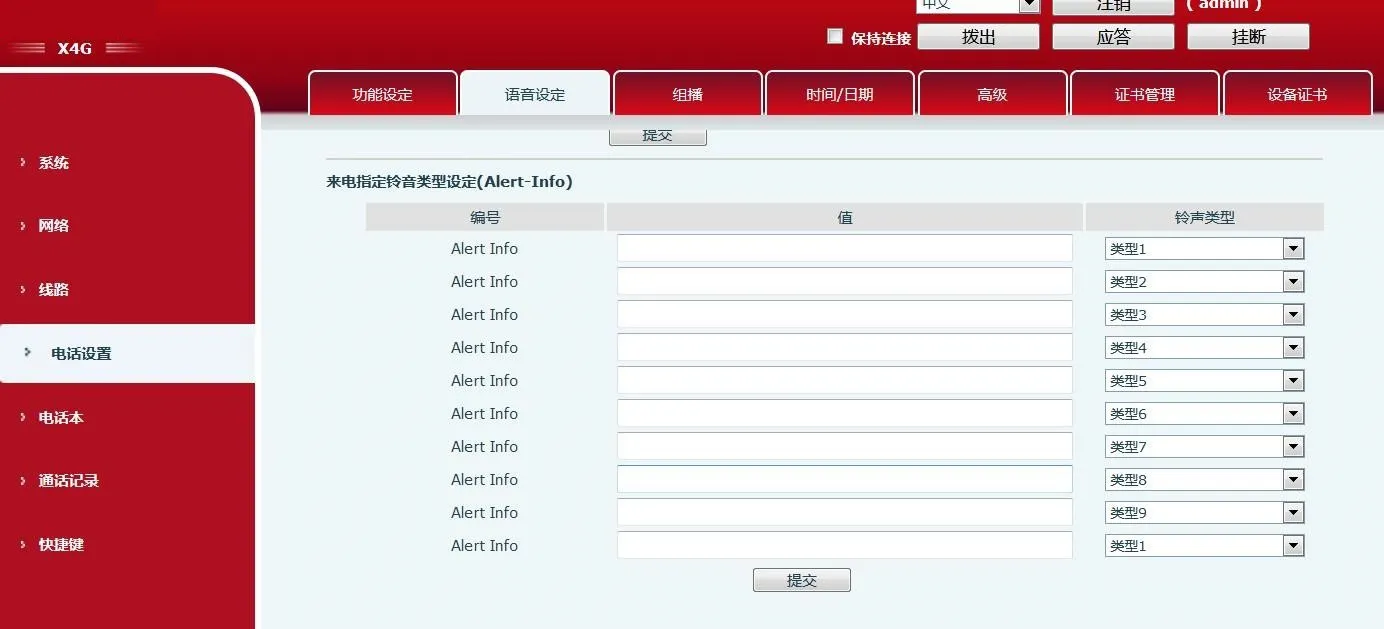
واجهة تكوين هاتف X4G
      واجهة تكوين هاتف X4G
2. استخدم محاكاة SIPP. الأمر: نفّذ sipp -sf uac_invite_alert_info.xml -i pc phone -m 1 -l 1 لإنشاء مكالمة واردة والتقاط الحزم.
ملاحظة: يجب أن تكون قيمة info في السكربت متطابقة مع قيمة value المضبوطة في صفحة web.
3. استبدل Alert-Info:music1;info=[field1] في السكربت بـ Alert-Info:http://127.0.0.1/Bellcore-dr1.
4. اضبط قيمة Alert-info في صفحة web على bellcore-drX(X=1-5)، ثم شغّل السكربت.

خطوات اختبار هواتف سلسلة Android

1. من شاشة LCD في هاتف الاختبار، ادخل من setting إلى phone settings->Tone، واضبط خاصية Alert-info وحدد نوع النغمة. تكون النغمة من نغمات نظام Android، وتكون قيمة value في Alert-info بالتسلسل music1-music10، ويمكن أيضًا أن تكون رقمًا.
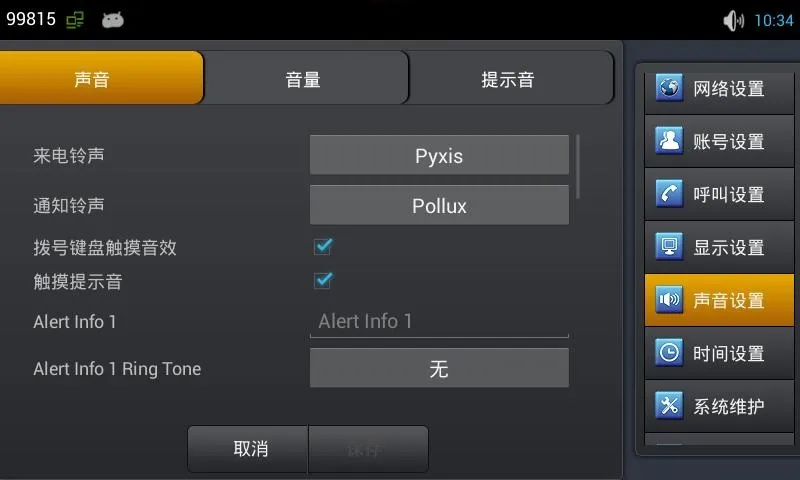
واجهة تكوين هاتف C400
      واجهة تكوين هاتف C400
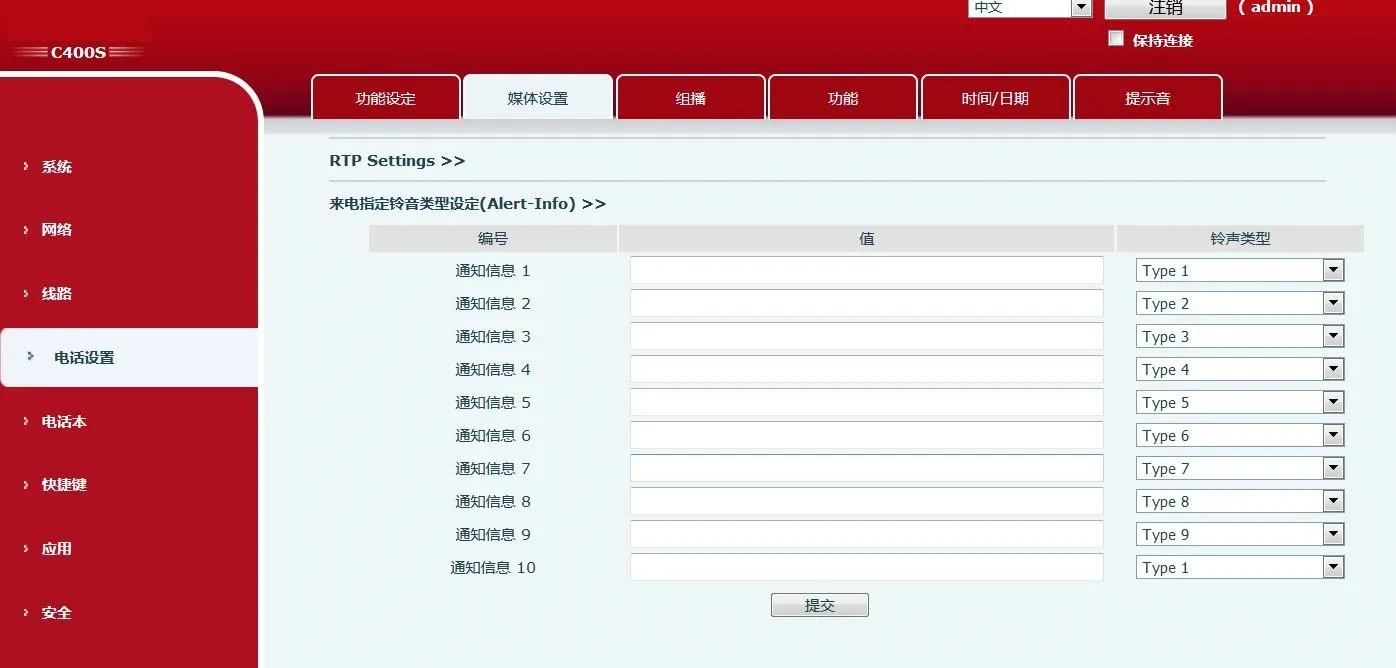
واجهة تكوين هاتف C400S      واجهة تكوين هاتف C400S
ملاحظة: يستخدم C400S صفحة الويب الخاصة بالمنصة مثل X6.
2. استخدم محاكاة SIPP. الأمر: نفّذ sipp -sf uac_invite_alert_info.xml -i pc phone -m 1 -l 1 لإنشاء مكالمة واردة والتقاط الحزم.
ملاحظة: يجب أن تكون قيمة info في السكربت متطابقة مع قيمة value المضبوطة على LCD.
3. استبدل Alert-Info:music1;info=[field1] في السكربت بـ Alert-Info:http://127.0.0.1/Bellcore-dr1.
4. اضبط قيمة Alert-info على LCD إلى bellcore-drX(X=1-5)، ثم شغّل السكربت.

كتالوج
خدمة العملاء الهاتف
We use cookie to improve your online experience. By continuing to browse this website, you agree to our use of cookie.

Cookies

This Cookie Policy explains how we use cookies and similar technologies when you access or use our website and related services. Please read this Policy together with our Terms and Conditions and Privacy Policy so that you understand how we collect, use, and protect information.

By continuing to access or use our Services, you acknowledge that cookies and similar technologies may be used as described in this Policy, subject to applicable law and your available choices.

Updates to This Cookie Policy

We may revise this Cookie Policy from time to time to reflect changes in legal requirements, technology, or our business practices. When we make updates, the revised version will be posted on this page and will become effective from the date of publication unless otherwise required by law.

Where required, we will provide additional notice or request your consent before applying material changes that affect your rights or choices.

What Are Cookies?

Cookies are small text files placed on your device when you visit a website or interact with certain online content. They help websites recognize your browser or device, remember your preferences, support essential functionality, and improve the overall user experience.

In this Cookie Policy, the term “cookies” also includes similar technologies such as pixels, tags, web beacons, and other tracking tools that perform comparable functions.

Why We Use Cookies

We use cookies to help our website function properly, remember user preferences, enhance website performance, understand how visitors interact with our pages, and support security, analytics, and marketing activities where permitted by law.

We use cookies to keep our website functional, secure, efficient, and more relevant to your browsing experience.

Categories of Cookies We Use

Strictly Necessary Cookies

These cookies are essential for the operation of the website and cannot be disabled in our systems where they are required to provide the service you request. They are typically set in response to actions such as setting privacy preferences, signing in, or submitting forms.

Without these cookies, certain parts of the website may not function correctly.

Functional Cookies

Functional cookies enable enhanced features and personalization, such as remembering your preferences, language settings, or previously selected options. These cookies may be set by us or by third-party providers whose services are integrated into our website.

If you disable these cookies, some services or features may not work as intended.

Performance and Analytics Cookies

These cookies help us understand how visitors use our website by collecting information such as traffic sources, page visits, navigation behavior, and general interaction patterns. In many cases, this information is aggregated and does not directly identify individual users.

We use this information to improve website performance, usability, and content relevance.

Targeting and Advertising Cookies

These cookies may be placed by our advertising or marketing partners to help deliver more relevant ads and measure the effectiveness of campaigns. They may use information about your browsing activity across different websites and services to build a profile of your interests.

These cookies generally do not store directly identifying personal information, but they may identify your browser or device.

First-Party and Third-Party Cookies

Some cookies are set directly by our website and are referred to as first-party cookies. Other cookies are set by third-party services, such as analytics providers, embedded content providers, or advertising partners, and are referred to as third-party cookies.

Third-party providers may use their own cookies in accordance with their own privacy and cookie policies.

Information Collected Through Cookies

Depending on the type of cookie used, the information collected may include browser type, device type, IP address, referring website, pages viewed, time spent on pages, clickstream behavior, and general usage patterns.

This information helps us maintain the website, improve performance, enhance security, and provide a better user experience.

Your Cookie Choices

You can control or disable cookies through your browser settings and, where available, through our cookie consent or preference management tools. Depending on your location, you may also have the right to accept or reject certain categories of cookies, especially those used for analytics, personalization, or advertising purposes.

Please note that blocking or deleting certain cookies may affect the availability, functionality, or performance of some parts of the website.

Restricting cookies may limit certain features and reduce the quality of your experience on the website.

Cookies in Mobile Applications

Where our mobile applications use cookie-like technologies, they are generally limited to those required for core functionality, security, and service delivery. Disabling these essential technologies may affect the normal operation of the application.

We do not use essential mobile application cookies to store unnecessary personal information.

How to Manage Cookies

Most web browsers allow you to manage cookies through browser settings. You can usually choose to block, delete, or receive alerts before cookies are stored. Because browser controls vary, please refer to your browser provider’s support documentation for details on how to manage cookie settings.

Contact Us

If you have any questions about this Cookie Policy or our use of cookies and similar technologies, please contact us at support@becke.cc .