مورد

فهم أفضل الممارسات واستكشاف الحلول المبتكرة وإقامة اتصالات مع شركاء آخرين في جميع أنحاء مجتمع بيكر.

×

نقطة اللمس

نقطة اللمس

بالإضافة إلى الأجهزة الطرفية ، يجب أيضًا مراعاة جميع الموظفين والأماكن والأشياء المتصلة بالشبكة.

تعلم المزيد

مورد

مورد

فهم أفضل الممارسات واستكشاف الحلول المبتكرة وإقامة اتصالات مع شركاء آخرين في جميع أنحاء مجتمع بيكر.

اتصل بنا
كيفية جمع معلومات التصحيح من هواتف Android IP ؟

المقدمة

نظرة عامة

عند حدوث مشكلة أثناء الاختبار الداخلي أو نشر هواتف IP التي تعمل بنظام أندرويد لدى العملاء، قد يحتاج فريق الدعم الفني إلى تقديم معلومات تصليح الأخطاء لاستكشاف المشكلات وتحليلها. يوضح هذا الدليل كيفية جمع ملفات التشخيص المطلوبة.

الموديلات المدعومة

GP32i, BX7A, BF600S, BJ7A, Bi56A

المتطلبات الأساسية

1. قم بتحضير هاتف IP يعمل بنظام أندرويد، ومحرق أقراص USB، ومبدل PoE أو مصدر طاقة تيار مستمر. قم بتوصيل الهاتف بالمبدل.

2. قم بتحضير جهاز كمبيوتر للتصليح، وقم بتوصيله بنفس المبدل. تأكد من أن الكمبيوتر والهاتف يمكنهما التواصل مع بعضهما البعض عبر الشبكة.

مخطط توصيل الجهاز والكمبيوتر

قم بتوصيل هاتف IP الذي يعمل بنظام أندرويد (نستخدم الموديل A32i كمثال هنا) بالمبدل، وقم بتوصيل الكمبيوتر بنفس المبدل. تأكد من أن الشبكة بين الكمبيوتر والجهاز قابلة للوصول. يُوضح مثيل التوصيل في الشكل 1.
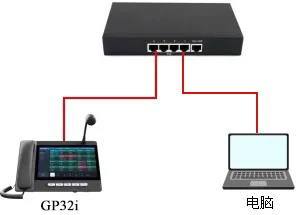
مخطط توصيل الجهاز والكمبيوتر

                 الشكل 1. مخطط توصيل الجهاز والكمبيوتر

طرق استكشاف الأخطاء وإصلاحها

بناءً على نوع المشكلة، قد تكون هناك حاجة إلى أنواع مختلفة من معلومات التشخيص للتحليل. توضح الأقسام التالية الملفات التي يجب تقديمها في ظروف مختلفة.

الحالات العامة

في معظم الحالات، يجب جمع ثلاثة ملفات وتقديمها لفريق البحث والتطوير:

1. ملف سجل تصليح الأخطاء النظامي (Debug Syslog)
سجل الدخول إلى واجهة الويب للهاتف وانتقل إلى النظام > صفحة الدعم، ثم ابحث عن سجل النظام.

قم بتكوين الإعدادات التالية:

1) قم بتمكين سجل النظام
2) قم بتعيين عنوان الخادم على عنوان IP للكمبيوتر المحلي
3) قم بتعيين منفذ الخادم على 514
4) قم بتعيين مستوى سجل النظام على تصليح الأخطاء
5) قم بتمكين تصدير السجل
6) بعد إعادة إنتاج المشكلة، انقر على تصدير السجل لتحميل ملف سجل النظام
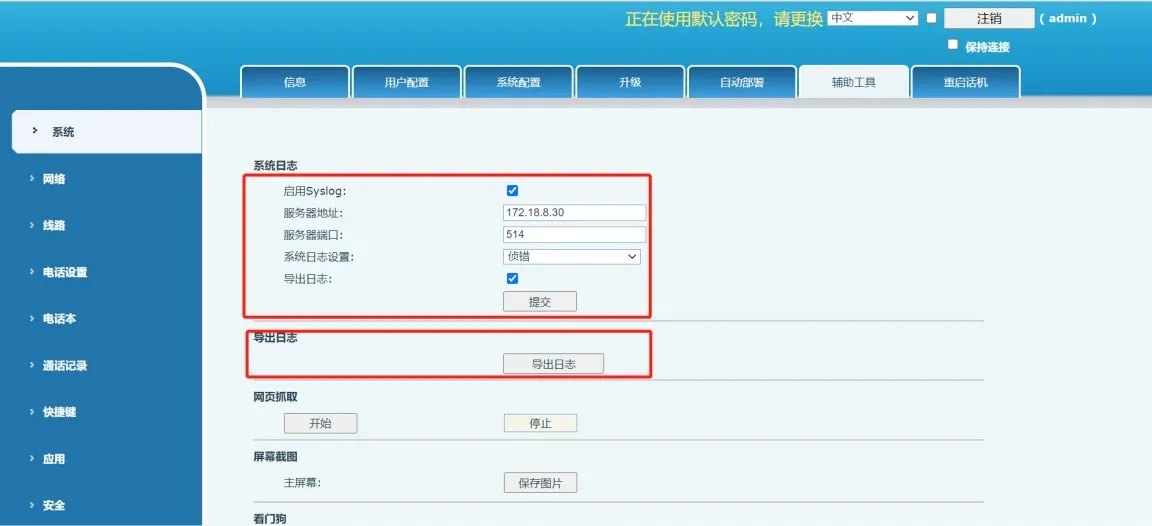
تصدير سجل تصليح الأخطاء النظامي

                                                                                                                                   الشكل 2. تصدير سجل تصليح الأخطاء النظامي

2. حزمة تصليح الأخطاء
تحتوي حزمة تصليح الأخطاء على السجلات المخزنة مؤقتًا والمعلومات التشغيلية وتفاصيل البرامج الثابتة وغيرها من بيانات التشخيص الداخلية للهاتف. يمكن تصديرها من واجهة الويب.

انتقل إلى النظام > أداة الدعم، وابحث عن خيار تصدير معلومات تصليح الأخطاء بنقرة واحدة، ثم انقر على تصدير. قد تستغرق هذه العملية حوالي دقيقة واحدة لإكمالها.
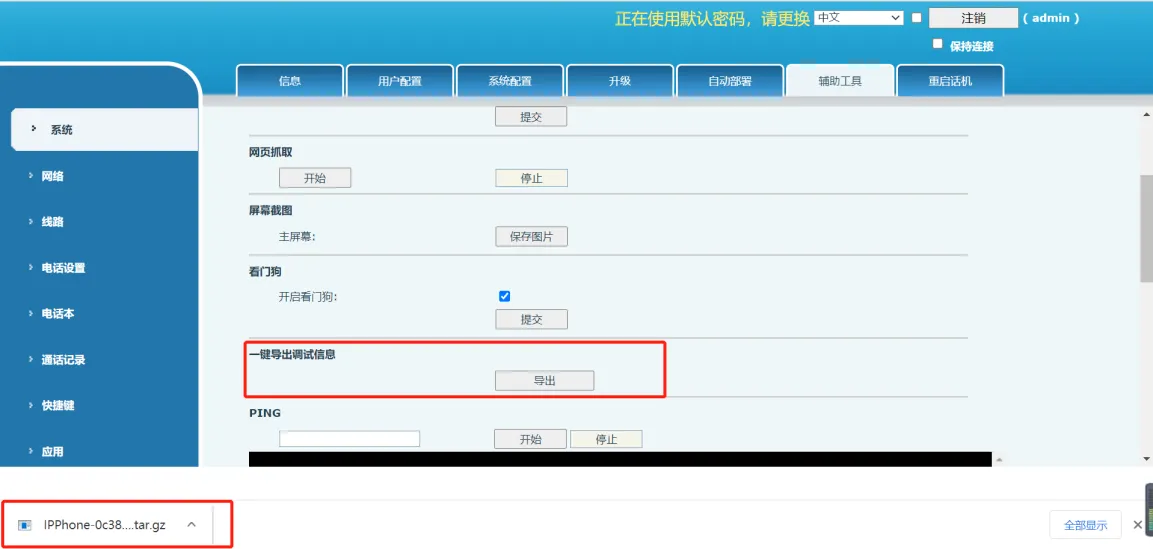
تصدير حزمة تصليح الأخطاء

                                                                                                                                        الشكل 3. تصدير حزمة تصليح الأخطاء

3. ملف التقاط حزم الشبكة
يسجل ملف التقاط الحزم حزم الشبكة المرسلة والمستلمة، ويمكن استخدامه للتحليل في أدوات مثل Wireshark.

لالتقاط حركة مرور الشبكة:

1) انقر على ابدأ وانتظر حتى تبدأ صفحة الويب عملية التقاط
2) أعد إنتاج المشكلة
3) بعد إعادة إنتاج المشكلة، انقر على إيقاف
4) افتح صفحة تنزيل المتصفح لتحديد ملف حزم الشبكة الملتقطة
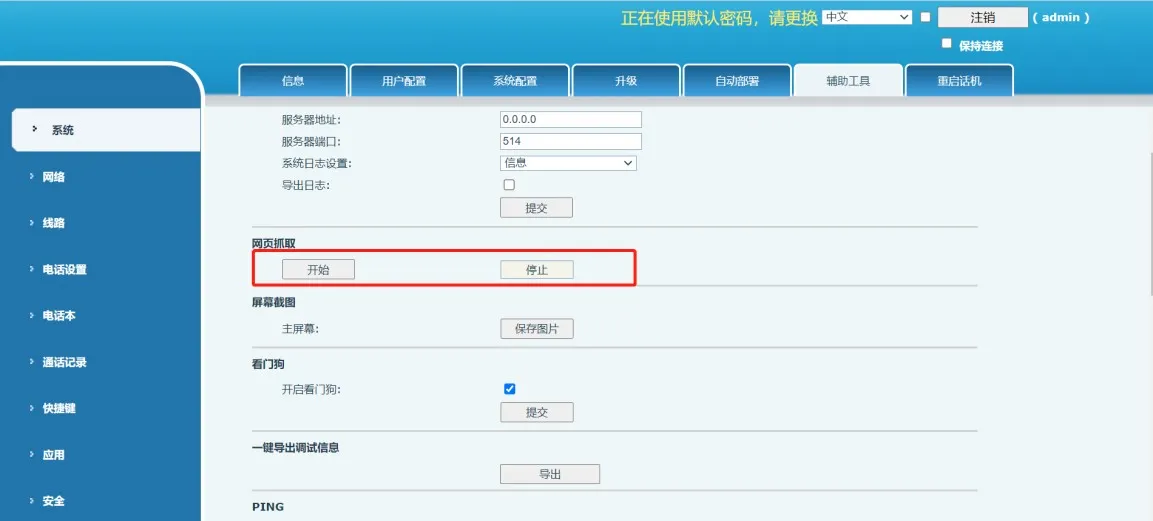
التقاط حزم الشبكة

                                                                                                                                          الشكل 4. التقاط حزم الشبكة

الحالات الخاصة

بعد تقديم الملفات الثلاثة المذكورة أعلاه، قد تظل هناك حاجة إلى معلومات إضافية في بعض المواقف.

عند طلب فريق البحث والتطوير

بعد مراجعة سجل تصليح الأخطاء النظامي وحزمة تصليح الأخطاء وملف التقاط الحزم، قد يطلب فريق البحث والتطوير سجلات أندرويد في الوقت الفعلي لدعم التحليل الأعمق. يوضح القسم التالي كيفية جمع سجلات أندرويد في الوقت الفعلي باستخدام أداة ADB.

سجل أندرويد في الوقت الفعلي
يصدر نظام أندرويد باستمرار سجلات التشغيل أثناء عمل الهاتف. يمكن لهذه السجلات مساعدة المهندسين في تحديد المشكلات وتحليلها.

1. تثبيت أداة ADB على الكمبيوتر

يمكنك تنزيل أداة ADB المناسبة لنظام التشغيل الخاص بك من الرابط:

https://developer.android.google.cn/studio/releases/platform-tools

بعد التثبيت، أضف مسار تثبيت ADB إلى متغيرات بيئة النظام. في نظام ويندوز، انتقل إلى هذا الكمبيوتر > الخصائص > إعدادات النظام المتقدمة > متقدم > متغيرات البيئة، ثم أضف المسار المطلق لدليل ADB إلى متغير Path.
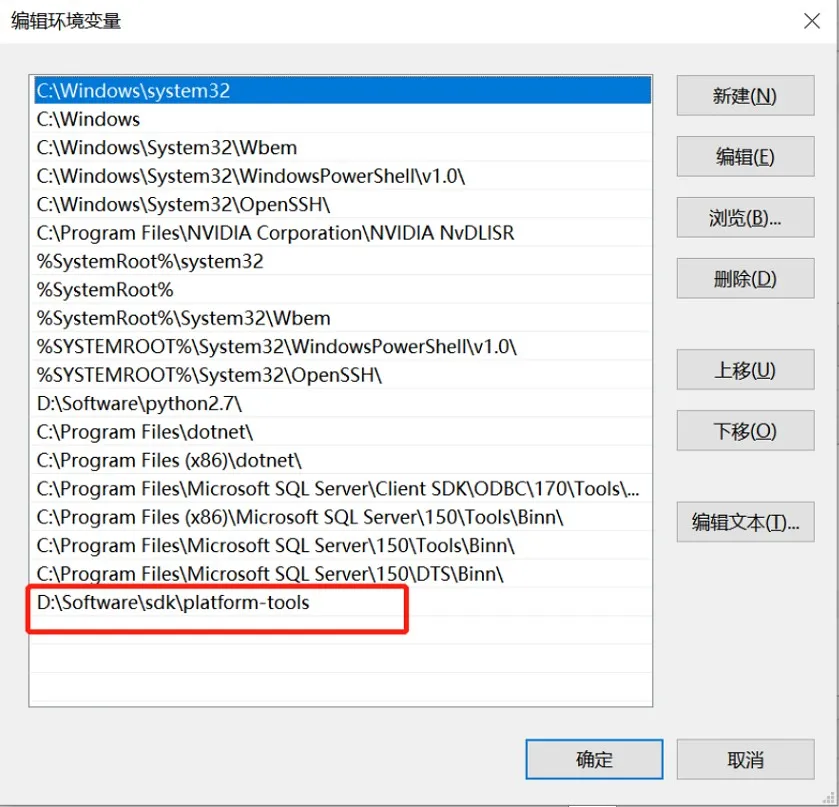
إضافة مسار ADB

                                                                                                        الشكل 5. إضافة مسار ADB

افتح نافذة موجه الأوامر على الكمبيوتر وادخل الأمر adb. إذا تم تشغيل الأمر بنجاح، فهذا يعني أن ADB قد تم تثبيته بشكل صحيح.
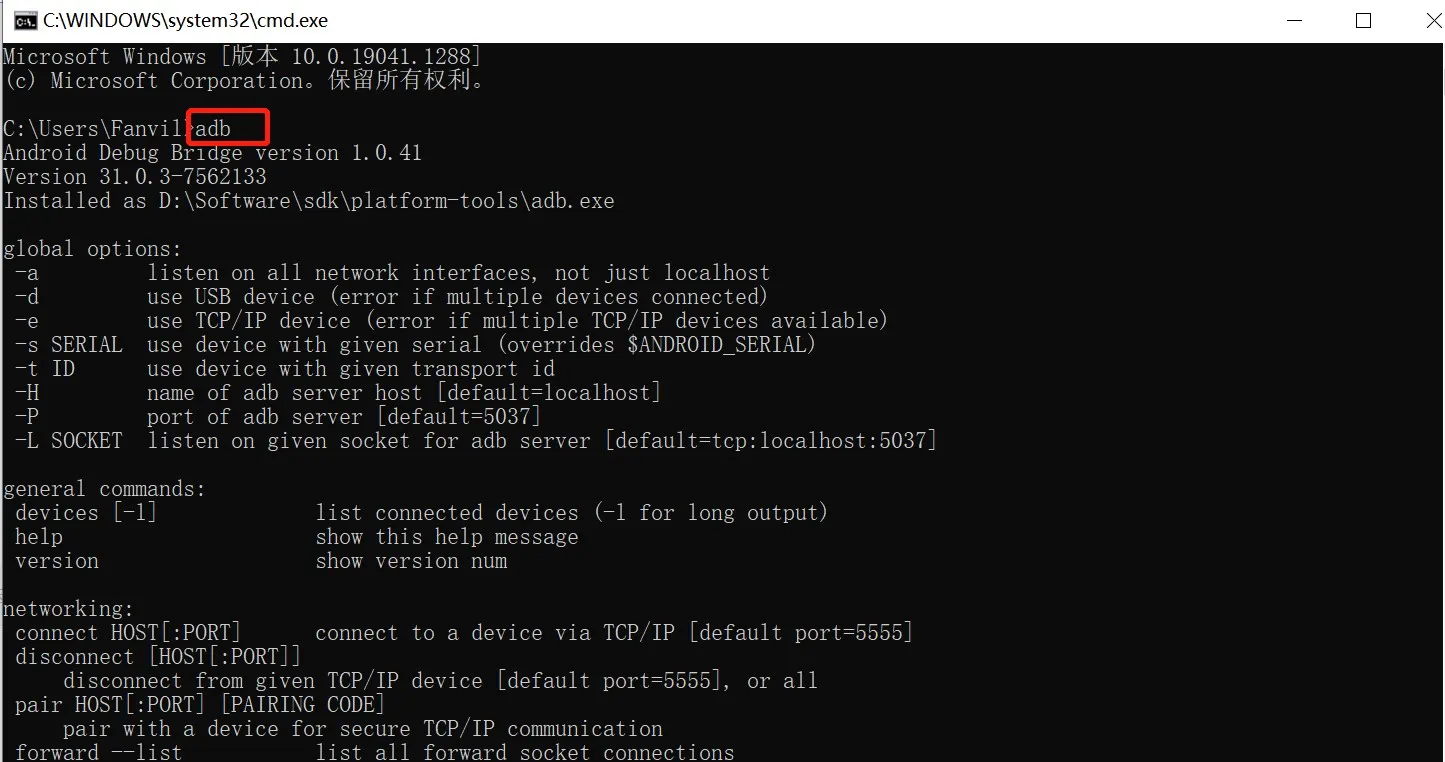
نجاح تثبيت ADB

                                                                                                          الشكل 6. نجاح تثبيت ADB

2. تمكين تصليح الأخطاء عبر USB على الهاتف

بالنسبة لبرامج أندرويد الثابتة الصادرة بعد 1 ديسمبر 2020، يتم تعطيل تصليح الأخطاء عبر ADB افتراضيًا ويجب تمكينه يدويًا.

أدخل محرق أقراص USB في الهاتف، ثم انتقل إلى الإعدادات > حول الجهاز وانقر على رقم إصدار البرنامج الثابت خمس مرات لتمكين وضع المطور.
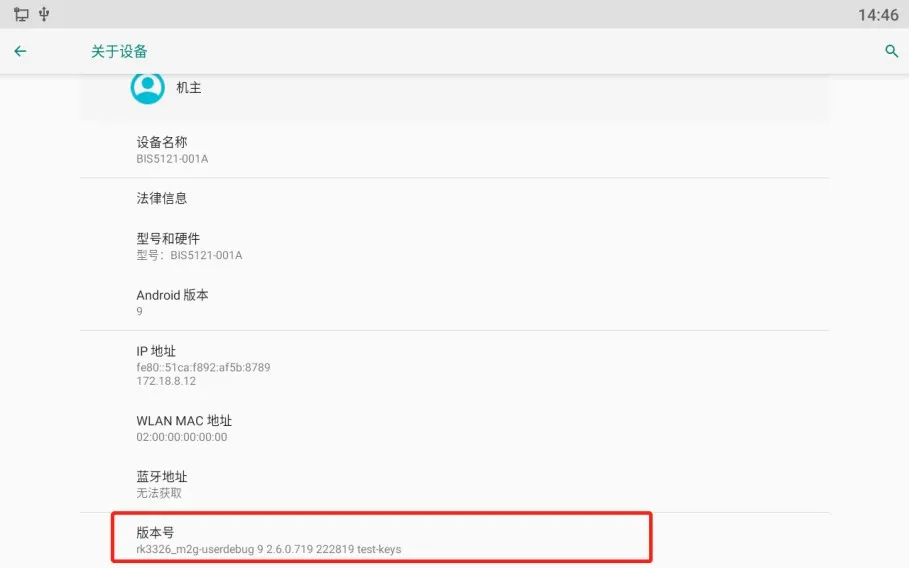
تمكين وضع المطور

                                                                                                                     الشكل 7. تمكين وضع المطور

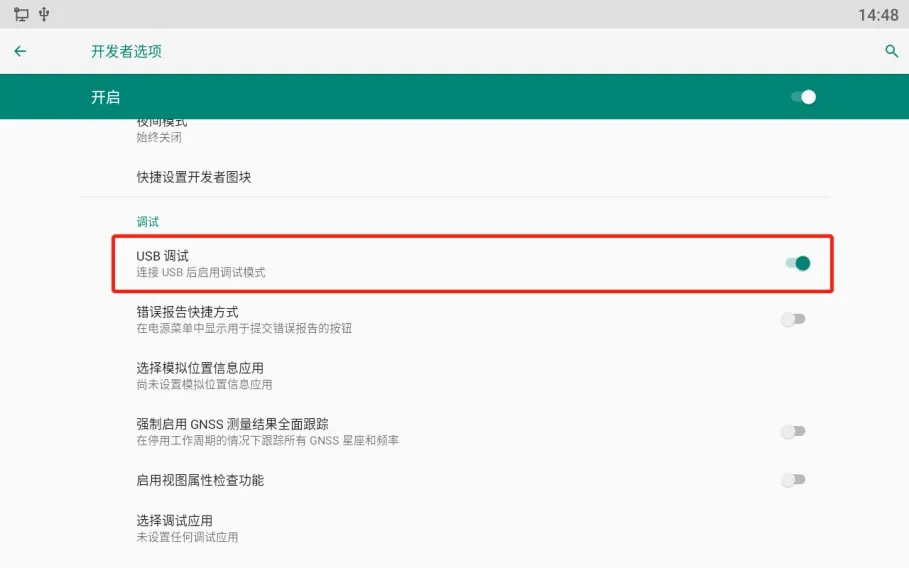
ثم انتقل إلى الإعدادات > النظام > خيارات المطور وقم بتشغيل تصليح الأخطاء عبر USB.
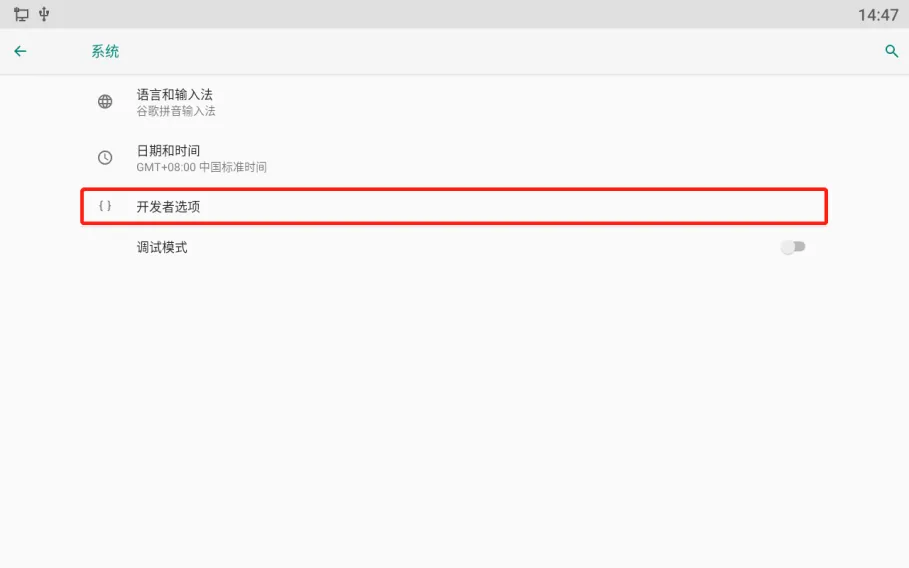
صفحة خيارات المطورتمكين تصليح الأخطاء عبر USB

                                                                                                                الشكل 8. تمكين تصليح الأخطاء عبر USB

3. تغيير مستوى سجل تصليح الأخطاء

عادةً ما يتم تعيين مستوى سجل الهاتف الافتراضي على إشعار، والذي يسجل فقط المعلومات الأساسية. لالتقاط سجلات أكثر تفصيلاً، قم بتغيير مستوى السجل إلى تتبع.

انتقل إلى إعدادات الهاتف > صيانة النظام > الأدوات، وقم بتعيين مستوى السجل على تتبع.
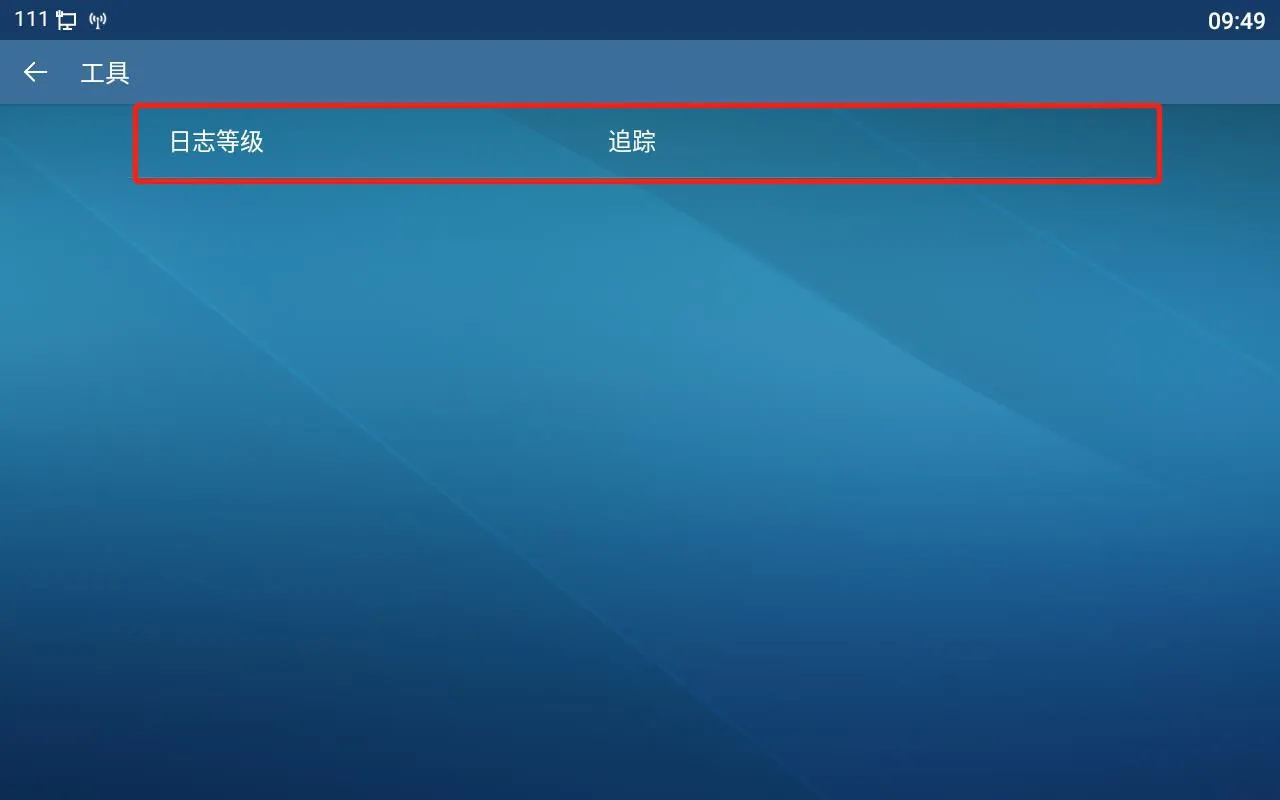
تغيير مستوى السجل

                                                                                                                  الشكل 9. تغيير مستوى السجل

4. التقاط السجلات في الوقت الفعلي

استخدم أوامر ADB التالية:

adb connect 172.18.8.28
استبدل 172.18.8.28 بعنوان IP الفعلي للهاتف. يقوم هذا الأمر بالاتصال بالهاتف عبر الشبكة.

adb devices
يقوم هذا الأمر بسرد الأجهزة المتصلة ويتيح لك التحقق مما إذا كان الهاتف متصلاً بنجاح.

adb logcat -G 16M
يقوم هذا الأمر بزيادة حجم مخزن السجل حتى يمكن تخزين المزيد من محتوى السجل.

adb logcat > logcat-202111051708.log
يقوم هذا الأمر بحفظ إخراج السجل في الوقت الفعلي في ملف على الكمبيوتر. تنسيق التسمية الموصى به هو: سنة + شهر + يوم + ساعة + دقيقة + ثانية + .log
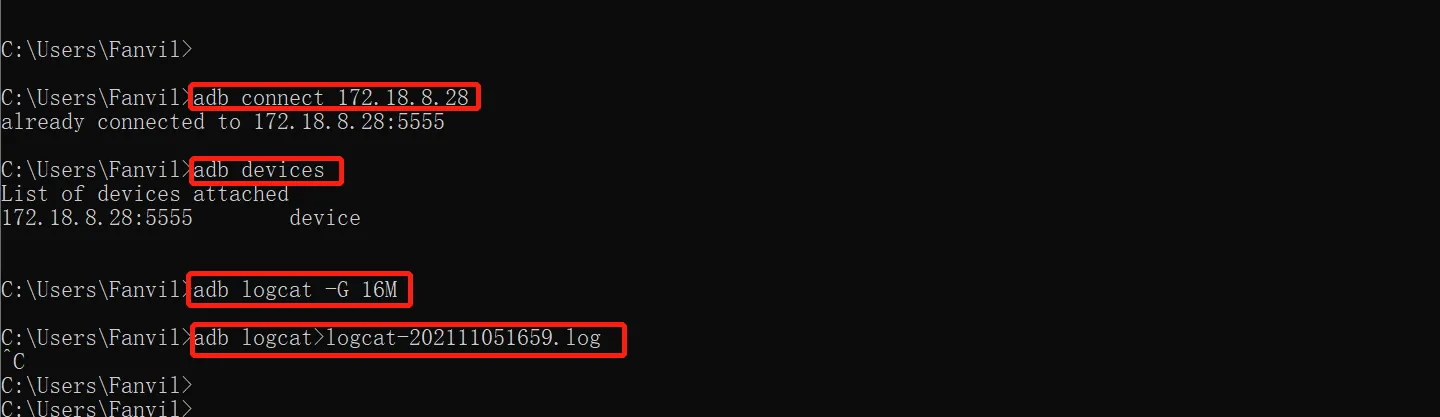
التقاط السجلات في الوقت الفعلي

                                                                                                              الشكل 10. التقاط السجلات في الوقت الفعلي

بعد الانتهاء من تسجيل السجلات، قم بتشغيل الأمر:

adb disconnect 172.18.8.28

يقوم هذا الأمر بفصل الكمبيوتر عن الهاتف. يمكنك بعد ذلك العثور على ملف السجل في الوقت الفعلي الذي تم إنشاؤه في الدليل المقابل على جهاز الكمبيوتر الخاص بك.
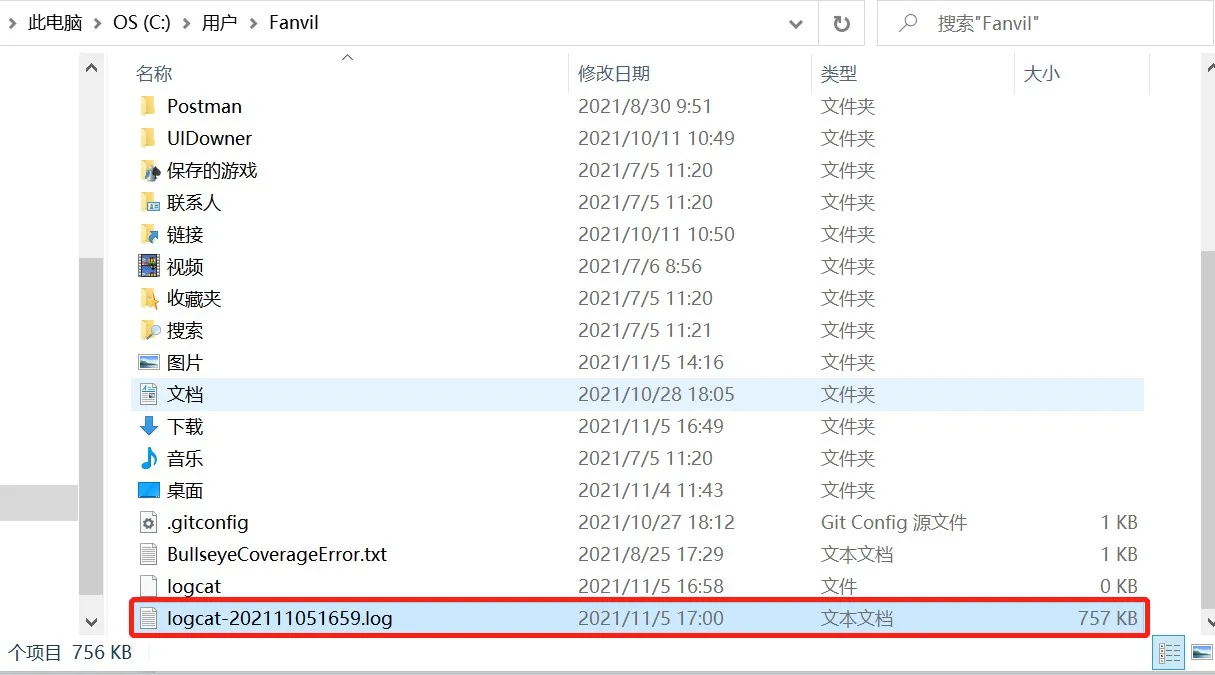
مسار ملف السجل في الوقت الفعلي

                                                                                                                   الشكل 11. مسار ملف السجل في الوقت الفعلي

المشكلات المتعلقة بالشاشة

إذا كانت المشكلة متعلقة بشاشة العرض LCD أو سلوك العرض، فيجب تقديم ملف لقطة شاشة أيضًا.

سجل الدخول إلى واجهة الويب للهاتف وانتقل إلى النظام > صفحة الدعم، ثم ابحث عن لقطة شاشة. انقر على حفظ الصورة لتحميل لقطة الشاشة وحفظها.
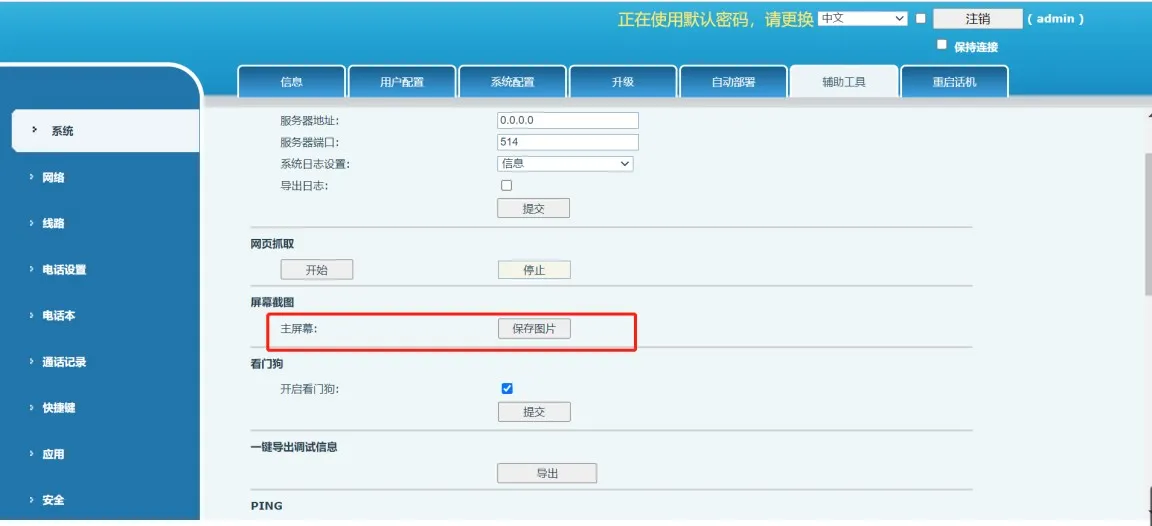
حفظ لقطة شاشة

                                                                                                                 الشكل 12. حفظ لقطة شاشة

كتالوج
المهنية الصانع الاتصالات الصناعية ، وتوفير ضمان الاتصالات موثوقية عالية!
مشاورات التعاون
خدمة العملاء الهاتف
We use cookie to improve your online experience. By continuing to browse this website, you agree to our use of cookie.

Cookies

This Cookie Policy explains how we use cookies and similar technologies when you access or use our website and related services. Please read this Policy together with our Terms and Conditions and Privacy Policy so that you understand how we collect, use, and protect information.

By continuing to access or use our Services, you acknowledge that cookies and similar technologies may be used as described in this Policy, subject to applicable law and your available choices.

Updates to This Cookie Policy

We may revise this Cookie Policy from time to time to reflect changes in legal requirements, technology, or our business practices. When we make updates, the revised version will be posted on this page and will become effective from the date of publication unless otherwise required by law.

Where required, we will provide additional notice or request your consent before applying material changes that affect your rights or choices.

What Are Cookies?

Cookies are small text files placed on your device when you visit a website or interact with certain online content. They help websites recognize your browser or device, remember your preferences, support essential functionality, and improve the overall user experience.

In this Cookie Policy, the term “cookies” also includes similar technologies such as pixels, tags, web beacons, and other tracking tools that perform comparable functions.

Why We Use Cookies

We use cookies to help our website function properly, remember user preferences, enhance website performance, understand how visitors interact with our pages, and support security, analytics, and marketing activities where permitted by law.

We use cookies to keep our website functional, secure, efficient, and more relevant to your browsing experience.

Categories of Cookies We Use

Strictly Necessary Cookies

These cookies are essential for the operation of the website and cannot be disabled in our systems where they are required to provide the service you request. They are typically set in response to actions such as setting privacy preferences, signing in, or submitting forms.

Without these cookies, certain parts of the website may not function correctly.

Functional Cookies

Functional cookies enable enhanced features and personalization, such as remembering your preferences, language settings, or previously selected options. These cookies may be set by us or by third-party providers whose services are integrated into our website.

If you disable these cookies, some services or features may not work as intended.

Performance and Analytics Cookies

These cookies help us understand how visitors use our website by collecting information such as traffic sources, page visits, navigation behavior, and general interaction patterns. In many cases, this information is aggregated and does not directly identify individual users.

We use this information to improve website performance, usability, and content relevance.

Targeting and Advertising Cookies

These cookies may be placed by our advertising or marketing partners to help deliver more relevant ads and measure the effectiveness of campaigns. They may use information about your browsing activity across different websites and services to build a profile of your interests.

These cookies generally do not store directly identifying personal information, but they may identify your browser or device.

First-Party and Third-Party Cookies

Some cookies are set directly by our website and are referred to as first-party cookies. Other cookies are set by third-party services, such as analytics providers, embedded content providers, or advertising partners, and are referred to as third-party cookies.

Third-party providers may use their own cookies in accordance with their own privacy and cookie policies.

Information Collected Through Cookies

Depending on the type of cookie used, the information collected may include browser type, device type, IP address, referring website, pages viewed, time spent on pages, clickstream behavior, and general usage patterns.

This information helps us maintain the website, improve performance, enhance security, and provide a better user experience.

Your Cookie Choices

You can control or disable cookies through your browser settings and, where available, through our cookie consent or preference management tools. Depending on your location, you may also have the right to accept or reject certain categories of cookies, especially those used for analytics, personalization, or advertising purposes.

Please note that blocking or deleting certain cookies may affect the availability, functionality, or performance of some parts of the website.

Restricting cookies may limit certain features and reduce the quality of your experience on the website.

Cookies in Mobile Applications

Where our mobile applications use cookie-like technologies, they are generally limited to those required for core functionality, security, and service delivery. Disabling these essential technologies may affect the normal operation of the application.

We do not use essential mobile application cookies to store unnecessary personal information.

How to Manage Cookies

Most web browsers allow you to manage cookies through browser settings. You can usually choose to block, delete, or receive alerts before cookies are stored. Because browser controls vary, please refer to your browser provider’s support documentation for details on how to manage cookie settings.

Contact Us

If you have any questions about this Cookie Policy or our use of cookies and similar technologies, please contact us at support@becke.cc .