
مورد

فهم أفضل الممارسات واستكشاف الحلول المبتكرة وإقامة اتصالات مع شركاء آخرين في جميع أنحاء مجتمع بيكر.

×

نقطة اللمس

نقطة اللمس

بالإضافة إلى الأجهزة الطرفية ، يجب أيضًا مراعاة جميع الموظفين والأماكن والأشياء المتصلة بالشبكة.

تعلم المزيد

مورد

مورد

فهم أفضل الممارسات واستكشاف الحلول المبتكرة وإقامة اتصالات مع شركاء آخرين في جميع أنحاء مجتمع بيكر.

اتصل بنا
كيفية تسجيل أجهزة الصناعة إلى خادم PortSIP ؟

المقدمة

نظرة عامة

عندما يحتاج الجهاز إلى التواصل باستخدام حساب SIP مسجل، يجب أن يتوفر خادم SIP ويجب تسجيل الحساب على الجهاز. يوضح هذا الدليل كيفية تسجيل الأجهزة الصناعية على خادم PortSIP.

الطرازات المعمول بها

جميع وحدات المراقبة الداخلية وأجهزة التحكم في الوصول ومنتجات الاتصال الداخلي الخاصة بنا. في هذا الدليل، نستخدم الطرازين Bi52W و Bi63 كمثالين.

مخطط الاتصال الشبكي

قم بتوصيل جهاز الكمبيوتر وجهاز Bi63 وجهاز Bi53W بنفس الشبكة المحلية، كما هو موضح أدناه.
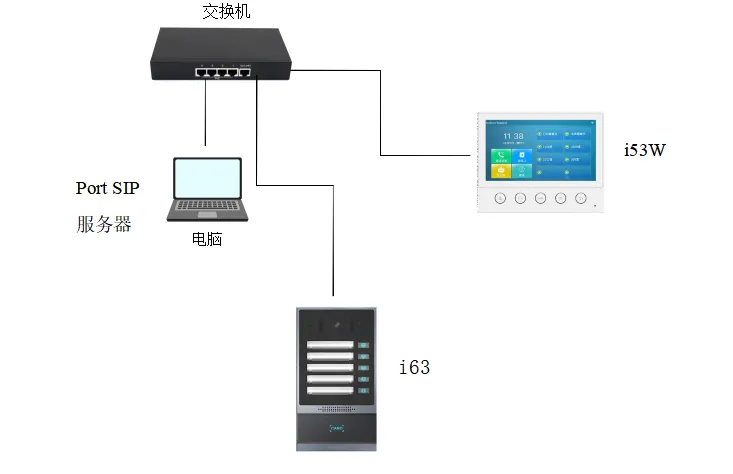
مخطط الاتصال الشبكي

التسجيل على خادم PortSIP

إضافة ملحق على الخادم

قبل تسجيل الجهاز على خادم PortSIP، يجب إعداد بيئة الخادم أولاً. في هذا المثال، نستخدم خادم PortSIP مثبتًا على جهاز كمبيوتر لتوضيح العملية.

1. إضافة ملحق.

سجل الدخول إلى واجهة ويب الخادم، ثم انتقل إلى إدارة المكالمات —— مستخدمي الملحقات. انقر على زر إضافة، ثم أدخل رقم الملحق وكلمة المرور لإنشاء حساب ملحق جديد، كما هو موضح أدناه.
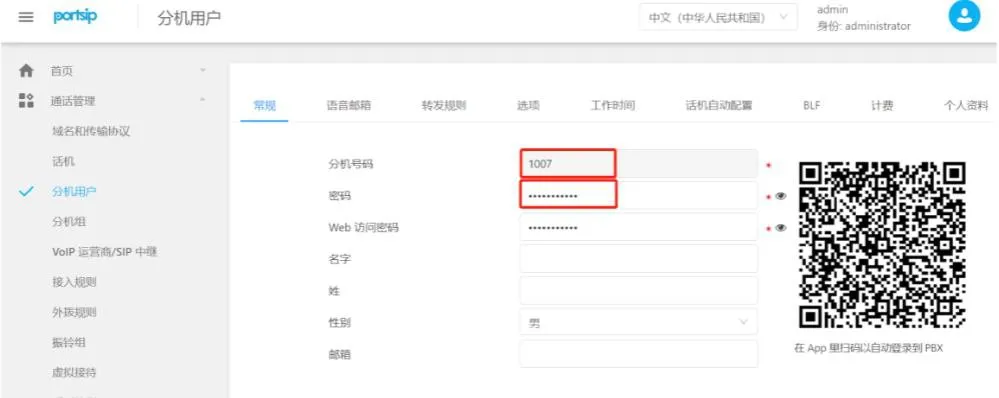
صفحة إضافة ملحق

2. التحقق من إعدادات مجال الخادم وبروتوكول النقل.

انتقل إلى إدارة المكالمات —— المجال وبروتوكول النقل لعرض مجال SIP وبروتوكول النقل ورقم المنفذ المقابل الذي يستخدمه الخادم، كما هو موضح أدناه.
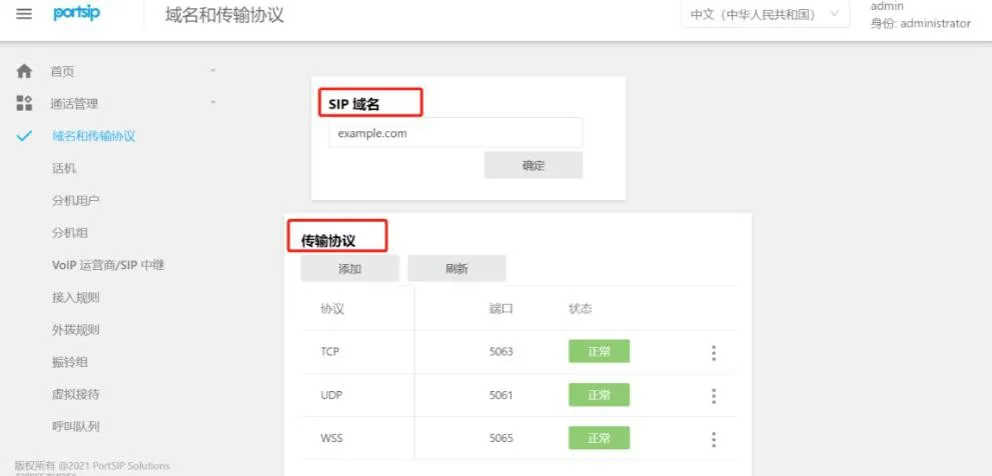
إعدادات المجال وبروتوكول النقل

الحصول على عنوان IP للجهاز وتسجيل الدخول وتسجيل الجهاز على الخادم

1. التحقق والحصول على عنوان IP للجهاز.

بالنسبة لأجهزة التحكم في الوصول والاتصال الداخلي:
   اضغط باستمرار على مفتاح DSS لمدة 10 ثوانٍ حتى تسمع صوتًا، ثم اضغط عليه مرة واحدة بسرعة وسيعلن الجهاز عنوان IP الخاص به.

بالنسبة لوحدات المراقبة الداخلية:

الطرازات غير ذات الشاشة اللمسية: i51W، i52W
   اضغط باستمرار على مفتاح موافق، ثم انتقل إلى معلومات النظام —— الشبكة —— IPv4.

الطرازات ذات الشاشة اللمسية: i53W، i56A
   انتقل إلى القائمة —— الحالة —— الشبكة —— IPv4.

2. افتح متصفحًا وأدخل عنوان IP للجهاز.

إدخال عنوان IP للجهاز في المتصفح

اسم المستخدم وكلمة المرور الافتراضيين هما admin.
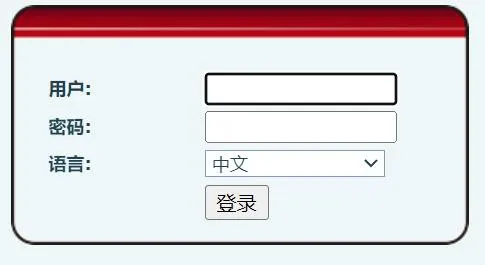
صفحة تسجيل الدخول للجهاز

3. انتقل إلى الخطSIPإعدادات التسجيل. أدخل معلومات الحساب وكلمة المرور والمنفذ وعنوان الخادم والتفاصيل المطلوبة الأخرى، ثم انقر على إرسال.

(1) اسم المستخدم، مستخدم المصادقة، كلمة المرور: هذه هي رقم الملحق وكلمة المرور اللذين تم إنشاؤهما على الخادم.

(2) عنوان الخادم: أدخل مجال SIP لخادم PortSIP.

(3) منفذ الخادم وبروتوكول النقل: استخدم بروتوكول النقل والمنفذ المطابق المحدد في إعدادات مجال PortSIP والنقل. في هذا المثال، نستخدم UDP والمنفذ المقابل له.

(4) خادم الوكيل والمنفذ: في هذا المثال، يتم إجراء التسجيل داخل الشبكة المحلية. بما أن الخادم مثبت على جهاز كمبيوتر، فيجب أن يكون خادم الوكيل هو عنوان IP الثابت لجهاز الكمبيوتر هذا، ويجب أن يتطابق المنفذ مع المنفذ المستخدم بواسطة بروتوكول النقل المختار.

(5) بعد إدخال جميع الإعدادات، تأكد من أن الجهاز والخادم يمكنهما التواصل عبر الشبكة. بمجرد نجاح التسجيل، ستتغير حالة الخط على الجهاز إلى مسجل، وهذا يعني أن حساب SIP قد تم تسجيله بنجاح على خادم PortSIP.
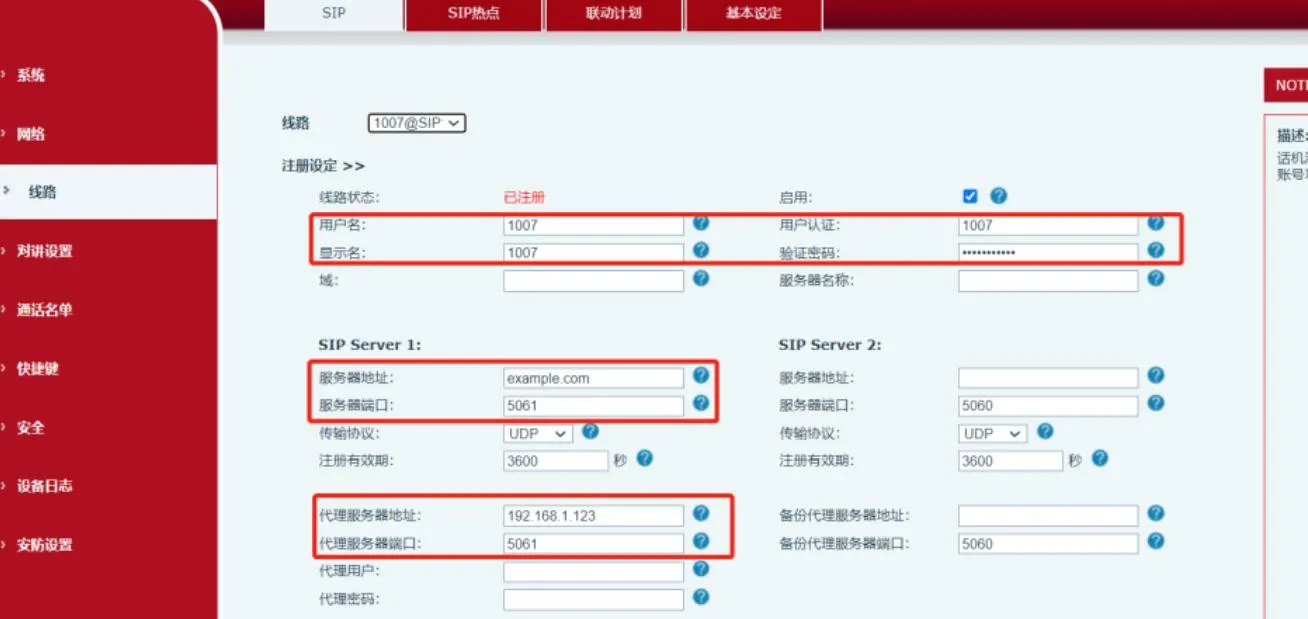

صفحة إعدادات تسجيل SIP

كتالوج
المهنية الصانع الاتصالات الصناعية ، وتوفير ضمان الاتصالات موثوقية عالية!
مشاورات التعاون
خدمة العملاء الهاتف
We use cookie to improve your online experience. By continuing to browse this website, you agree to our use of cookie.

Cookies

This Cookie Policy explains how we use cookies and similar technologies when you access or use our website and related services. Please read this Policy together with our Terms and Conditions and Privacy Policy so that you understand how we collect, use, and protect information.

By continuing to access or use our Services, you acknowledge that cookies and similar technologies may be used as described in this Policy, subject to applicable law and your available choices.

Updates to This Cookie Policy

We may revise this Cookie Policy from time to time to reflect changes in legal requirements, technology, or our business practices. When we make updates, the revised version will be posted on this page and will become effective from the date of publication unless otherwise required by law.

Where required, we will provide additional notice or request your consent before applying material changes that affect your rights or choices.

What Are Cookies?

Cookies are small text files placed on your device when you visit a website or interact with certain online content. They help websites recognize your browser or device, remember your preferences, support essential functionality, and improve the overall user experience.

In this Cookie Policy, the term “cookies” also includes similar technologies such as pixels, tags, web beacons, and other tracking tools that perform comparable functions.

Why We Use Cookies

We use cookies to help our website function properly, remember user preferences, enhance website performance, understand how visitors interact with our pages, and support security, analytics, and marketing activities where permitted by law.

We use cookies to keep our website functional, secure, efficient, and more relevant to your browsing experience.

Categories of Cookies We Use

Strictly Necessary Cookies

These cookies are essential for the operation of the website and cannot be disabled in our systems where they are required to provide the service you request. They are typically set in response to actions such as setting privacy preferences, signing in, or submitting forms.

Without these cookies, certain parts of the website may not function correctly.

Functional Cookies

Functional cookies enable enhanced features and personalization, such as remembering your preferences, language settings, or previously selected options. These cookies may be set by us or by third-party providers whose services are integrated into our website.

If you disable these cookies, some services or features may not work as intended.

Performance and Analytics Cookies

These cookies help us understand how visitors use our website by collecting information such as traffic sources, page visits, navigation behavior, and general interaction patterns. In many cases, this information is aggregated and does not directly identify individual users.

We use this information to improve website performance, usability, and content relevance.

Targeting and Advertising Cookies

These cookies may be placed by our advertising or marketing partners to help deliver more relevant ads and measure the effectiveness of campaigns. They may use information about your browsing activity across different websites and services to build a profile of your interests.

These cookies generally do not store directly identifying personal information, but they may identify your browser or device.

First-Party and Third-Party Cookies

Some cookies are set directly by our website and are referred to as first-party cookies. Other cookies are set by third-party services, such as analytics providers, embedded content providers, or advertising partners, and are referred to as third-party cookies.

Third-party providers may use their own cookies in accordance with their own privacy and cookie policies.

Information Collected Through Cookies

Depending on the type of cookie used, the information collected may include browser type, device type, IP address, referring website, pages viewed, time spent on pages, clickstream behavior, and general usage patterns.

This information helps us maintain the website, improve performance, enhance security, and provide a better user experience.

Your Cookie Choices

You can control or disable cookies through your browser settings and, where available, through our cookie consent or preference management tools. Depending on your location, you may also have the right to accept or reject certain categories of cookies, especially those used for analytics, personalization, or advertising purposes.

Please note that blocking or deleting certain cookies may affect the availability, functionality, or performance of some parts of the website.

Restricting cookies may limit certain features and reduce the quality of your experience on the website.

Cookies in Mobile Applications

Where our mobile applications use cookie-like technologies, they are generally limited to those required for core functionality, security, and service delivery. Disabling these essential technologies may affect the normal operation of the application.

We do not use essential mobile application cookies to store unnecessary personal information.

How to Manage Cookies

Most web browsers allow you to manage cookies through browser settings. You can usually choose to block, delete, or receive alerts before cookies are stored. Because browser controls vary, please refer to your browser provider’s support documentation for details on how to manage cookie settings.

Contact Us

If you have any questions about this Cookie Policy or our use of cookies and similar technologies, please contact us at support@becke.cc .