
مورد

فهم أفضل الممارسات واستكشاف الحلول المبتكرة وإقامة اتصالات مع شركاء آخرين في جميع أنحاء مجتمع بيكر.

×

نقطة اللمس

نقطة اللمس

بالإضافة إلى الأجهزة الطرفية ، يجب أيضًا مراعاة جميع الموظفين والأماكن والأشياء المتصلة بالشبكة.

تعلم المزيد

مورد

مورد

فهم أفضل الممارسات واستكشاف الحلول المبتكرة وإقامة اتصالات مع شركاء آخرين في جميع أنحاء مجتمع بيكر.

اتصل بنا
كيفية استكشاف مشكلات الصوت أحادية الاتجاه أو بدون اتجاه وإصلاحها ؟

    مقدمة

    نظرة عامة

أثناء الاتصال الصوتي بين جهازين طرفيين، قد تحدث مشكلات في الصوت أحادي الاتجاه أو انعدام الصوت تمامًا. يعني الصوت أحادي الاتجاه أن كلا الطرفين يمكنهما الرد على المكالمة بشكل طبيعي، ولكن طرفًا واحدًا فقط يمكنه سماع الآخر، بينما لا يستطيع الطرف الآخر سماع أي صوت. أما انعدام الصوت فيعني أن كلا الطرفين يمكنهما الرد على المكالمة بشكل طبيعي، ولكن لا يمكن لأي منهما سماع الآخر.

    النماذج المتوافقة

جميع موديلات منتجاتنا، بما في ذلك المنتجات الصناعية ومنتجات الهواتف.

    المتطلبات الأساسية

① قم بإعداد كمبيوتر تصحيح أخطاء واحد مثبت عليه برنامج Wireshark، وقم بتوصيله بنفس الشبكة المحلية للأجهزة. تأكد من أن الكمبيوتر يمكنه التواصل مع الأجهزة ومع خادم SIP.
② تأكد من أن مصدر طاقة الجهاز والاتصال بالشبكة طبيعيان، وأن الأجهزة تعمل بشكل صحيح، وأنها قادرة على الوصول إلى بيئة الشبكة التي تم نشرها فيها.
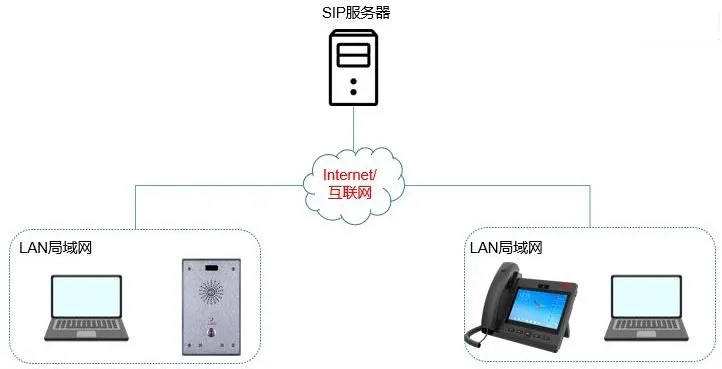
    مخطط توصيل الأجهزة والكمبيوتر

مخطط توصيل الجهاز والكمبيوتر

    طريقة استكشاف الأخطاء وإصلاحها

عند تحليل مشكلة الصوت، فإن الخطوة الأولى هي تحديد العرض الدقيق لمشكلة الصوت أحادي الاتجاه. في التطبيقات العملية، غالبًا ما تتواصل أجهزة الاتصال الداخلي والتحكم في الوصول الصناعية مع هواتف IP. لذلك، يستخدم الوصف التالي المصطلحين الاتصال الداخلي و الهاتف لتمثيل طرفي المكالمة.

    لا يمكن للاتصال الداخلي سماع الهاتف

عندما تكون المشكلة هي أن الاتصال الداخلي لا يمكنه سماع الهاتف، اتبع الخطوات التالية لاستكشاف الأخطاء وإصلاحها:
1. تأكد من قناة الصوت التي يستخدمها الهاتف: السماعة اليدوية، أو مكبر الصوت، أو سماعة الرأس. إذا تم التحقق من السماعة اليدوية فقط، فقم بالتبديل إلى مكبر الصوت وتأكد مما إذا كان الصوت لا يزال غير متاح. سبب شائع هو أن كابل السماعة اليدوية موصول بمنفذ سماعة الرأس. في هذه الحالة، يستخدم النظام قناة السماعة اليدوية، ولكن نظرًا لأن الكابل الفعلي متصل بمنفذ سماعة الرأس، فلا يمكن التقاط الصوت بشكل صحيح.
2. تأكد مما إذا كان مفتاح الاختصار الخاص بالاتصال الداخلي مهيأ كـ اتصال سريع.
عندما يتصل الاتصال الداخلي بالهاتف، يجب تهيئة مفتاح الاختصار الخاص بالاتصال الداخلي كاتصال سريع:

تكوين الاتصال السريع للاتصال الداخلي
قد يقوم بعض المستخدمين عن طريق الخطأ بتكوينه كـ اتصال داخلي بدلاً من ذلك.
3. إذا كان الاتصال الداخلي لا يزال غير قادر على سماع الهاتف بغض النظر عن استخدام السماعة اليدوية أو مكبر الصوت، فاتبع الخطوات الواردة في القسم 2.3 لالتقاط حزم الشبكة في نفس الوقت على الاتصال الداخلي والهاتف والخادم، ثم أرسل ملفات الالتقاط إلى الدعم الفني للتحليل.

    لا يمكن للهاتف سماع الاتصال الداخلي

1. تأكد مما إذا كان الهاتف لا يمكنه سماع الاتصال الداخلي عبر السماعة اليدوية فقط، أم عبر كل من السماعة اليدوية ومكبر الصوت. إذا كانت السماعة اليدوية فقط لا تحتوي على صوت، فتحقق مما إذا كان كابل السماعة اليدوية موصولاً بمنفذ سماعة الرأس.
2. إذا كان الهاتف يستخدم مفتاح اختصار للاتصال بالاتصال الداخلي، فتحقق مما إذا كان نوع المكالمة لمفتاح الاختصار مضبوطًا على اتصال سريع أم اتصال داخلي. إذا كان مضبوطًا على اتصال داخلي، فيمكن تغييره إلى اتصال سريع. إذا كان يجب على مفتاح الاختصار استخدام الاتصال الداخلي كنوع المكالمة، فقم في إعدادات الاتصال الداخلي بتعطيل المعامل “تمكين كتم صوت الاتصال الداخلي“.
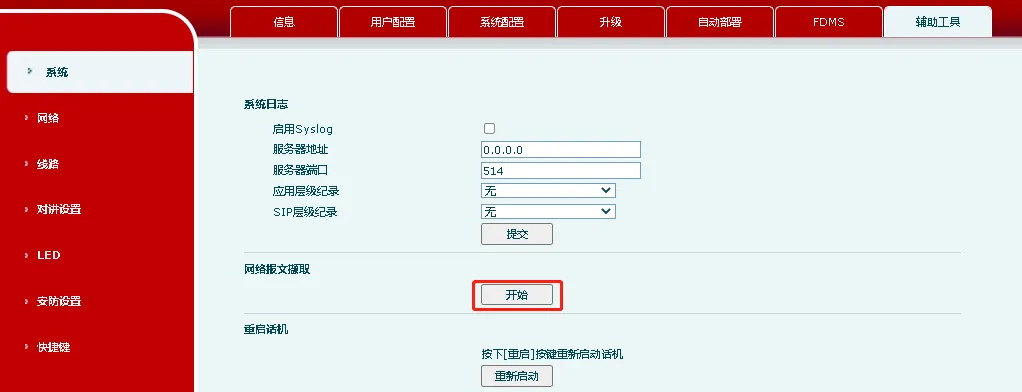
التقاط حزم الشبكة
3. اتبع الخطوات الواردة في القسم 2.3 لالتقاط حزم الشبكة في نفس الوقت على الاتصال الداخلي والهاتف والخادم، ثم أرسل الملفات إلى الدعم الفني للتحليل.

    لا يمكن لأي من الطرفين سماع الآخر أثناء المكالمة

عندما لا يتمكن أي من الطرفين من سماع الآخر أثناء المكالمة، فقد تشمل الأسباب المحتملة عدم تطابق برامج ترميز الصوت على كلا الطرفين أو فشل إرسال RTP بسبب مشكلات في الشبكة. في هذه الحالة، يحتاج المستخدم إلى تزويد الدعم الفني بالتقاط حزم الشبكة لإجراء تحليل مفصل. فيما يلي إجراء التقاط الحزمة:
1. قم بتسجيل الدخول إلى واجهة الويب الخاصة بالجهاز A، ثم انتقل إلى “النظام” – “الأدوات المساعدة” – “التقاط الويب”، وانقر على “بدء” لبدء التقاط الحزمة على الجهاز A.
ملاحظة: عند التقاط الحزم على الجهاز، يوصى باستخدام متصفح Chrome، حيث قد تواجه المتصفحات الأخرى مشكلات في التوافق.
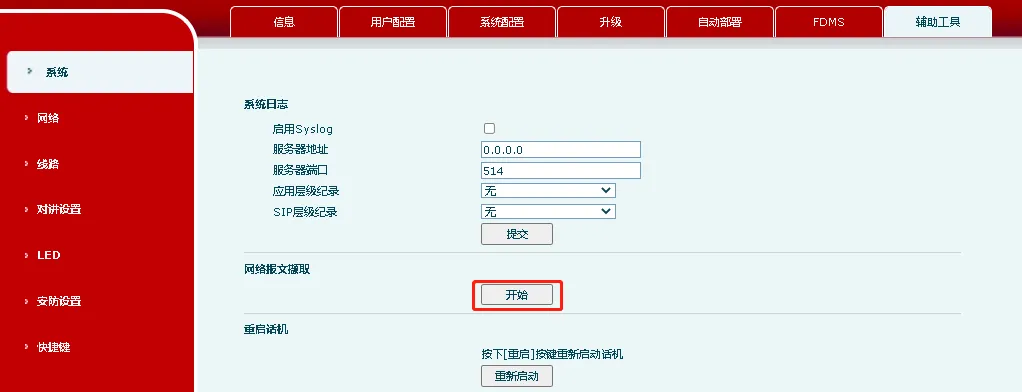
التقاط حزمة الجهاز
2. كرر الخطوة 1 على الجهاز B لبدء التقاط الحزمة على الجهاز B.
3. ابدأ التقاط حزم الشبكة على الخادم. بالنسبة لهذا الجزء، استشر بائع الخادم.
4. قم بإجراء المكالمة والرد عليها. بعد الاتصال، تحدث على كل من الجهاز A والجهاز B، ثم أنهي المكالمة.
5. أوقف التقاط الحزمة على الجهاز A والجهاز B والخادم على التوالي، ثم أرسل ملفات التقاط الحزمة الثلاثة إلى الدعم الفني.

كتالوج
المهنية الصانع الاتصالات الصناعية ، وتوفير ضمان الاتصالات موثوقية عالية!
مشاورات التعاون
خدمة العملاء الهاتف
We use cookie to improve your online experience. By continuing to browse this website, you agree to our use of cookie.

Cookies

This Cookie Policy explains how we use cookies and similar technologies when you access or use our website and related services. Please read this Policy together with our Terms and Conditions and Privacy Policy so that you understand how we collect, use, and protect information.

By continuing to access or use our Services, you acknowledge that cookies and similar technologies may be used as described in this Policy, subject to applicable law and your available choices.

Updates to This Cookie Policy

We may revise this Cookie Policy from time to time to reflect changes in legal requirements, technology, or our business practices. When we make updates, the revised version will be posted on this page and will become effective from the date of publication unless otherwise required by law.

Where required, we will provide additional notice or request your consent before applying material changes that affect your rights or choices.

What Are Cookies?

Cookies are small text files placed on your device when you visit a website or interact with certain online content. They help websites recognize your browser or device, remember your preferences, support essential functionality, and improve the overall user experience.

In this Cookie Policy, the term “cookies” also includes similar technologies such as pixels, tags, web beacons, and other tracking tools that perform comparable functions.

Why We Use Cookies

We use cookies to help our website function properly, remember user preferences, enhance website performance, understand how visitors interact with our pages, and support security, analytics, and marketing activities where permitted by law.

We use cookies to keep our website functional, secure, efficient, and more relevant to your browsing experience.

Categories of Cookies We Use

Strictly Necessary Cookies

These cookies are essential for the operation of the website and cannot be disabled in our systems where they are required to provide the service you request. They are typically set in response to actions such as setting privacy preferences, signing in, or submitting forms.

Without these cookies, certain parts of the website may not function correctly.

Functional Cookies

Functional cookies enable enhanced features and personalization, such as remembering your preferences, language settings, or previously selected options. These cookies may be set by us or by third-party providers whose services are integrated into our website.

If you disable these cookies, some services or features may not work as intended.

Performance and Analytics Cookies

These cookies help us understand how visitors use our website by collecting information such as traffic sources, page visits, navigation behavior, and general interaction patterns. In many cases, this information is aggregated and does not directly identify individual users.

We use this information to improve website performance, usability, and content relevance.

Targeting and Advertising Cookies

These cookies may be placed by our advertising or marketing partners to help deliver more relevant ads and measure the effectiveness of campaigns. They may use information about your browsing activity across different websites and services to build a profile of your interests.

These cookies generally do not store directly identifying personal information, but they may identify your browser or device.

First-Party and Third-Party Cookies

Some cookies are set directly by our website and are referred to as first-party cookies. Other cookies are set by third-party services, such as analytics providers, embedded content providers, or advertising partners, and are referred to as third-party cookies.

Third-party providers may use their own cookies in accordance with their own privacy and cookie policies.

Information Collected Through Cookies

Depending on the type of cookie used, the information collected may include browser type, device type, IP address, referring website, pages viewed, time spent on pages, clickstream behavior, and general usage patterns.

This information helps us maintain the website, improve performance, enhance security, and provide a better user experience.

Your Cookie Choices

You can control or disable cookies through your browser settings and, where available, through our cookie consent or preference management tools. Depending on your location, you may also have the right to accept or reject certain categories of cookies, especially those used for analytics, personalization, or advertising purposes.

Please note that blocking or deleting certain cookies may affect the availability, functionality, or performance of some parts of the website.

Restricting cookies may limit certain features and reduce the quality of your experience on the website.

Cookies in Mobile Applications

Where our mobile applications use cookie-like technologies, they are generally limited to those required for core functionality, security, and service delivery. Disabling these essential technologies may affect the normal operation of the application.

We do not use essential mobile application cookies to store unnecessary personal information.

How to Manage Cookies

Most web browsers allow you to manage cookies through browser settings. You can usually choose to block, delete, or receive alerts before cookies are stored. Because browser controls vary, please refer to your browser provider’s support documentation for details on how to manage cookie settings.

Contact Us

If you have any questions about this Cookie Policy or our use of cookies and similar technologies, please contact us at support@becke.cc .