
دليل الاتصال المباشر عبر IP لأجهزة التحكم في الدخول

مقدمة

نظرة عامة

عندما تكون أجهزة التحكم في الدخول ضمن نفس الشبكة المحلية المترابطة ولا تكون مسجلة في بيئة PBX، يمكن استخدام وظيفة الاتصال المباشر عبر IP لتحقيق الاتصال الداخلي بين الأجهزة.

الطرازات المناسبة

BHP-SOS10/BHP-SOS10V/BHP-SOS10D/BHP-SOS12/BHP-SOS16/BHP-SOS16V/i18S/i20S/i23S/i30/i31S/ i32V/i33V/i33VF/i61/i62/i63/i64

الأدوات والتحضيرات المطلوبة

① جهاز i20S واحد وهاتف واحد (X7A)، ومحول POE واحد (أو مصدر طاقة DC)، ثم توصيل الأجهزة بالمحول.
② جهاز كمبيوتر للتصحيح، وتوصيله بالمحول لضمان اتصال الشبكة بين الكمبيوتر والهاتف.

مخطط توصيل الجهاز والكمبيوتر

قم بتوصيل i20S/i52W/i53W بالمحول، وقم بتوصيل الكمبيوتر بالمحول نفسه مع الجهاز. تأكد من أن الشبكة بين الكمبيوتر والجهاز متصلة بشكل صحيح. يظهر مخطط التوصيل أدناه:
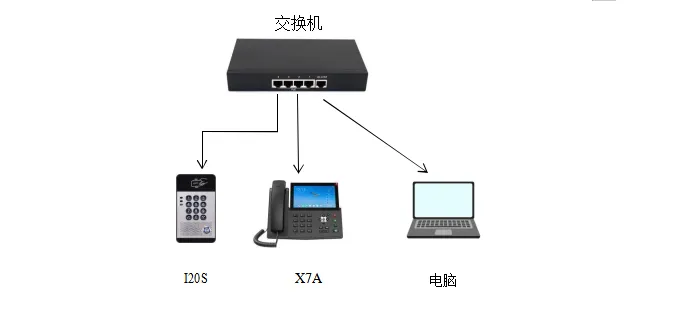
مخطط توصيل الجهاز والكمبيوتر
            مخطط توصيل الجهاز والكمبيوتر

طريقة الإعداد

الاتصال بزر الاختصار

BHP-SOS10/BHP-SOS10V/BHP-SOS10D/BHP-SOS12/BHP-SOS16/BHP-SOS16V/i18S/i32V/i33V/i33VF/i61/i62/i63/i64
i64: في وضع الاستعداد، اضغط مطولًا على زر الاتصال السريع لمدة 10 ثوانٍ. يستمر صوت التنبيه 5 ثوانٍ. اضغط زر الاتصال السريع مرة واحدة خلال 5 ثوانٍ؛ يتوقف التنبيه ويعلن الجهاز عنوان IP تلقائيًا.
i20S/i23S/i30/i31S: اضغط مطولًا على زر # في الجهاز لمدة 3 ثوانٍ خلال 30 ثانية بعد التشغيل. سيعلن الجهاز عنوان IP المحلي صوتيًا.
قم بتسجيل الدخول إلى واجهة الويب الخلفية للجهاز. في زر الاختصار---زر الاختصار---إعدادات زر الاختصار، املأ المعلومات ثم أرسلها. اختر “زر الذاكرة” كنوع، ويمكن تخصيص الاسم، واكتب عنوان IP للجهاز المقابل كقيمة، ثم اختر “الاتصال السريع”.
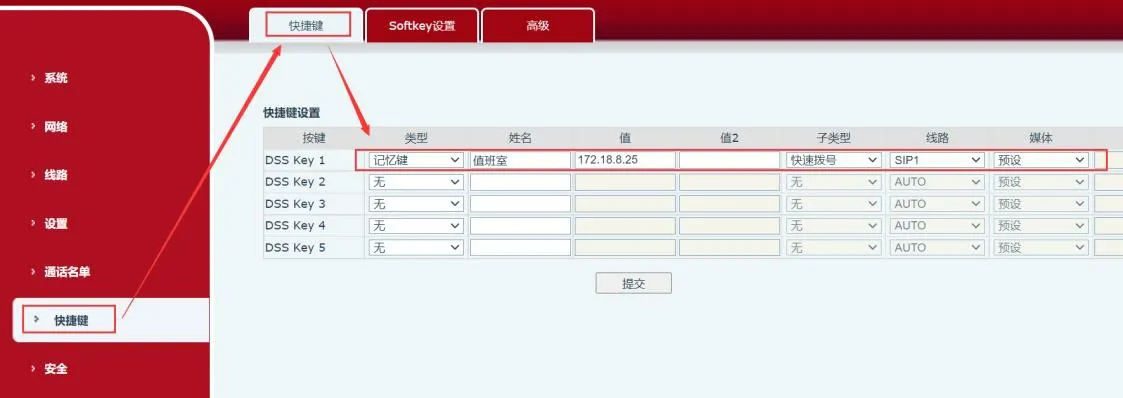
واجهة إعداد زر الاختصار

الاتصال اليدوي

ينطبق على: i20S/i23S/i30/i31S/i32V/i33V/i33VF/i64
أدخل عنوان IP على لوحة مفاتيح جهاز التحكم في الدخول لإجراء الاتصال. على سبيل المثال، 172.18.8.23 يتصل بـ 172.18.8.5، حيث يتم استبدال “.” بزر “*”.

قواعد الاتصال

لاستخدام قواعد الاتصال، يجب إعدادها من صفحة الويب الخاصة بالجهاز. فيما يلي شرح خطوات الإعداد بالتفصيل.
تسجيل الدخول إلى صفحة الويب: أدخل عنوان IP الذي تم الحصول عليه في المتصفح، ثم أدخل اسم المستخدم وكلمة المرور لتسجيل الدخول (الافتراضي admin).
بعد تسجيل الدخول إلى صفحة الويب، انتقل إلى “الخط”---“Dial Peer”---“إضافة Dial Peer”، ثم قم بالإعداد كما في الشكل التالي:
① الرقم: مخصص، أي أن الرقم المدخل هنا سيحل محل الرقم الأصلي لإجراء الاتصال؛
② الوجهة: هي العنوان المطلوب الاتصال به، ويمكن إدخال عنوان IP أو حساب SIP. إذا تم استخدام حساب SIP فيجب تسجيل الحساب. في هذا المثال نستخدم عنوان IP؛
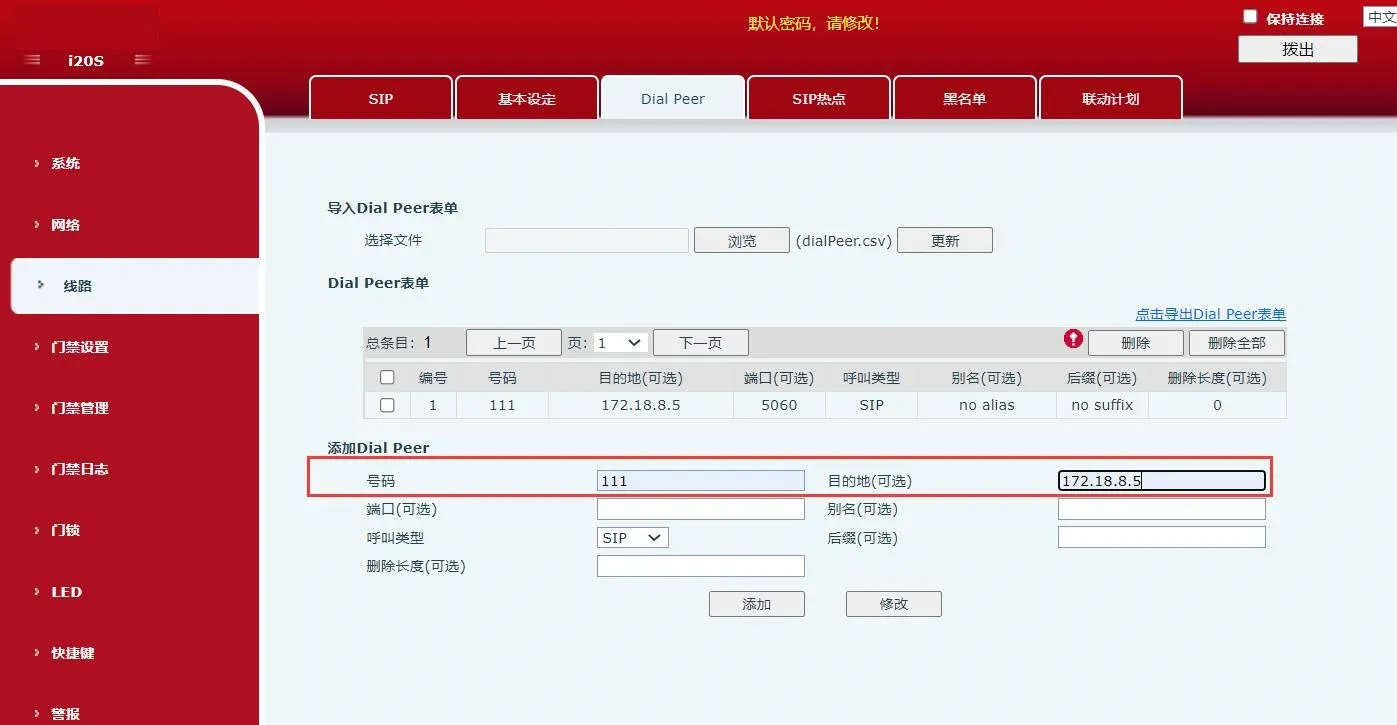
مخطط إضافة قاعدة الاتصال        مخطط إضافة قاعدة اتصال

1. في “إعدادات التحكم في الدخول”---“إعدادات الوظائف”، قم بالإعداد كما في الشكل. في “الإعدادات العامة” قم بما يلي:
① اجعل “وضع الأزرار” على “الاتصال وإدخال كلمة المرور”: يمكن استخدام إدخال الأزرار للاتصال وإدخال كلمة المرور؛
② اختر “وضع الإدخال الافتراضي” كـ “كلمة المرور”: في الحالة الافتراضية يستخدم إدخال الأزرار للتحقق من كلمة المرور فقط؛
في “إعدادات الأزرار القابلة للبرمجة”، قم بالإعداد التالي:
اضبط حالة الاستعداد لـ “الزر *” على “تبديل وضع الإدخال”، واختر في “الاتصال” خيار “رقم صادر”؛
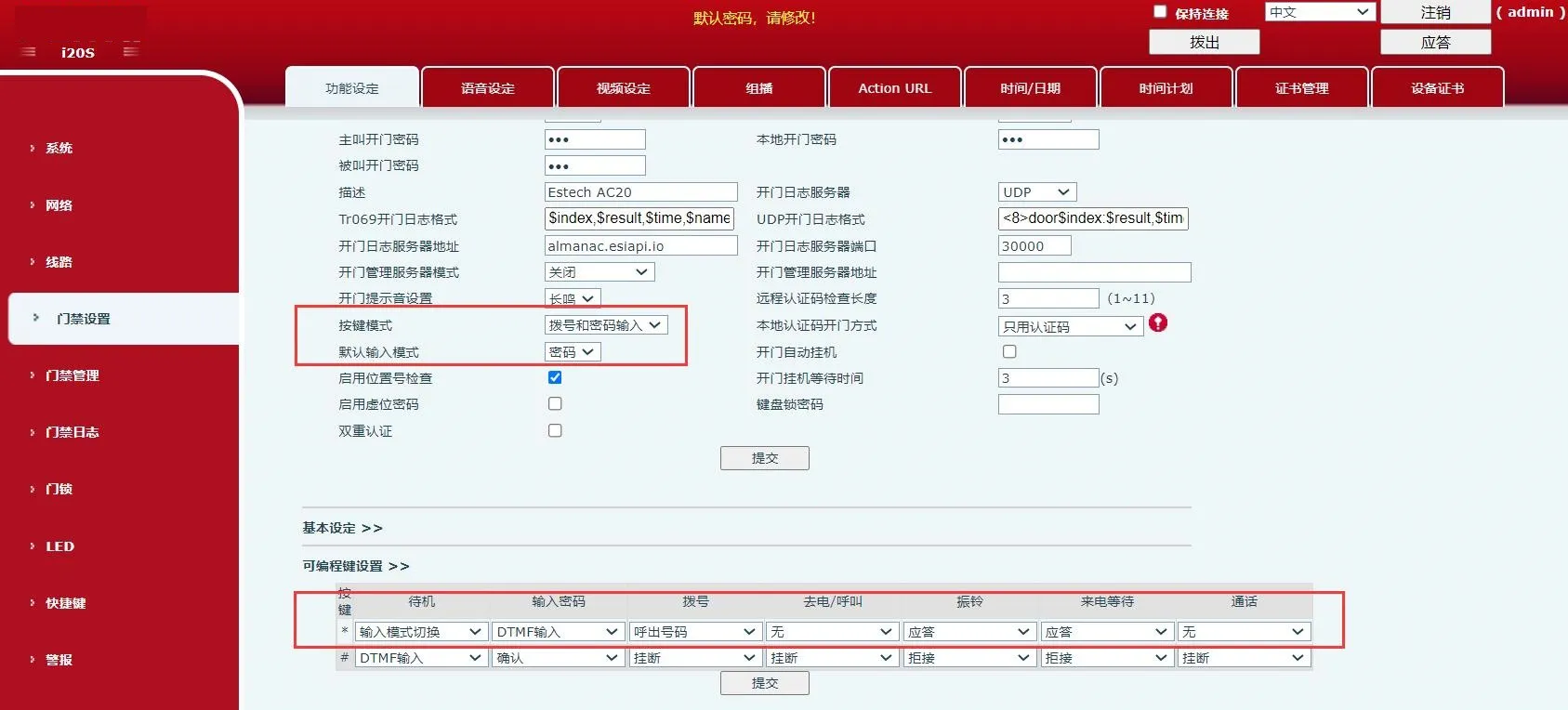
مخطط إعداد وضع الأزرار والأزرار القابلة للبرمجة        مخطط إعداد وضع الأزرار والأزرار القابلة للبرمجة

2. في “إعدادات التحكم في الدخول”---“إعدادات الوظائف”---“الإعدادات الأساسية”، قم بإلغاء تحديد “الاتصال بطول ثابت” كما في الشكل التالي؛
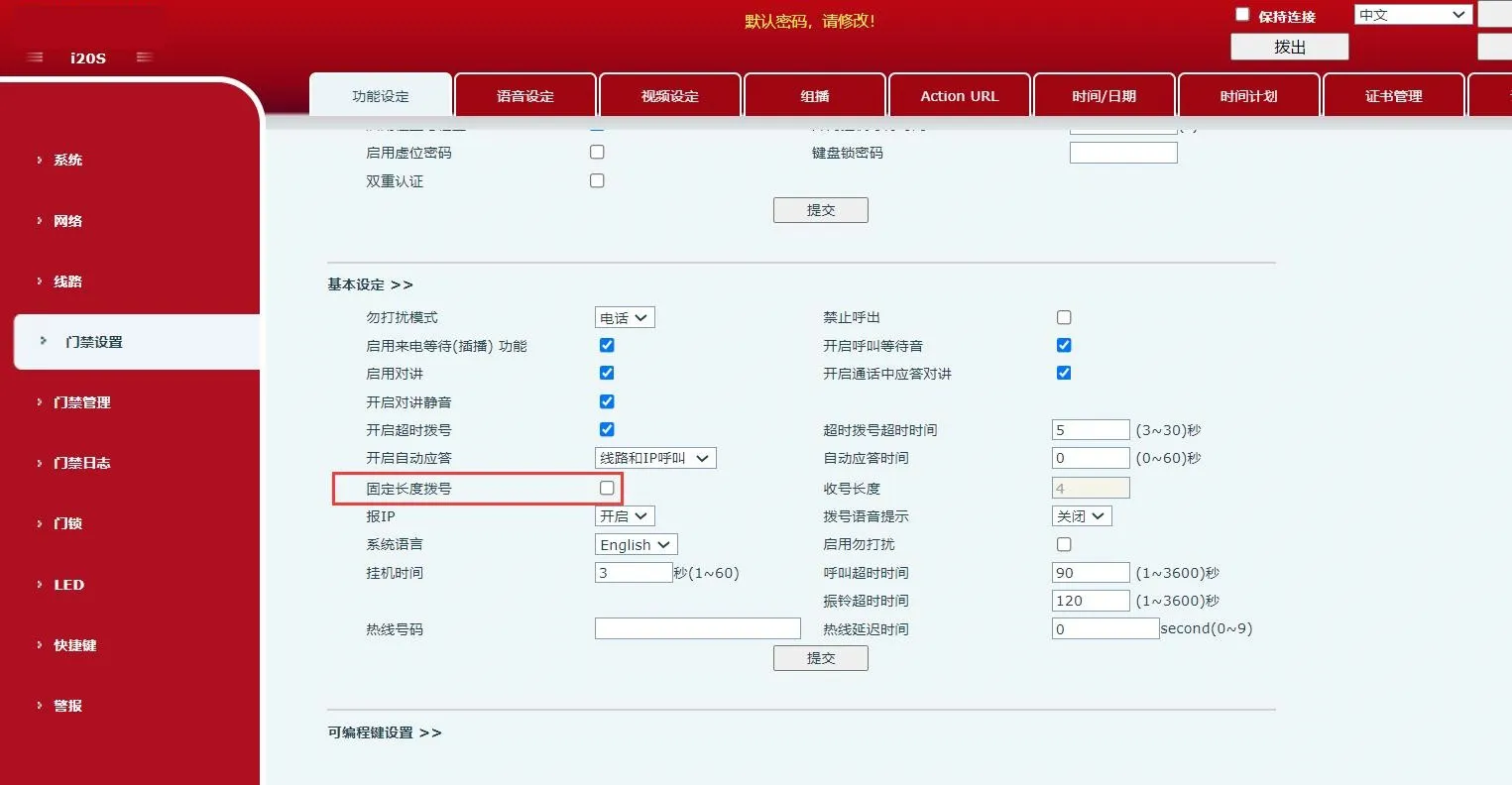
مخطط إلغاء الاتصال بالطول الثابت
        مخطط إلغاء الاتصال بطول ثابت

3. بعد إكمال الإعدادات أعلاه، أدخل “*الرقم المخصص*” على لوحة مفاتيح الجهاز للاتصال فورًا. ويمكن أيضًا إدخال “*الرقم المخصص” والانتظار 3 ثوانٍ ليقوم الجهاز بالاتصال تلقائيًا. في هذا المثال، أدخل “*111*” أو “*111” للاتصال.
ملاحظات:
قم بإلغاء مطابقة UA الصارمة في الطرف المطلوب لضمان إمكانية استقبال الجهاز للمكالمات.
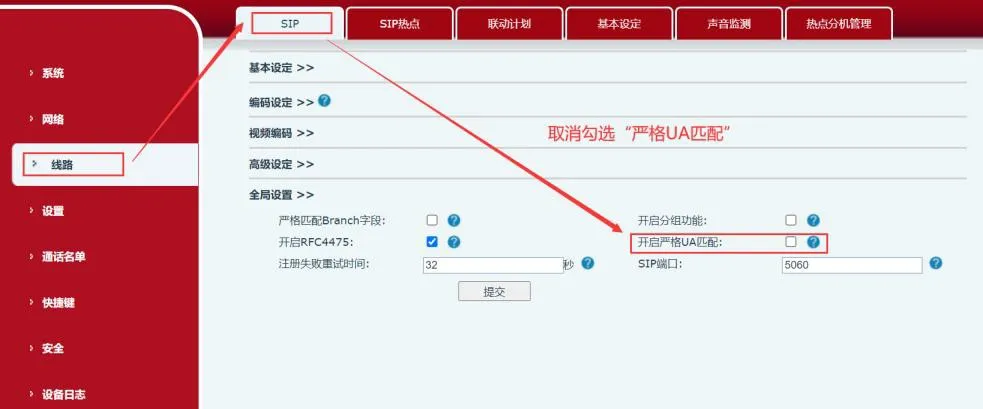
Disable strict UA matching diagram
حدد السماح بالاتصال الصادر دون تسجيل لضمان إمكانية الاتصال دون تسجيل.
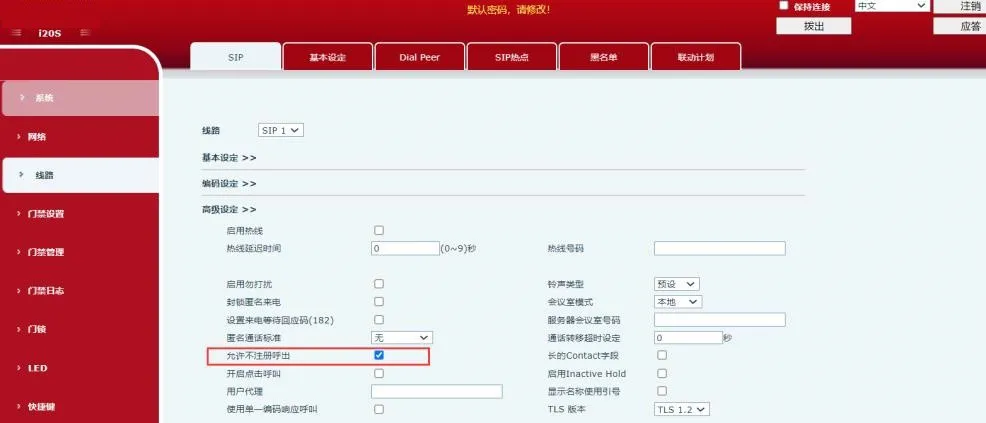

Enable unregistered outbound calling diagram

كتالوج
خدمة العملاء الهاتف
We use cookie to improve your online experience. By continuing to browse this website, you agree to our use of cookie.

Cookies

This Cookie Policy explains how we use cookies and similar technologies when you access or use our website and related services. Please read this Policy together with our Terms and Conditions and Privacy Policy so that you understand how we collect, use, and protect information.

By continuing to access or use our Services, you acknowledge that cookies and similar technologies may be used as described in this Policy, subject to applicable law and your available choices.

Updates to This Cookie Policy

We may revise this Cookie Policy from time to time to reflect changes in legal requirements, technology, or our business practices. When we make updates, the revised version will be posted on this page and will become effective from the date of publication unless otherwise required by law.

Where required, we will provide additional notice or request your consent before applying material changes that affect your rights or choices.

What Are Cookies?

Cookies are small text files placed on your device when you visit a website or interact with certain online content. They help websites recognize your browser or device, remember your preferences, support essential functionality, and improve the overall user experience.

In this Cookie Policy, the term “cookies” also includes similar technologies such as pixels, tags, web beacons, and other tracking tools that perform comparable functions.

Why We Use Cookies

We use cookies to help our website function properly, remember user preferences, enhance website performance, understand how visitors interact with our pages, and support security, analytics, and marketing activities where permitted by law.

We use cookies to keep our website functional, secure, efficient, and more relevant to your browsing experience.

Categories of Cookies We Use

Strictly Necessary Cookies

These cookies are essential for the operation of the website and cannot be disabled in our systems where they are required to provide the service you request. They are typically set in response to actions such as setting privacy preferences, signing in, or submitting forms.

Without these cookies, certain parts of the website may not function correctly.

Functional Cookies

Functional cookies enable enhanced features and personalization, such as remembering your preferences, language settings, or previously selected options. These cookies may be set by us or by third-party providers whose services are integrated into our website.

If you disable these cookies, some services or features may not work as intended.

Performance and Analytics Cookies

These cookies help us understand how visitors use our website by collecting information such as traffic sources, page visits, navigation behavior, and general interaction patterns. In many cases, this information is aggregated and does not directly identify individual users.

We use this information to improve website performance, usability, and content relevance.

Targeting and Advertising Cookies

These cookies may be placed by our advertising or marketing partners to help deliver more relevant ads and measure the effectiveness of campaigns. They may use information about your browsing activity across different websites and services to build a profile of your interests.

These cookies generally do not store directly identifying personal information, but they may identify your browser or device.

First-Party and Third-Party Cookies

Some cookies are set directly by our website and are referred to as first-party cookies. Other cookies are set by third-party services, such as analytics providers, embedded content providers, or advertising partners, and are referred to as third-party cookies.

Third-party providers may use their own cookies in accordance with their own privacy and cookie policies.

Information Collected Through Cookies

Depending on the type of cookie used, the information collected may include browser type, device type, IP address, referring website, pages viewed, time spent on pages, clickstream behavior, and general usage patterns.

This information helps us maintain the website, improve performance, enhance security, and provide a better user experience.

Your Cookie Choices

You can control or disable cookies through your browser settings and, where available, through our cookie consent or preference management tools. Depending on your location, you may also have the right to accept or reject certain categories of cookies, especially those used for analytics, personalization, or advertising purposes.

Please note that blocking or deleting certain cookies may affect the availability, functionality, or performance of some parts of the website.

Restricting cookies may limit certain features and reduce the quality of your experience on the website.

Cookies in Mobile Applications

Where our mobile applications use cookie-like technologies, they are generally limited to those required for core functionality, security, and service delivery. Disabling these essential technologies may affect the normal operation of the application.

We do not use essential mobile application cookies to store unnecessary personal information.

How to Manage Cookies

Most web browsers allow you to manage cookies through browser settings. You can usually choose to block, delete, or receive alerts before cookies are stored. Because browser controls vary, please refer to your browser provider’s support documentation for details on how to manage cookie settings.

Contact Us

If you have any questions about this Cookie Policy or our use of cookies and similar technologies, please contact us at support@becke.cc .