
مورد

فهم أفضل الممارسات واستكشاف الحلول المبتكرة وإقامة اتصالات مع شركاء آخرين في جميع أنحاء مجتمع بيكر.

×

نقطة اللمس

نقطة اللمس

بالإضافة إلى الأجهزة الطرفية ، يجب أيضًا مراعاة جميع الموظفين والأماكن والأشياء المتصلة بالشبكة.

تعلم المزيد

مورد

مورد

فهم أفضل الممارسات واستكشاف الحلول المبتكرة وإقامة اتصالات مع شركاء آخرين في جميع أنحاء مجتمع بيكر.

اتصل بنا
دليل ميزة الاختبار الذاتي Echo

مقدمة

نظرة عامة

في بعض التطبيقات الصناعية، قد يلزم فحص مكبر الصوت والميكروفون بالجهاز بشكل تلقائي. ويتم ذلك من خلال وظيفة اختبار الصدى الذاتي. المبدأ بسيط: يقوم الجهاز بتشغيل الصوت عبر مكبر الصوت وتسجيله عبر الميكروفون للتحقق مما إذا كان كل من مكبر الصوت والميكروفون يعملان بشكل صحيح. توضح الأقسام التالية كيفية إجراء اختبار الصوت الذاتي على الأجهزة الصناعية.

الموديلات المعمول بها

أجهزة التحكم في الوصول، والاتصال المتبادل، وغيرها من المحطات الطرفية الخاصة بالصناعات.

المتطلبات الأساسية

① جهاز اتصال متبادل واحد (يتم استخدام جهاز i12 كمثال في هذا الدليل)، ومحول شبكة PoE واحد أو مصدر طاقة DC، وخادم يون يي واحد. قم بتوصيل الجهاز بالمحول الشبكي.
   ② جهاز كمبيوتر واحد لإعداد الإعدادات وخادم واحد متصلان بنفس المحول الشبكي، مع تأكيد وجود اتصال شبكي بين الكمبيوتر والجهاز.

مخطط توصيل الجهاز وجهاز الكمبيوتر

قم بتوصيل جهاز i12 بالمحول الشبكي، وخادم يون يي بنفس المحول، وجهاز الكمبيوتر أيضًا بنفس المحول، مع التأكد من إمكانية تواصل الكمبيوتر والجهاز عبر الشبكة، كما هو موضح أدناه.
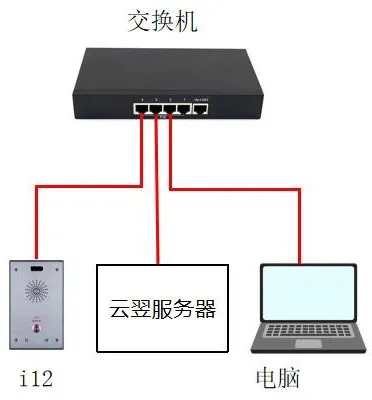
مخطط توصيل الجهاز وجهاز الكمبيوتر

طرق اختبار الصدى الذاتي

يمكن تنفيذ اختبار الصدى الذاتي بعدة طرق مختلفة. ويوضح أدناه كل طريقة.

طريقة URI النشطة

تعمل طريقة URI النشطة عن طريق إرسال طلب HTTP GET من وحدة تحكم عن بعد. يحتوي الجهاز على خادم HTTP مدمج يقوم بتحليل الطلب وتنفيذ الأمر، مما يسمح بالتحكم عن بعد في الجهاز.

تنسيق الاختبار هو:
   http://Device_IP/cgi-bin/ConfigManApp.com?key=ECHO_TEST

Device IP: عنوان IP للجهاز قيد الاختبار. في هذا المثال، عنوان IP هو 172.18.8.15.
   ② النتيجة المعادة: إذا كان كل من مكبر الصوت والميكروفون متصلين ويعملان بشكل صحيح، فستكون النتيجة نجاح. إذا كان مكبر الصوت أو الميكروفون غير متصل أو تالف، فستكون النتيجة فشل.

المثال: أدخل العنوان التالي في شريط عناوين المتصفح. إذا كان مكبر الصوت والميكروفون بالجهاز يعملان بشكل طبيعي، فستكون النتيجة المعادة نجاح، كما هو موضح في الشكل 1.

http://172.18.8.15/cgi-bin/ConfigManApp.com?key=ECHO_TEST

نتيجة نجاح اختبار الصدى الذاتي في المتصفح

طريقة HTTP API

تم تصميم واجهة برمجة التطبيقات HTTP للتكامل مع التطبيقات الطرف الثالثة أو أنظمة الإدارة. يعمل الجهاز كخادم HTTP ويقدم خدمات API عبر عنوان URL http://ip/xmlservice. يعمل تطبيق الطرف الثالث كعميل HTTP ويرسل طلب HTTP POST يحتوي على محتوى XML.

تنسيق طلب HTTP API هو كما يلي:

طلب العميل -> الخادم:


   URI="cmd:echo_test"
   

يشير هذا إلى أن الأمر المطلوب هو اختبار الصدى الذاتي.

استجابة الخادم -> العميل:


   URI="cmd:echo_test"
   0


النتيجة المعادة: إذا كان كل من مكبر الصوت والميكروفون متصلين ويعملان بشكل طبيعي، فالنتيجة هي نجاح. إذا كان مكبر الصوت أو الميكروفون غير متصل أو تالف، فالنتيجة هي فشل.

المثال: يمكنك استخدام برنامج Postman أو ApiPost للاختبار. أرسل طلب POST إلى http://Device_IP/xmlservice، وأدخل نص طلب XML الصحيح، ثم انقر على إرسال. إذا كان الطلب صحيحًا، سيعيد الجهاز نتيجة الاختبار بنجاح، كما هو موضح في الشكل 2.
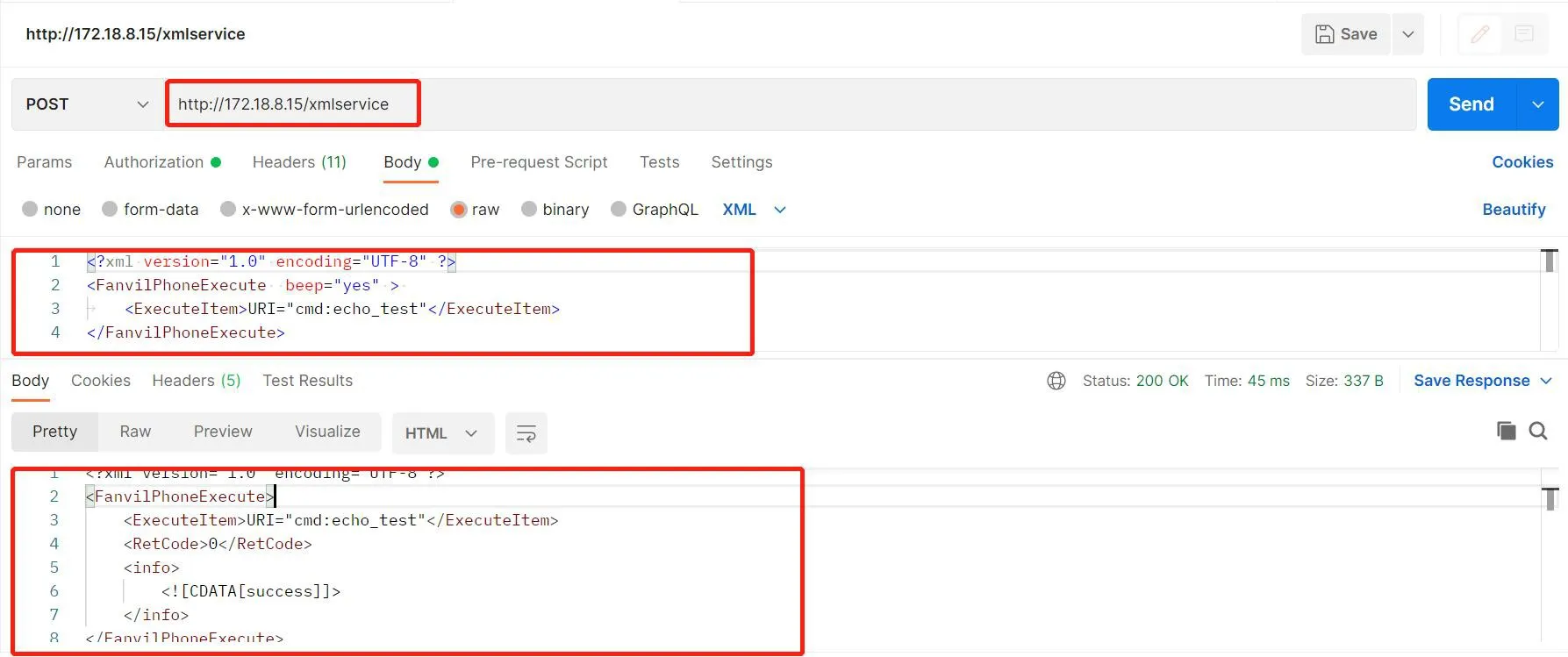
إرسال طلب POST إلى الجهاز لإجراء اختبار الصدى الذاتي

طريقة الخطة الزمنية

يمكنك إضافة عنصر اختبار الصوت الذاتي في إعدادات الخطة الزمنية. سيقوم الجهاز بإجراء الاختبار الذاتي تلقائيًا في الوقت المُكوّن أو خلال الفترة الزمنية المُكوّنة، وإبلاغ النتيجة عبر آلية عنوان URL للإجراء.

سجل الدخول إلى واجهة الويب الخاصة بالجهاز، ثم انتقل إلى إعدادات الاتصال المتبادل --- الخطة الزمنية --- قواعد الخطة الزمنية وأنشئ خطة زمنية جديدة، كما هو موضح في الشكل 3.

نوع التنفيذ: اختر اختبار الصوت الذاتي.
   ② وقت التنفيذ: اختر الفترة الزمنية المطلوبة. سيقوم الجهاز بإجراء الاختبار الذاتي خلال تلك الفترة المُكوّنة.
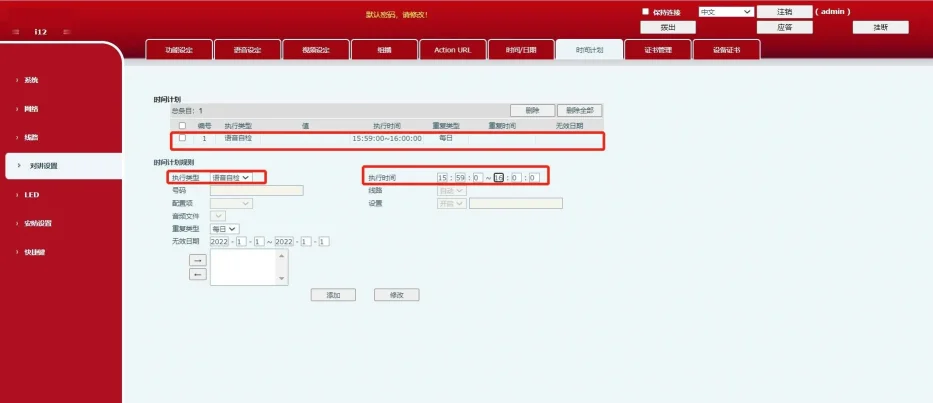
تكوين خطة زمنية لاختبار الصدى الذاتي

بعد إضافة القاعدة بنجاح، سيظهر إدخال خطة زمنية جديد في قسم الخطة الزمنية. عند الوصول إلى الوقت المحدد، سيقوم الجهاز بتشغيل الاختبار الذاتي تلقائيًا.

طريقة رسالة SIP

في بيئة الشبكة العامة، تعمل طريقة رسالة SIP عن طريق قيام الخادم بإرسال أمر URI النشط للرسالة إلى الجهاز. يرد الجهاز على طلب الرسالة بـ 200 OK. ثم يرسل استجابة رسالة تحتوي على نتيجة الاختبار الذاتي مرة أخرى إلى المنصة، وترد المنصة بـ 200 OK.

1. سجل حساب الجهاز على الخادم.

2. أنشئ مهمة اختبار ذاتي على الخادم. في هذا المثال، يتم استخدام خادم يون يي. سجل الدخول إلى واجهة الويب الخاصة بخادم يون يي، انتقل إلى مهمة الاختبار الذاتي --- إضافة، وأنشئ مهمة اختبار ذاتي جديدة.

3. بعد إضافة المهمة، اختر المهمة وانقر على تنفيذ. إذا كان مكبر الصوت والميكروفون بالجهاز متصلين ويعملان بشكل صحيح، فستكتمل المهمة بنجاح. إذا كان مكبر الصوت أو الميكروفون غير متصل أو تالف، فسيفشل التنفيذ وستعرض واجهة الخادم حالة غير طبيعية. يمكنك أيضًا الانتقال إلى نتيجة الاختبار الذاتي في واجهة الويب الخاصة بالخادم لعرض النتيجة مباشرة.
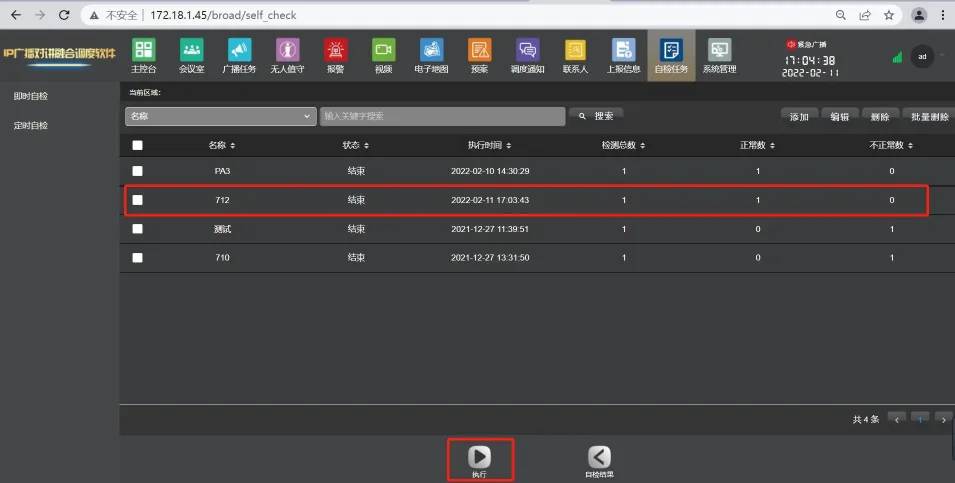
عرض نتائج الاختبار الذاتي على الخادم

يمكنك أيضًا التحقق مما إذا كان الاختبار الذاتي ناجحًا أو فاشلًا عن طريق التقاط الحزم على الجهاز. قبل بدء الاختبار الذاتي، سجل الدخول إلى واجهة الويب الخاصة بالجهاز، ثم انتقل إلى النظام --- الأدوات --- التقاط حزم الشبكة، وانقر على بدء.
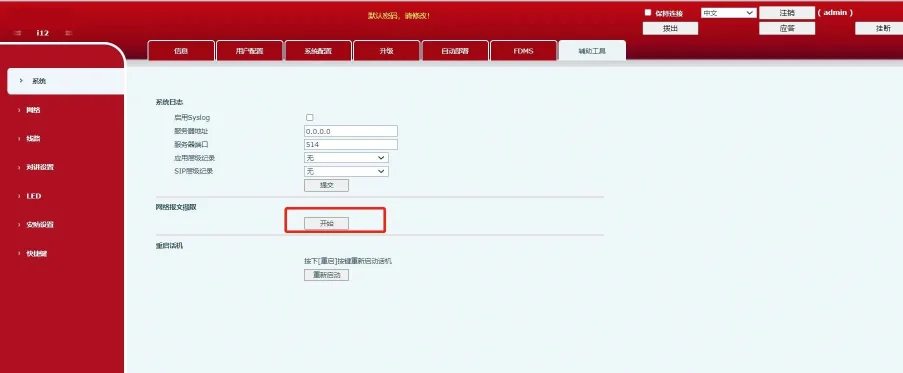
التقاط حزم الشبكة على الجهاز

بعد الانتهاء من الاختبار الذاتي، انقر على إيقاف في واجهة الويب الخاصة بالجهاز. افتح ملف حزم التقاط في برنامج Wireshark وقم بالتصفية حسب sip. في حزمة الرسالة MESSAGE، إذا رأيت الحقل نجاح، فالاختبار الذاتي كان ناجحًا. إذا أظهرت النتيجة فشل أو فشل، فالاختبار الذاتي فشل.
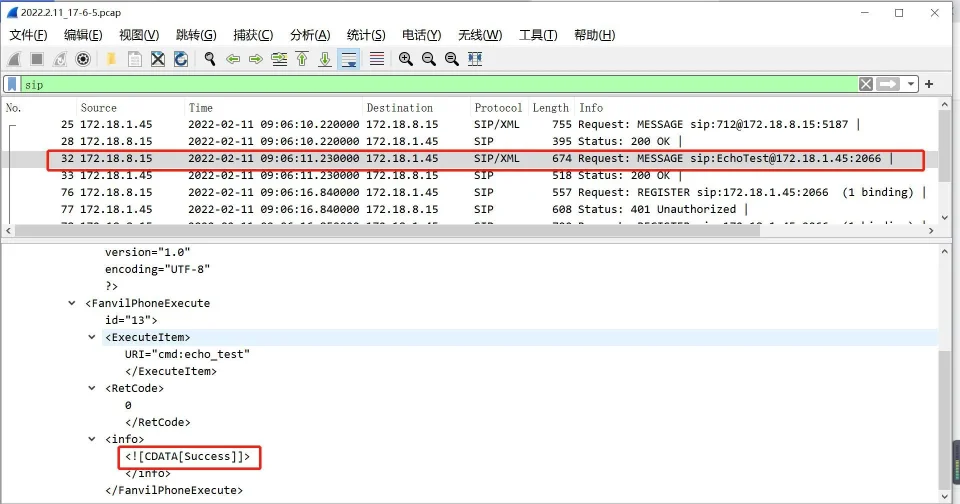

عرض نتائج الاختبار الذاتي في حزم التقاط

كتالوج
المهنية الصانع الاتصالات الصناعية ، وتوفير ضمان الاتصالات موثوقية عالية!
مشاورات التعاون
خدمة العملاء الهاتف
We use cookie to improve your online experience. By continuing to browse this website, you agree to our use of cookie.

Cookies

This Cookie Policy explains how we use cookies and similar technologies when you access or use our website and related services. Please read this Policy together with our Terms and Conditions and Privacy Policy so that you understand how we collect, use, and protect information.

By continuing to access or use our Services, you acknowledge that cookies and similar technologies may be used as described in this Policy, subject to applicable law and your available choices.

Updates to This Cookie Policy

We may revise this Cookie Policy from time to time to reflect changes in legal requirements, technology, or our business practices. When we make updates, the revised version will be posted on this page and will become effective from the date of publication unless otherwise required by law.

Where required, we will provide additional notice or request your consent before applying material changes that affect your rights or choices.

What Are Cookies?

Cookies are small text files placed on your device when you visit a website or interact with certain online content. They help websites recognize your browser or device, remember your preferences, support essential functionality, and improve the overall user experience.

In this Cookie Policy, the term “cookies” also includes similar technologies such as pixels, tags, web beacons, and other tracking tools that perform comparable functions.

Why We Use Cookies

We use cookies to help our website function properly, remember user preferences, enhance website performance, understand how visitors interact with our pages, and support security, analytics, and marketing activities where permitted by law.

We use cookies to keep our website functional, secure, efficient, and more relevant to your browsing experience.

Categories of Cookies We Use

Strictly Necessary Cookies

These cookies are essential for the operation of the website and cannot be disabled in our systems where they are required to provide the service you request. They are typically set in response to actions such as setting privacy preferences, signing in, or submitting forms.

Without these cookies, certain parts of the website may not function correctly.

Functional Cookies

Functional cookies enable enhanced features and personalization, such as remembering your preferences, language settings, or previously selected options. These cookies may be set by us or by third-party providers whose services are integrated into our website.

If you disable these cookies, some services or features may not work as intended.

Performance and Analytics Cookies

These cookies help us understand how visitors use our website by collecting information such as traffic sources, page visits, navigation behavior, and general interaction patterns. In many cases, this information is aggregated and does not directly identify individual users.

We use this information to improve website performance, usability, and content relevance.

Targeting and Advertising Cookies

These cookies may be placed by our advertising or marketing partners to help deliver more relevant ads and measure the effectiveness of campaigns. They may use information about your browsing activity across different websites and services to build a profile of your interests.

These cookies generally do not store directly identifying personal information, but they may identify your browser or device.

First-Party and Third-Party Cookies

Some cookies are set directly by our website and are referred to as first-party cookies. Other cookies are set by third-party services, such as analytics providers, embedded content providers, or advertising partners, and are referred to as third-party cookies.

Third-party providers may use their own cookies in accordance with their own privacy and cookie policies.

Information Collected Through Cookies

Depending on the type of cookie used, the information collected may include browser type, device type, IP address, referring website, pages viewed, time spent on pages, clickstream behavior, and general usage patterns.

This information helps us maintain the website, improve performance, enhance security, and provide a better user experience.

Your Cookie Choices

You can control or disable cookies through your browser settings and, where available, through our cookie consent or preference management tools. Depending on your location, you may also have the right to accept or reject certain categories of cookies, especially those used for analytics, personalization, or advertising purposes.

Please note that blocking or deleting certain cookies may affect the availability, functionality, or performance of some parts of the website.

Restricting cookies may limit certain features and reduce the quality of your experience on the website.

Cookies in Mobile Applications

Where our mobile applications use cookie-like technologies, they are generally limited to those required for core functionality, security, and service delivery. Disabling these essential technologies may affect the normal operation of the application.

We do not use essential mobile application cookies to store unnecessary personal information.

How to Manage Cookies

Most web browsers allow you to manage cookies through browser settings. You can usually choose to block, delete, or receive alerts before cookies are stored. Because browser controls vary, please refer to your browser provider’s support documentation for details on how to manage cookie settings.

Contact Us

If you have any questions about this Cookie Policy or our use of cookies and similar technologies, please contact us at support@becke.cc .