
مورد

فهم أفضل الممارسات واستكشاف الحلول المبتكرة وإقامة اتصالات مع شركاء آخرين في جميع أنحاء مجتمع بيكر.

×

نقطة اللمس

نقطة اللمس

بالإضافة إلى الأجهزة الطرفية ، يجب أيضًا مراعاة جميع الموظفين والأماكن والأشياء المتصلة بالشبكة.

تعلم المزيد

مورد

مورد

فهم أفضل الممارسات واستكشاف الحلول المبتكرة وإقامة اتصالات مع شركاء آخرين في جميع أنحاء مجتمع بيكر.

اتصل بنا
مقدمة إلى SIP Server التكرار الأساسي / النسخ الاحتياطي والتكوين

مقدمة

خوادم SIP الرئيسية والاحتياطية

تضمن آلية تكرار خوادم SIP موثوقية واستمرارية خدمات SIP. يعد نشر الخادم الرئيسي/الاحتياطي أحد طرق التكرار هذه. تشارك الخوادم الرئيسية والاحتياطية حسابات المستخدمين ومعلومات الحوار (حسب تنفيذ تكرار الخادم) ومعلومات التسجيل والبيانات الأخرى ذات الصلة. في الظروف العادية، يتم التعامل مع جميع طلبات واستجابات SIP بواسطة الخادم الرئيسي. عندما يتعطل الخادم الرئيسي أو يكون قيد الصيانة أو يصبح غير متاح، يتحول طرف SIP تلقائيًا إلى الخادم الاحتياطي لطلبات الخدمة، مما يضمن استمرار وصول المستخدم. بمجرد استعادة الخادم الرئيسي، يمكن لطرف SIP العودة تلقائيًا إلى الخادم الرئيسي.
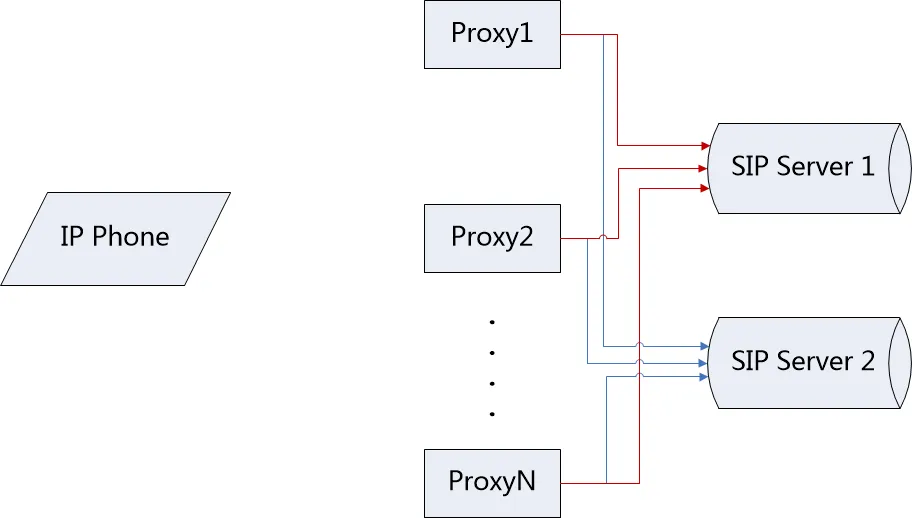
خادم SIP الرئيسي والاحتياطي
                                                                            الشكل 1 خادم SIP الرئيسي والاحتياطي

المصطلحات

الفيل أوفير (Failover): آلية يتولى فيها الخادم الاحتياطي جميع الخدمات عندما يكون الخادم الرئيسي غير متاح، دون التأثير على تجربة المستخدم.
الفيل بيك (Failback): آلية يقوم فيها الجهاز بالتحقق مما إذا كان الخادم الرئيسي قد استعيد أثناء تشغيل الخادم الاحتياطي، حتى يتمكن من العودة بسرعة إلى الخادم الرئيسي.
عدم توفر الخادم: عندما يحاول العميل التسجيل، يرد الخادم برمز 500/503، أو يتلقى UDP رسالة ICMP عدم إمكانية الوصول إلى الهدف، أو ينتهي وقت اتصال TCP.
الفيل بيك للتسجيل: عندما يكون الخادم الرئيسي غير متاح ويقوم الهاتف بالتسجيل في الخادم الاحتياطي، يقوم الهاتف بإنشاء حوار تسجيل جديد للكشف مما إذا كان الخادم الرئيسي قد استعيد. تحتوي هذه الوظيفة على فترة فحص مستقلة وقابلة للتكوين.

الجمهور المستهدف

يهدف هذا المستند إلى مستخدمي الهواتف وموظفي الصيانة.

الخوادم الرئيسية والاحتياطية

إعدادات الوظيفة

قم بتكوين إدخالين للخادم لخط SIP على الهاتف. خادم SIP 1 هو الخادم الرئيسي، وخادم SIP 2 هو الخادم الاحتياطي.

الفيل أوفير (Failover)

يدعم الهاتف حاليًا إشارات الفيل أوفير للتسجيل (Register) والدعوة (Invite) وإنهاء المكالمة (Bye). لا يتم دعم طرق الإشارات الأخرى حاليًا.

1. الفيل أوفير للتسجيل

شروط التشغيل: التسجيل اليدوي / انتهاء وقت التسجيل / انتهاء وقت OPTIONS / انتهاء وقت طلب CANCEL
(1) يرسل الهاتف طلب تسجيل إلى الخادم الرئيسي؛
(2) يحاول الهاتف إرسال طلبات تسجيل إلى الخادم الرئيسي لعدد محدد من المرات (منتجات V3) أو خلال فترة زمنية محددة (منتجات V2)؛
(3) إذا كان الخادم الرئيسي غير متاح، يرسل الهاتف طلب تسجيل إلى الخادم الاحتياطي؛
(4) يرد الخادم الاحتياطي برمز 200 OK، ويقوم الهاتف بالتسجيل بنجاح.
2. الفيل أوفير للدعوة
شرط التشغيل: قيام المستخدم بإجراء مكالمة
(1) يقوم الهاتف A بالاتصال بالهاتف B؛
(2) يرسل الهاتف A طلب دعوة إلى الخادم الرئيسي؛
(3) يحاول الهاتف A إرسال طلبات دعوة إلى الخادم الرئيسي لعدد محدد من المرات (منتجات V3) أو خلال فترة زمنية محددة (منتجات V2)؛
(4) إذا كان الخادم الرئيسي غير متاح، يرسل الهاتف طلب تسجيل إلى الخادم الاحتياطي؛
(5) يرد الخادم الاحتياطي برمز 200 OK، ويقوم الهاتف بالتسجيل في الخادم الاحتياطي بنجاح؛
(6) يرسل الهاتف طلب دعوة إلى الخادم الاحتياطي؛
(7) يرد الخادم الاحتياطي برمز 200 OK، ويتم إنشاء مكالمة بين الهاتفين A و B.
3. الفيل أوفير لإنهاء المكالمة
شرط التشغيل: إيقاف الهاتف للمكالمة بعد إنشائها عبر الخادم الرئيسي
(1) يقوم الهاتف A بإنشاء مكالمة مع الهاتف B عبر الخادم الرئيسي؛
(2) يوقف الهاتف A المكالمة؛
(3) يرسل الهاتف A طلب إنهاء إلى الخادم الرئيسي؛
(4) يحاول الهاتف A إرسال طلبات إنهاء إلى الخادم الرئيسي لعدد محدد من المرات (منتجات V3) أو خلال فترة زمنية محددة (منتجات V2)؛
(5) إذا كان الخادم الرئيسي غير متاح، يرسل الهاتف طلب تسجيل إلى الخادم الاحتياطي؛
(6) يرد الخادم الاحتياطي برمز 200 OK، ويقوم الهاتف بالتسجيل في الخادم الاحتياطي بنجاح؛
(7) يرسل الهاتف رسالة إنهاء إلى الخادم الاحتياطي؛
(8) يرد الخادم الاحتياطي برمز 200 OK، ويتم إنهاء المكالمة مع الهاتف B.
4. فشل الفيل أوفير
عندما تكون جميع الخوادم غير متاحة، يحاول الهاتف كل خادم بالترتيب حسب الأولوية الرئيسية/الاحتياطية لعدد محدد من المرات (منتجات V3) أو خلال فترة زمنية محددة (منتجات V2). يتم التعامل مع الخادم الأخير كاستثناء. وفقًا لمعيار RFC 3261، سيقوم SIP بإعادة المحاولة لمدة 64*T1 (32 ثانية). إذا فشل طلب إشارة SIP الحالي لا يزال، يتم إخطار المستخدم بالفشل.

الفيل بيك (Failback)

يدعم الهاتف الفيل بيك المستقل للتسجيل. بعد تسجيل الهاتف بنجاح في الخادم الاحتياطي، يرسل الهاتف طلب تسجيل مستقل بشكل دوري إلى الخادم الرئيسي للكشف مما إذا كان الخادم الرئيسي قد استعيد.
شرط التشغيل: انتهاء وقت مؤقت الفيل بيك للتسجيل.
(1) يقوم الهاتف بالتسجيل بنجاح في الخادم الاحتياطي؛
(2) عند انتهاء وقت الفيل بيك للتسجيل، يرسل الهاتف طلب تسجيل مستقل إلى الخادم الرئيسي؛
(3) إذا رد الخادم الرئيسي برمز 200 OK، يعود الهاتف إلى الخادم الرئيسي؛
(4) إذا كان الخادم الرئيسي لا يزال غير متاح، يتم إعادة إرسال طلب التسجيل وفقًا لمعيار RFC 3261 حتى انتهاء الوقت 64*T1 (32 ثانية). بعد انتهاء الوقت، يبدأ المؤقت مرة أخرى ويستمر في فحص الخادم الرئيسي بشكل دوري.

تكوين خادم SIP الرئيسي/الاحتياطي

وصف عناصر التكوين

                عنصر التكوين                الوصف                >القيمة
                SIPN Register Addr:                عنوان الخادم الرئيسي.IP / اسم النطاق الافتراضي: فارغ
                SIPN Register Port:                >منفذ الخادم الرئيسي.قيمة عددية الافتراضي: 5060
                SIPN Register TTL:                >فترة تسجيل الخادم الرئيسي.قيمة عددية الافتراضي: 3600 ثانية
                SIPN Transport:                >بروتوكول النقل للخادم الرئيسي: UDP أو TCP أو TLS.0: UDP
1: TCP
3: TLS
الافتراضي: 0
                SIPN Backup Addr:                عنوان الخادم الاحتياطي.IP / اسم النطاق الافتراضي: فارغ
                SIPN Backup Port:                منفذ الخادم الاحتياطي.قيمة عددية الافتراضي: 5060
                SIPN Backup TTL:                فترة تسجيل الخادم الاحتياطي.قيمة عددية الافتراضي: 3600 ثانية
                SIPN Backup Transport:                بروتوكول النقل للخادم الاحتياطي: UDP أو TCP أو TLS.0: UDP
1: TCP
3: TLS
الافتراضي: 0
                SIPN Enable Failback:                يتحكم في ما إذا كان تم تمكين الفيل بيك للتسجيل للخط.0 / 1 الافتراضي: 1
                SIPN Failback Interval:                الفترة الزمنية لفحص ما إذا كان الخادم/الوكيل الرئيسي قد استعيد بعد تسجيل الهاتف في الخادم/الوكيل الاحتياطي.قيمة عددية الافتراضي: 1800 ثانية
                SIPN Signal Retry Counts:                عدد إعادة إرسال طلبات SIP عندما يكون الخادم/الوكيل غير متاح، باستثناء الخادم/الوكيل الأخير (انتهاء الوقت 32 ثانية).قيمة عددية الافتراضي: 3

واجهة تكوين المستخدم

يمكن للمستخدمين تسجيل الدخول إلى خادم الويب الخاص بالهاتف لتكوين الخوادم الرئيسية والاحتياطية.
(1) انقر على علامة التبويب “Line” (الخط) واختر علامة التبويب الفرعية SIP (هذه هي الصفحة الافتراضية)؛
(2) اختر الخط المراد تكوينه من القائمة المنسدلة “Line” (الخط) داخل الصفحة؛
(3) قم بتكوين معلومات تسجيل الخط؛
(4) قم بتكوين معلومات خادم SIP 1 (الرئيسي) وخادم SIP 2 (الاحتياطي)، كما هو موضح في الشكل 2؛
(5) انقر على “Basic Settings” (الإعدادات الأساسية) في الصفحة الحالية لتكوين إعدادات الفيل بيك ذات الصلة للخوادم الرئيسية والاحتياطية، كما هو موضح في الشكل 3؛
(6) انقر على زر “Submit” (إرسال) في أسفل الصفحة لتطبيق التكوين.
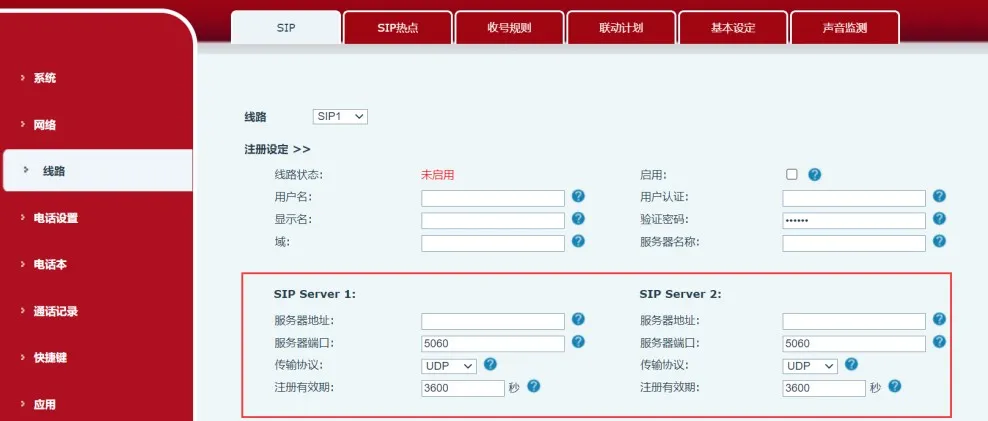
تكوين خادم SIP الرئيسي والاحتياطي
                                                 الشكل 2 تكوين خادم SIP الرئيسي/الاحتياطي
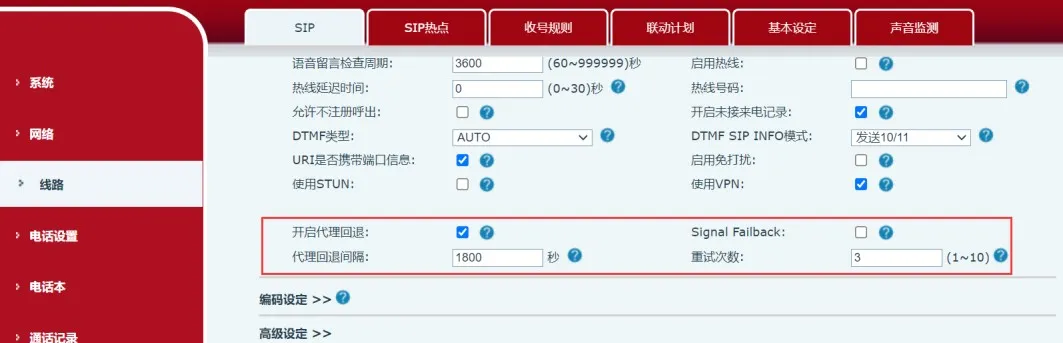

إعدادات الفيل بيك

كتالوج
المهنية الصانع الاتصالات الصناعية ، وتوفير ضمان الاتصالات موثوقية عالية!
مشاورات التعاون
خدمة العملاء الهاتف
We use cookie to improve your online experience. By continuing to browse this website, you agree to our use of cookie.

Cookies

This Cookie Policy explains how we use cookies and similar technologies when you access or use our website and related services. Please read this Policy together with our Terms and Conditions and Privacy Policy so that you understand how we collect, use, and protect information.

By continuing to access or use our Services, you acknowledge that cookies and similar technologies may be used as described in this Policy, subject to applicable law and your available choices.

Updates to This Cookie Policy

We may revise this Cookie Policy from time to time to reflect changes in legal requirements, technology, or our business practices. When we make updates, the revised version will be posted on this page and will become effective from the date of publication unless otherwise required by law.

Where required, we will provide additional notice or request your consent before applying material changes that affect your rights or choices.

What Are Cookies?

Cookies are small text files placed on your device when you visit a website or interact with certain online content. They help websites recognize your browser or device, remember your preferences, support essential functionality, and improve the overall user experience.

In this Cookie Policy, the term “cookies” also includes similar technologies such as pixels, tags, web beacons, and other tracking tools that perform comparable functions.

Why We Use Cookies

We use cookies to help our website function properly, remember user preferences, enhance website performance, understand how visitors interact with our pages, and support security, analytics, and marketing activities where permitted by law.

We use cookies to keep our website functional, secure, efficient, and more relevant to your browsing experience.

Categories of Cookies We Use

Strictly Necessary Cookies

These cookies are essential for the operation of the website and cannot be disabled in our systems where they are required to provide the service you request. They are typically set in response to actions such as setting privacy preferences, signing in, or submitting forms.

Without these cookies, certain parts of the website may not function correctly.

Functional Cookies

Functional cookies enable enhanced features and personalization, such as remembering your preferences, language settings, or previously selected options. These cookies may be set by us or by third-party providers whose services are integrated into our website.

If you disable these cookies, some services or features may not work as intended.

Performance and Analytics Cookies

These cookies help us understand how visitors use our website by collecting information such as traffic sources, page visits, navigation behavior, and general interaction patterns. In many cases, this information is aggregated and does not directly identify individual users.

We use this information to improve website performance, usability, and content relevance.

Targeting and Advertising Cookies

These cookies may be placed by our advertising or marketing partners to help deliver more relevant ads and measure the effectiveness of campaigns. They may use information about your browsing activity across different websites and services to build a profile of your interests.

These cookies generally do not store directly identifying personal information, but they may identify your browser or device.

First-Party and Third-Party Cookies

Some cookies are set directly by our website and are referred to as first-party cookies. Other cookies are set by third-party services, such as analytics providers, embedded content providers, or advertising partners, and are referred to as third-party cookies.

Third-party providers may use their own cookies in accordance with their own privacy and cookie policies.

Information Collected Through Cookies

Depending on the type of cookie used, the information collected may include browser type, device type, IP address, referring website, pages viewed, time spent on pages, clickstream behavior, and general usage patterns.

This information helps us maintain the website, improve performance, enhance security, and provide a better user experience.

Your Cookie Choices

You can control or disable cookies through your browser settings and, where available, through our cookie consent or preference management tools. Depending on your location, you may also have the right to accept or reject certain categories of cookies, especially those used for analytics, personalization, or advertising purposes.

Please note that blocking or deleting certain cookies may affect the availability, functionality, or performance of some parts of the website.

Restricting cookies may limit certain features and reduce the quality of your experience on the website.

Cookies in Mobile Applications

Where our mobile applications use cookie-like technologies, they are generally limited to those required for core functionality, security, and service delivery. Disabling these essential technologies may affect the normal operation of the application.

We do not use essential mobile application cookies to store unnecessary personal information.

How to Manage Cookies

Most web browsers allow you to manage cookies through browser settings. You can usually choose to block, delete, or receive alerts before cookies are stored. Because browser controls vary, please refer to your browser provider’s support documentation for details on how to manage cookie settings.

Contact Us

If you have any questions about this Cookie Policy or our use of cookies and similar technologies, please contact us at support@becke.cc .