مورد

فهم أفضل الممارسات واستكشاف الحلول المبتكرة وإقامة اتصالات مع شركاء آخرين في جميع أنحاء مجتمع بيكر.

×

نقطة اللمس

نقطة اللمس

بالإضافة إلى الأجهزة الطرفية ، يجب أيضًا مراعاة جميع الموظفين والأماكن والأشياء المتصلة بالشبكة.

تعلم المزيد

مورد

مورد

فهم أفضل الممارسات واستكشاف الحلول المبتكرة وإقامة اتصالات مع شركاء آخرين في جميع أنحاء مجتمع بيكر.

اتصل بنا
دليل إعداد دليل الهاتف البعيد

    مقدمة

    دليل الهاتف عن بُعد بتنسيق XML هو دليل هاتف قائم على الشبكة يتم تخزينه بتنسيق XML. لاستخدام هذه الميزة، قم بتحميل ملف دليل الهاتف بصيغة XML إلى الخادم الخاص بك، ثم قم بتكوين عنوان URL للخادم المقابل على صفحة ويب دليل الهاتف عن بُعد في الهاتف. بمجرد تطبيق الإعدادات، يمكن للهاتف تنزيل ملف دليل الهاتف بصيغة XML واستخدامه مباشرة.

    تنسيق URL لدليل هاتف XML عن بُعد على خادم FTP هو:

ftp://Server_IP/XML_File_Name أو ftp://Server_IP/Folder_Name/XML_File_Name

    تنسيق URL لدليل هاتف XML عن بُعد على خادم TFTP هو:

tftp://Server_IP/XML_File_Name

    تنسيق XML لدليل الهاتف عن بُعد

    دليل هاتف عن بُعد أحادي المستوى

    يعرض دليل الهاتف عن بُعد أحادي المستوى جميع جهات الاتصال في دليل واحد دون أي هيكل تصنيف. علامات XML الافتتاحية والختامية ثابتة ولا يجوز إعادة تسميتها أو تغييرها.

    مثال: ملف XML التالي هو ملف دليل هاتف عن بُعد كامل. يمكن إضافة جهات اتصال متعددة بالتسلسل، بما في ذلك معلومات مثل اسم جهة الاتصال ورقم الهاتف.
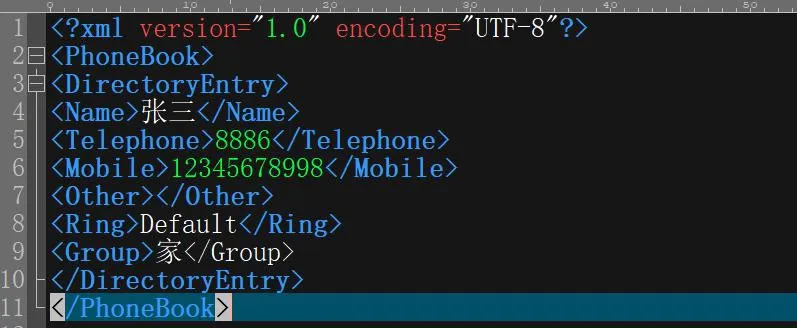
مثال على دليل هاتف عن بُعد أحادي المستوى

    شرح:

    1. هو إعلان XML. إنه مطلوب، ويدعم الهاتف ترميز UTF-8.

    2. يحدد العقدة الرئيسية لدليل الهاتف. إنه يحدد بداية ونهاية دليل الهاتف، ويتم وضع جميع إدخالات جهات الاتصال بداخله.

    3. يحدد إدخال جهة اتصال فردي. يجب أن يكون لكل علامة فتح علامة إغلاق مطابقة، وتتم كتابة تفاصيل جهة الاتصال بينهما.

    دليل هاتف عن بُعد متعدد المستويات

    يسمح دليل الهاتف عن بُعد متعدد المستويات بتنظيم جهات الاتصال في أقسام أو فئات، مع فئات فرعية إضافية تحت كل دليل. يتطلب هذا الهيكل ملفات XML متعددة.

كيفية إنشاء ملف XML من المستوى الأول:

    على سبيل المثال، قم بتسميته Index.xml.

    المحتوى:
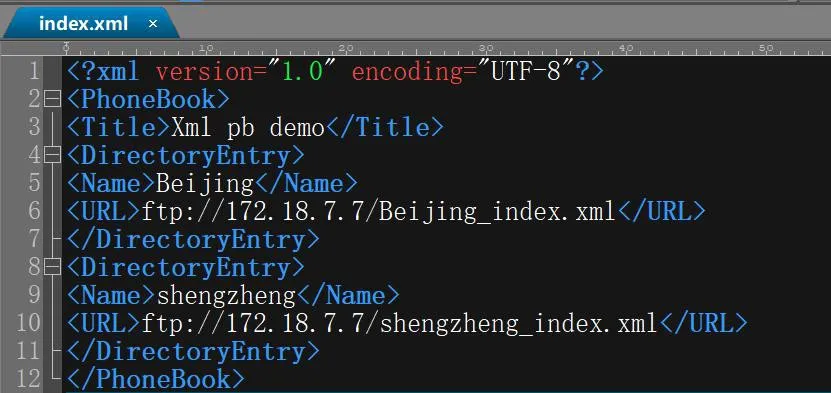
مثال Index.xml

    شرح:

    1. يحدد العقدة الرئيسية لدليل الهاتف.

    2. يحدد إدخال دليل فردي، ويجب مطابقة جميع العلامات بشكل صحيح.

الاسم: يحدد الاسم المعروض لدليل المستوى التالي، مثل بكين.

URL: يحدد البروتوكول وعنوان IP للخادم واسم ملف XML لدليل المستوى التالي. في هذا المثال، الملفات التالية هي Beijing_index.xml و Shengzheng_index.xml.

كيفية إنشاء ملف XML من المستوى الثاني:

    يمكن لملف XML من المستوى الثاني متابعة هيكل التصنيف بنفس طريقة ملف المستوى الأول. إذا كانت هناك حاجة إلى مستويين فقط، فيمكنك تخطي التنسيق مباشرة إلى ملف جهة الاتصال من المستوى الثالث.

    مثال: Beijing_index.xml
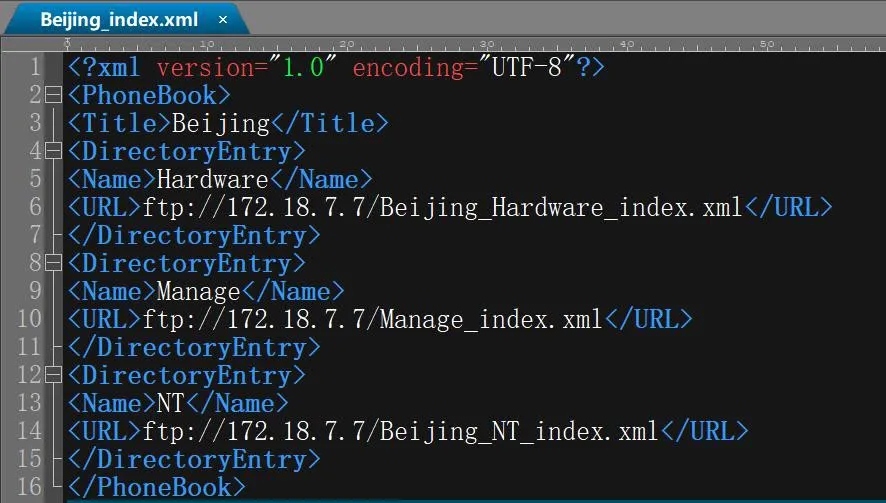
مثال على ملف XML من المستوى الثاني

كيفية إنشاء ملف XML من المستوى الثالث:

    مثال: Beijing_Hardware_index.xml
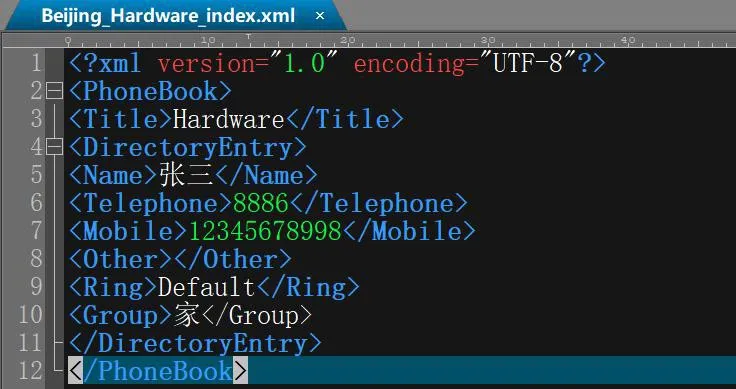
مثال على ملف XML من المستوى الثالث

    شرح: يحتوي هذا الملف على إدخالات جهات الاتصال الفعلية، ويتبع تنسيقه نفس بنية دليل الهاتف عن بُعد أحادي المستوى.

    إعداد خادم دليل الهاتف عن بُعد

    إعداد خادم FTP

    استخدم برنامج خادم FTP: أيقونة برنامج FTP

    افتح البرنامج، ثم انقر على الأمانالمستخدم/الصلاحيات للدخول إلى صفحة التكوين الموضحة أدناه:
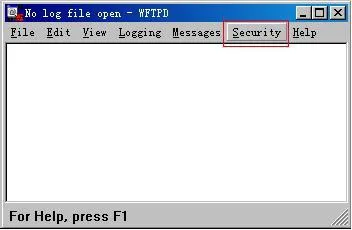
الدخول إلى قائمة الأمان في برنامج FTP

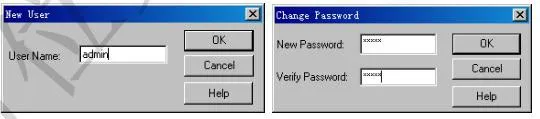
    حدد مستخدم جديد لإنشاء اسم مستخدم وكلمة مرور، كما هو موضح أدناه:
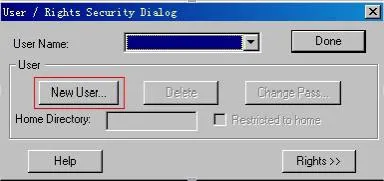
إنشاء مستخدم جديد على خادم FTP

    بعد ذلك، في الدليل الرئيسي، حدد المجلد الذي يتم تخزين ملفات XML الخاصة بدليل الهاتف عن بُعد فيه.
إعداد الدليل الرئيسي

    على سبيل المثال، إذا تم تخزين ملفات XML في مجلد remote_right ضمن دليل FTP على محرك الأقراص E:، فقم بتكوينه كما هو موضح أدناه:
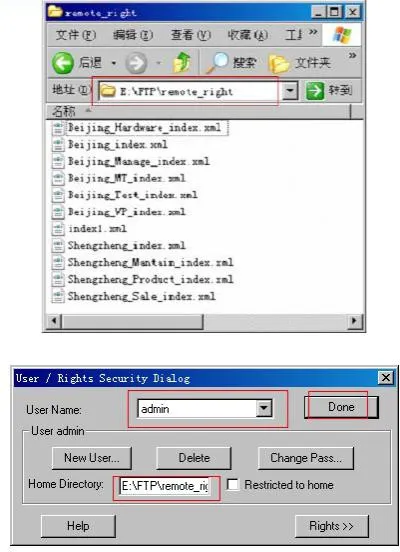
مثال على مسار تخزين ملفات FTP

    بعد الانتهاء من إعدادات المسار، انقر فوق تم لإكمال تكوين خادم FTP.

    إعداد خادم TFTP

    استخدم برنامج خادم TFTP: أيقونة برنامج TFTP

    بعد تشغيل برنامج TFTP، تظهر الواجهة كما هو موضح أدناه:
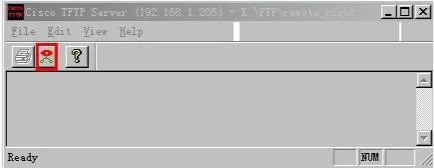
واجهة برنامج TFTP

    انقر على زر الخيار المميز في المربع الأحمر في الصورة أعلاه لفتح صفحة الإعدادات التالية:
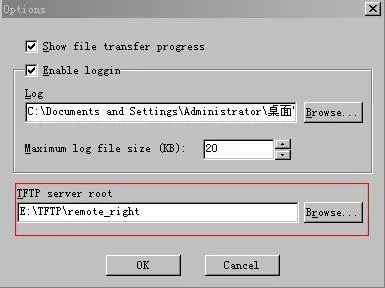
تصفح مسار التخزين في إعدادات TFTP

    في حقل جذر خادم TFTP، انقر فوق تصفح وحدد المجلد الذي يتم تخزين ملفات XML الخاصة بدليل الهاتف عن بُعد فيه. على سبيل المثال، اختر مجلد remote_right ضمن دليل TFTP على محرك الأقراص E:.

    تكوين دليل الهاتف عن بُعد على هاتف IP

    افتح واجهة الويب الخاصة بالهاتف وانتقل إلى صفحة دليل الهاتف عن بُعد: دليل الهاتفدليل الهاتف السحابيإدارة دليل الهاتف السحابي، كما هو موضح أدناه:
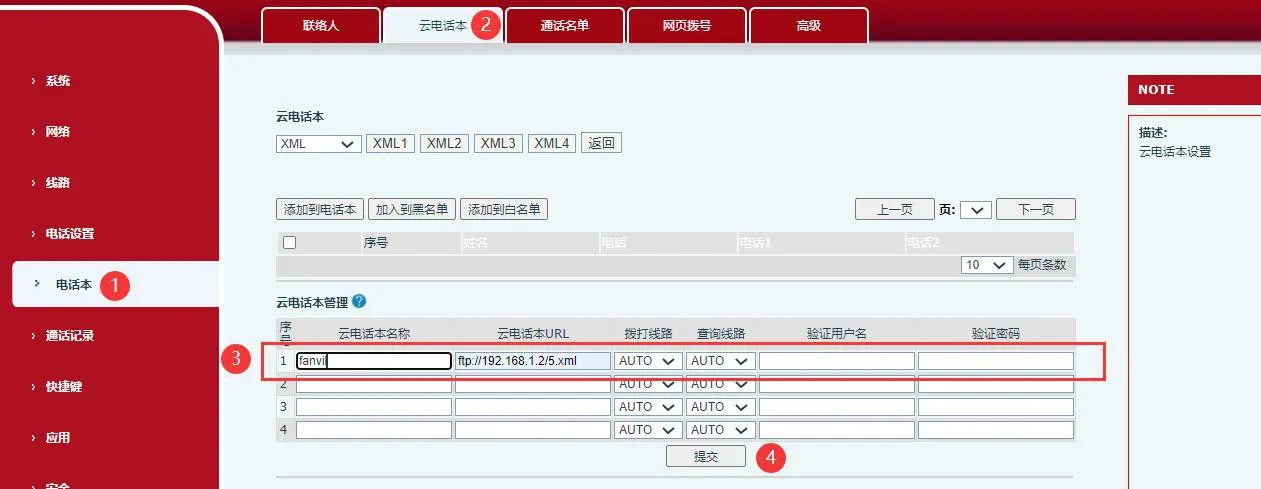
صفحة إدارة دليل الهاتف السحابي على واجهة ويب الهاتف

    قم بتكوين الإعدادات التالية:

    1. اسم دليل الهاتف: أدخل أي اسم تفضله، مثل العائلة أو الزملاء أو الأصدقاء.

    2. عنوان الخادم: أدخل العنوان الصحيح بناءً على نوع الخادم المستخدم.

    إذا كنت تستخدم خادم FTP، فأدخل:
ftp://FTP_Server_IP_Address/XML_File_Name
مثال: ftp://192.168.1.206/index1.xml

    إذا كنت تستخدم خادم TFTP، فأدخل:
tftp://TFTP_Server_IP_Address/XML_File_Name
مثال: tftp://192.168.1.206/index1.xml

    3. الخط الصادر: اختر الخط الذي سيتم استخدامه للاتصال. إذا تم تحديد الخيار الافتراضي، فعادةً ما يتم إجراء المكالمات من خلال الخط 1.

    4. اسم المستخدم وكلمة المرور: مطلوب للوصول إلى خادم FTP ويجب أن يتطابق مع بيانات الاعتماد التي تم إنشاؤها على خادم FTP. هذه الحقول غير مطلوبة لـ TFTP.

    بعد حفظ التكوين، انتقل إلى جهات الاتصالدليل الهاتف السحابي على الهاتف. يمكن للهاتف بعد ذلك تنزيل دليل الهاتف عن بُعد من الخادم الذي تم تكوينه وعرض قائمة جهات الاتصال محليًا. يمكن للمستخدمين تنفيذ إجراءات مثل الاتصال المباشر، واسترداد الأرقام، والبحث عن جهات الاتصال، وإرسال الرسائل، وإضافة إدخالات إلى جهات الاتصال المحلية، أو إضافة إدخالات إلى القائمة السوداء.

*ملاحظة 1: تأكد من أن عنوان URL يستخدم بادئة البروتوكول الصحيحة. استخدم FTP لخوادم FTP، و TFTP لخوادم TFTP، أو الاسم المناسب لأي بروتوكول آخر مدعوم.
*ملاحظة 2: عند استخدام ميزة دليل الهاتف عن بُعد، يجب أن يظل الخادم نشطًا، ويجب إدخال اسم المستخدم وكلمة المرور بشكل صحيح.

كتالوج
المهنية الصانع الاتصالات الصناعية ، وتوفير ضمان الاتصالات موثوقية عالية!
مشاورات التعاون
خدمة العملاء الهاتف
We use cookie to improve your online experience. By continuing to browse this website, you agree to our use of cookie.

Cookies

This Cookie Policy explains how we use cookies and similar technologies when you access or use our website and related services. Please read this Policy together with our Terms and Conditions and Privacy Policy so that you understand how we collect, use, and protect information.

By continuing to access or use our Services, you acknowledge that cookies and similar technologies may be used as described in this Policy, subject to applicable law and your available choices.

Updates to This Cookie Policy

We may revise this Cookie Policy from time to time to reflect changes in legal requirements, technology, or our business practices. When we make updates, the revised version will be posted on this page and will become effective from the date of publication unless otherwise required by law.

Where required, we will provide additional notice or request your consent before applying material changes that affect your rights or choices.

What Are Cookies?

Cookies are small text files placed on your device when you visit a website or interact with certain online content. They help websites recognize your browser or device, remember your preferences, support essential functionality, and improve the overall user experience.

In this Cookie Policy, the term “cookies” also includes similar technologies such as pixels, tags, web beacons, and other tracking tools that perform comparable functions.

Why We Use Cookies

We use cookies to help our website function properly, remember user preferences, enhance website performance, understand how visitors interact with our pages, and support security, analytics, and marketing activities where permitted by law.

We use cookies to keep our website functional, secure, efficient, and more relevant to your browsing experience.

Categories of Cookies We Use

Strictly Necessary Cookies

These cookies are essential for the operation of the website and cannot be disabled in our systems where they are required to provide the service you request. They are typically set in response to actions such as setting privacy preferences, signing in, or submitting forms.

Without these cookies, certain parts of the website may not function correctly.

Functional Cookies

Functional cookies enable enhanced features and personalization, such as remembering your preferences, language settings, or previously selected options. These cookies may be set by us or by third-party providers whose services are integrated into our website.

If you disable these cookies, some services or features may not work as intended.

Performance and Analytics Cookies

These cookies help us understand how visitors use our website by collecting information such as traffic sources, page visits, navigation behavior, and general interaction patterns. In many cases, this information is aggregated and does not directly identify individual users.

We use this information to improve website performance, usability, and content relevance.

Targeting and Advertising Cookies

These cookies may be placed by our advertising or marketing partners to help deliver more relevant ads and measure the effectiveness of campaigns. They may use information about your browsing activity across different websites and services to build a profile of your interests.

These cookies generally do not store directly identifying personal information, but they may identify your browser or device.

First-Party and Third-Party Cookies

Some cookies are set directly by our website and are referred to as first-party cookies. Other cookies are set by third-party services, such as analytics providers, embedded content providers, or advertising partners, and are referred to as third-party cookies.

Third-party providers may use their own cookies in accordance with their own privacy and cookie policies.

Information Collected Through Cookies

Depending on the type of cookie used, the information collected may include browser type, device type, IP address, referring website, pages viewed, time spent on pages, clickstream behavior, and general usage patterns.

This information helps us maintain the website, improve performance, enhance security, and provide a better user experience.

Your Cookie Choices

You can control or disable cookies through your browser settings and, where available, through our cookie consent or preference management tools. Depending on your location, you may also have the right to accept or reject certain categories of cookies, especially those used for analytics, personalization, or advertising purposes.

Please note that blocking or deleting certain cookies may affect the availability, functionality, or performance of some parts of the website.

Restricting cookies may limit certain features and reduce the quality of your experience on the website.

Cookies in Mobile Applications

Where our mobile applications use cookie-like technologies, they are generally limited to those required for core functionality, security, and service delivery. Disabling these essential technologies may affect the normal operation of the application.

We do not use essential mobile application cookies to store unnecessary personal information.

How to Manage Cookies

Most web browsers allow you to manage cookies through browser settings. You can usually choose to block, delete, or receive alerts before cookies are stored. Because browser controls vary, please refer to your browser provider’s support documentation for details on how to manage cookie settings.

Contact Us

If you have any questions about this Cookie Policy or our use of cookies and similar technologies, please contact us at support@becke.cc .