SIP الهاتف والباب إنترفون التكوين والتطبيق


مقدمة

نظرة عامة

نظام الاتصال الداخلي للباب هو نظام اتصال ثنائي الاتجاه يسمح للمستخدمين بالتحكم في قفل / فتح الباب ومراقبة البيئة المحيطة عبر كاميرا مدمجة. يتكون من جزأين: الاتصال الداخلي الداخلي الداخلي (هاتف IP) والاتصال الداخلي الخارجي (محطة الباب).

تعمل سلسلة الاتصال الداخلي كمحطة خارجية ، بينما تعمل سلسلة الهاتف كمحطة داخلية. كلاهما يدعم مكالمات الصوت والفيديو IP / SIP ، ويعملان معًا لتحقيق التحكم في الباب والمراقبة. داخل نفس الشبكة المحلية ، يمكن لجهاز واحد الاتصال بأجهزة متعددة (واحد إلى كثير أو كثير إلى كثير) عبر IP أو SIP.

يستخدم هذا المستند
Bi31s (Intercom Series) and BF600S (Android Indoor Phone) as examples.

نماذج قابلة للتطبيق

ينطبق هذا المستند على سلسلة هاتف IP داخلي وسلسلة محطة باب الاتصال الداخلي.

الفئة المستهدفة

هذا الدليل مخصص للمستخدمين الذين يرغبون في تعلم الإعدادات والتطبيقات الأساسية لهواتف SIP التي تعمل مع أنظمة الاتصال الداخلي.

مسرد المصطلحات

SIP
خادم للاتصال في الوقت الحقيقي باستخدام حسابات SIP المسجلة.
DTMF: Signaling used to send command codes to control remote devices.Audio Codec: Audio encoding format that ensures stable voice transmission.Video Codec: Video encoding format that ensures normal video image transmission.


تعليمات التكوين

هاتف داخلي الإعدادات الأساسية (BF600S)

BF600S هو هاتف فيديو يعمل بنظام Android مع واجهة مستخدم واضحة وعملية بسيطة. يمكنه التواصل مع محطة الباب عن طريق التسجيل في نفس خادم SIP. حتى بدون خادم SIP ، تتوفر مكالمات الصوت / الفيديو من نظير إلى نظير عبر IP في نفس الشبكة المحلية.

قم بتكوين العناصر التالية بشكل صحيح لتمكين الاتصال والتحكم في الباب:

تحديد البند
الحالة
الوصف
تسجيل SIP
مسجل
مسجل على نفس خادم SIP مثل محطة الباب
DTMF
البيت
لا يمكن فتح الباب (غير صالح للتحكم في الترحيل)
RFC2833
صالحة لفتح الباب
معلومات
صالحة لفتح الباب
تلقائي
يتفاوض وضع DTMF مع جهاز نظير
ترميز الصوت
تمكين الكل
تجنب مشاكل التوافق
ترميز الفيديو
H.264
يجب أن يتطابق مع ترميز محطة الباب
جهات الاتصال
أضف أرقام محطة الباب
تحديد المكالمات الواردة من محطات باب محددة

الملاحظات:
1. يجب أن يدعم خادم SIP عبور DTMF لنقل الأوامر الصحيحة. يجب أن يدعم خادم الفيديو H.264 لنقل الوسائط.

3.1.1 تسجيل SIP

أدخل تفاصيل حساب SIP وتمكين التسجيل. تأكد من تسجيل الهاتف ومحطة الباب في
same SIP server.

مسار الويب:
VOIP -> SIP -> Basic Settings

مثال: الخادم: 192.168.3.207 ، المنفذ: 5060 اسم المستخدم: 2006 ، كلمة المرور: * * * * * ، الهاتف: 2006 اسم العرض: 2006

تحقق
Enable and click Save.
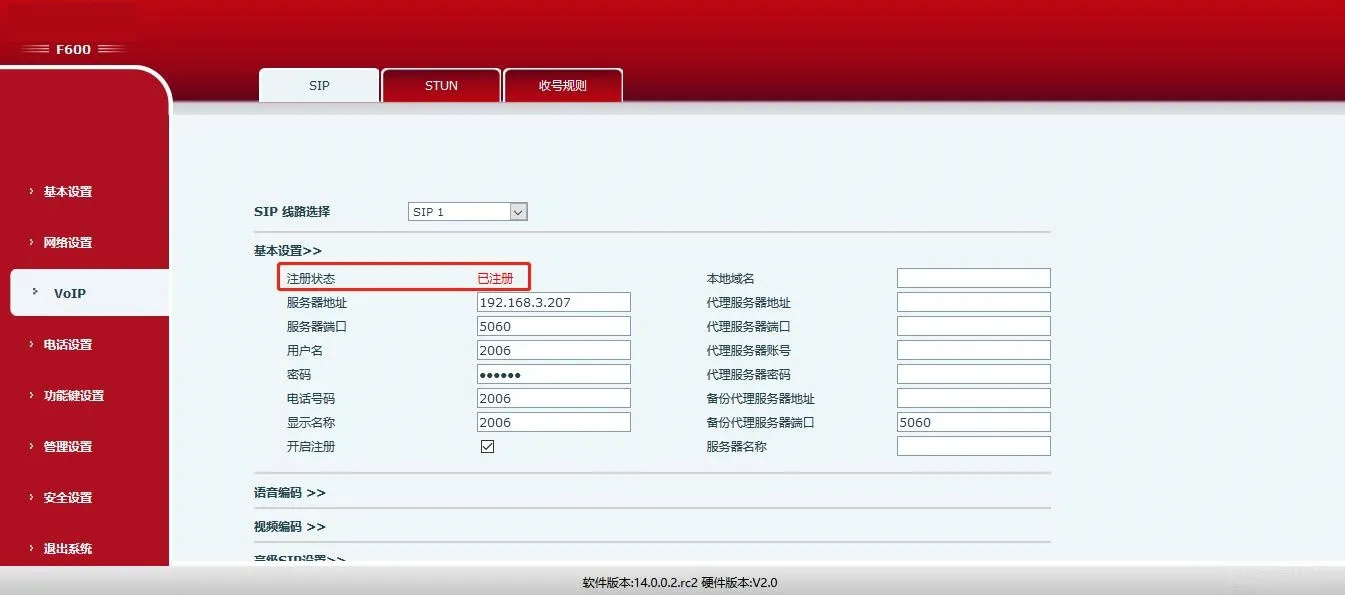
SIP Registration Interface

3.1.2 نوع DTMF

اضبط DTMF على
RFC2833 or Info (INBAND is not supported for door unlock).

مسار الويب:
VOIP -> SIP -> Advanced SIP Settings
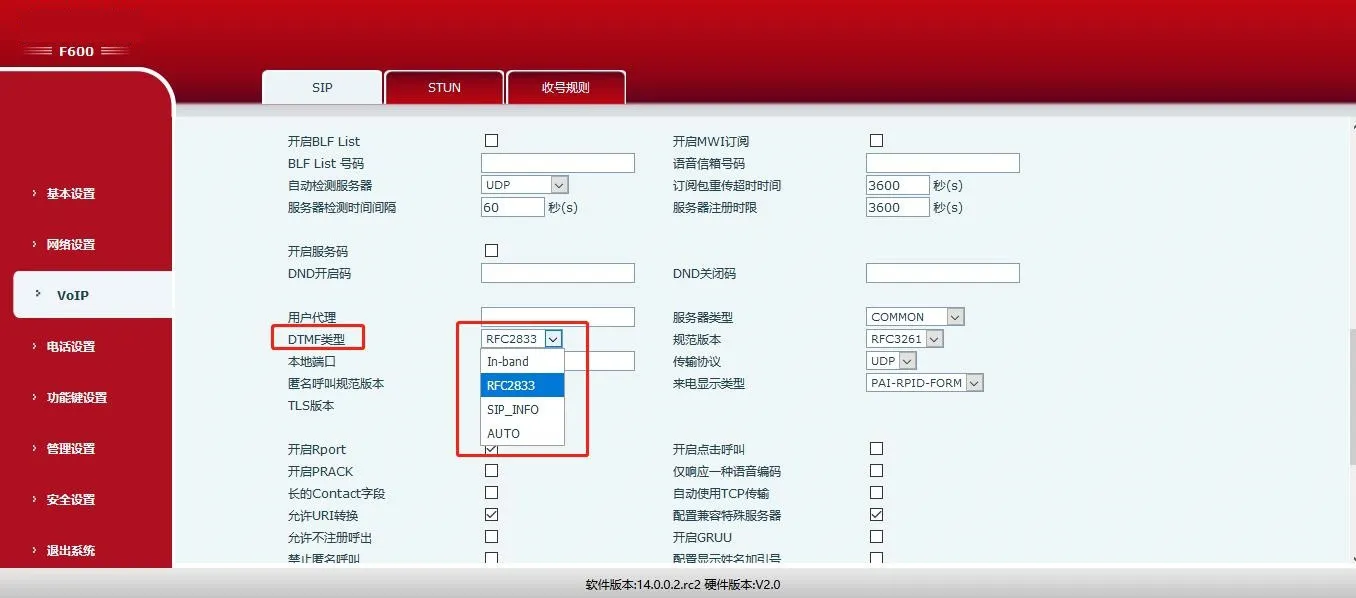
SIP Advanced Settings Interface

3.1.3 ترميز الصوت

قم بتمكين جميع برامج ترميز الصوت لضمان التوافق مع جميع محطات الأبواب في الشبكة المحلية.

مسار الويب:
Phone Settings -> Media -> Audio Settings
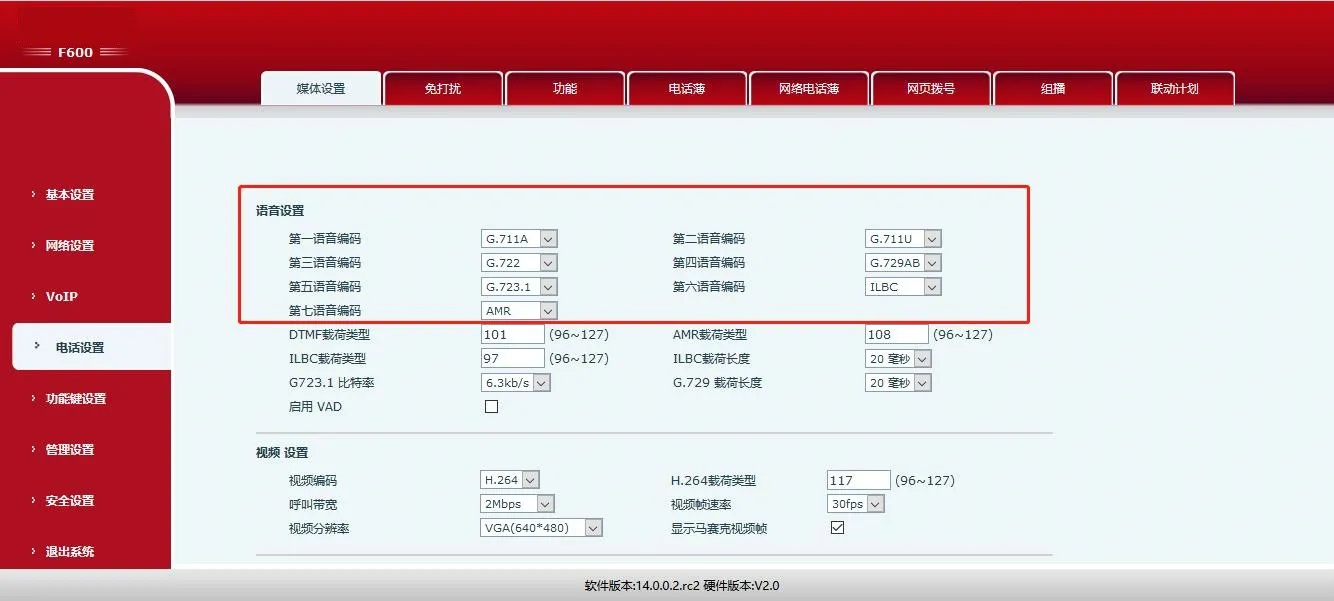
Audio Settings Interface

3.1.4 فيديو الترميز

محطة الباب تدعم فقط H.264. اضبط برنامج ترميز الفيديو الخاص بالهاتف على H.264.

مسار الويب:
Phone Settings -> Media -> Video Settings

ملاحظة: يدعم BF600S أيضًا أوضاع الاتصال الداخلي والبث المتعدد. الرجوع إلى دليلها الرسمي للحصول على التفاصيل.
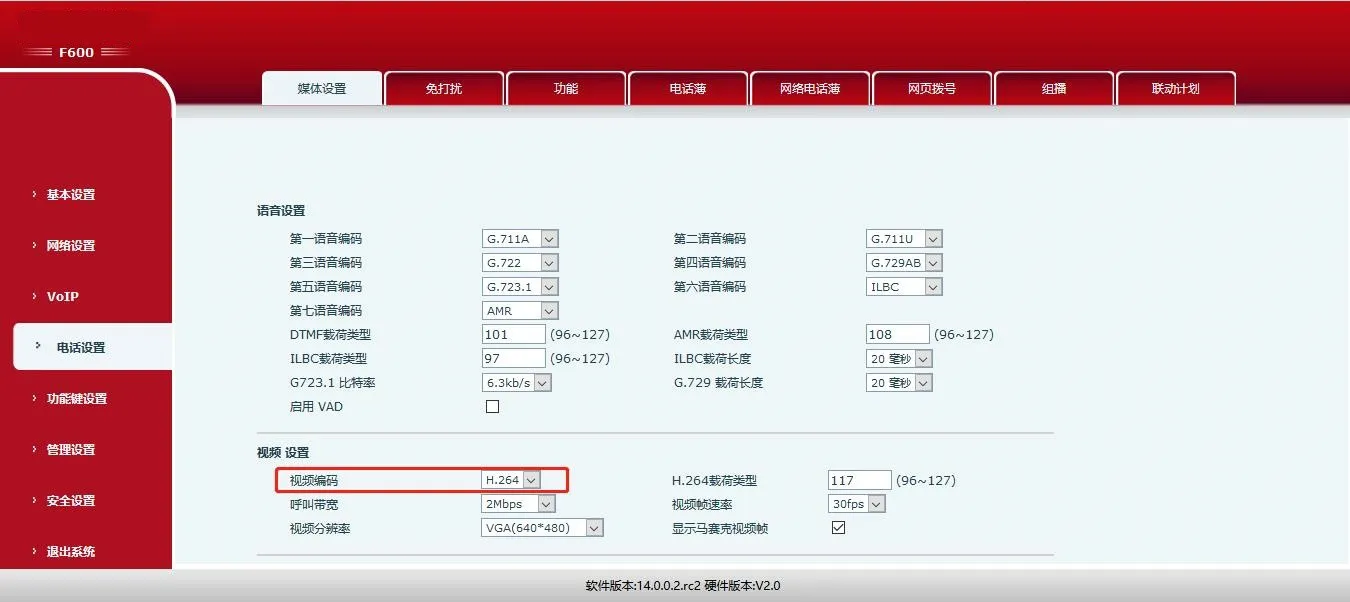
Video Settings Interface

إعدادات محطة الباب (Bi31s)

تدعم Bi31s الصوت ثنائي الاتجاه والفيديو أحادي الاتجاه. عندما يضغط الزائر على جرس الباب ، يرن الهاتف الداخلي. يمكن للمستخدم التحدث ومشاهدة الفيديو وفتح الباب عن بُعد عبر رموز DTMF.

عناصر التكوين الرئيسية لـ Bi31s:

تحديد البند
الحالة
الوصف
تسجيل SIP
مسجل
مسجل على نفس خادم SIP مثل الهاتف
رمز فتح عن بعد
حسب الطلب
الأرقام أو * فقط
فتح التطبيق
مخصص (الافتراضي إيقاف)
تمكين لفتح عبر مكالمة هاتفية
قائمة الوصول البعيد
تمكين
فقط الأرقام المدرجة يمكن فتح الباب
رمز أوث طول
حسب الطلب
تقليل وقت الانتظار لفتح
الرقم الرئيسي
هاتف داخلي رقم SIP
حساب SIP للهاتف الداخلي
رمز أوث
حسب الطلب
رمز لفتح الباب
الرد التلقائي
مخصص (الافتراضي على)
الرد التلقائي على المكالمات الواردة بعد المهلة

3.2.1 تسجيل SIP

قم بتسجيل محطة الباب على نفس خادم SIP مثل الهاتف الداخلي.

مسار الويب:
VOIP -> SIP -> Basic Settings

مثال: الخادم: 192.168.3.207 ، المنفذ: 5060 اسم المستخدم: 2008 ، كلمة المرور: * * * * * ، الهاتف: 2008

تحقق
Enable and click Save.
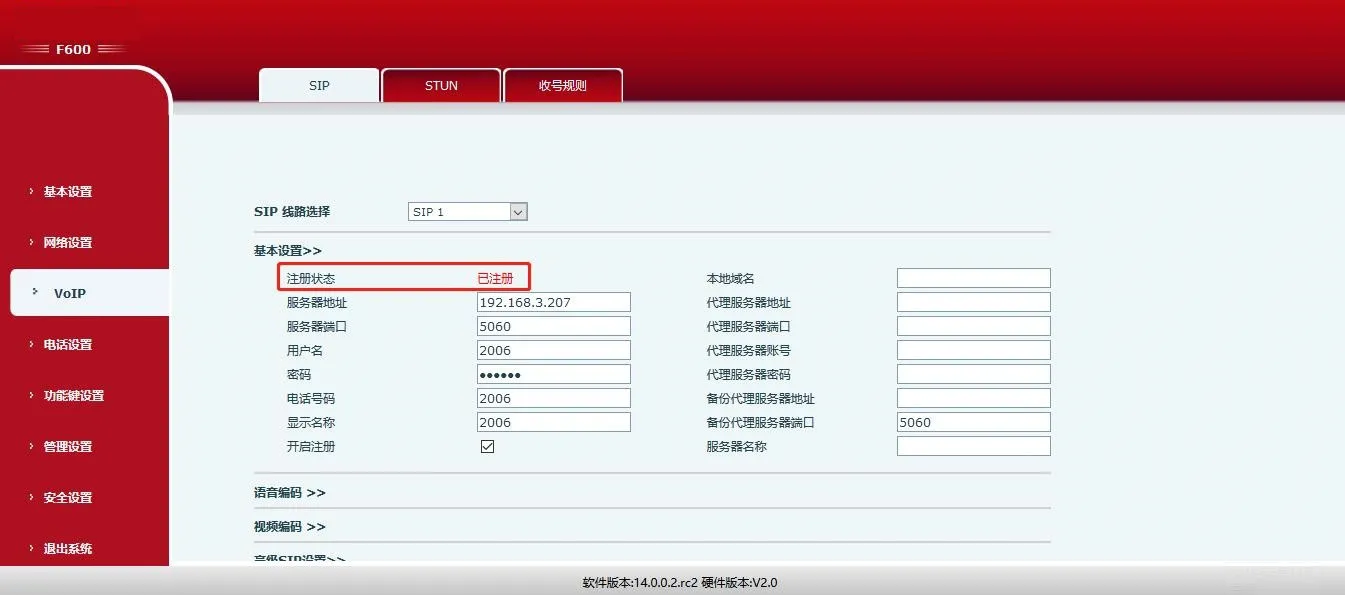
SIP Registration Successful Interface

3.2.2 رمز فتح عن بعد

تعيين رمز (افتراضي:
*). After answering a call from the door station, enter this code to unlock.

مسار الويب:
Door Settings -> Features -> General Settings

ملاحظة: يُسمح فقط بالأرقام أو *.
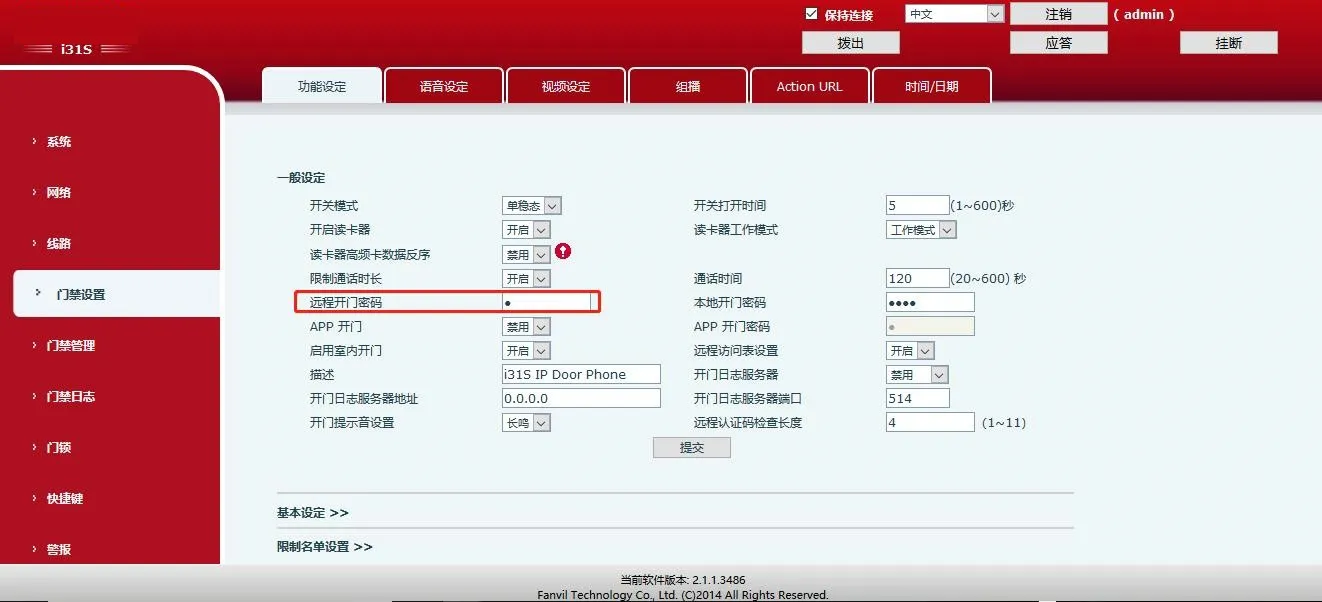
Remote Door Unlock Interface

3.2.3 فتح التطبيق

تمكين APP فتح لفتح عندما
phone calls the door station.

مسار الويب:
Door Settings -> Features -> General Settings

ملاحظة: تدعم كلمة المرور الأرقام أو * فقط.
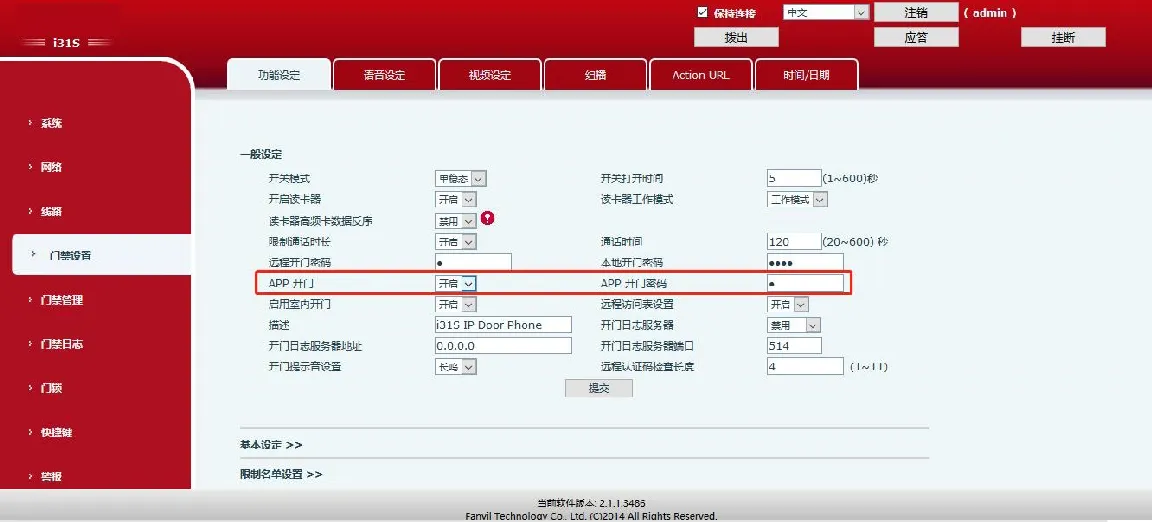
APP Remote Unlock Settings

3.2.4 قائمة الوصول البعيد

قم بتمكين قائمة الوصول (افتراضي: تشغيل). فقط الأرقام الموجودة في القائمة يمكنها فتح الباب.

مسار الويب:
Door Settings -> Features -> General Settings
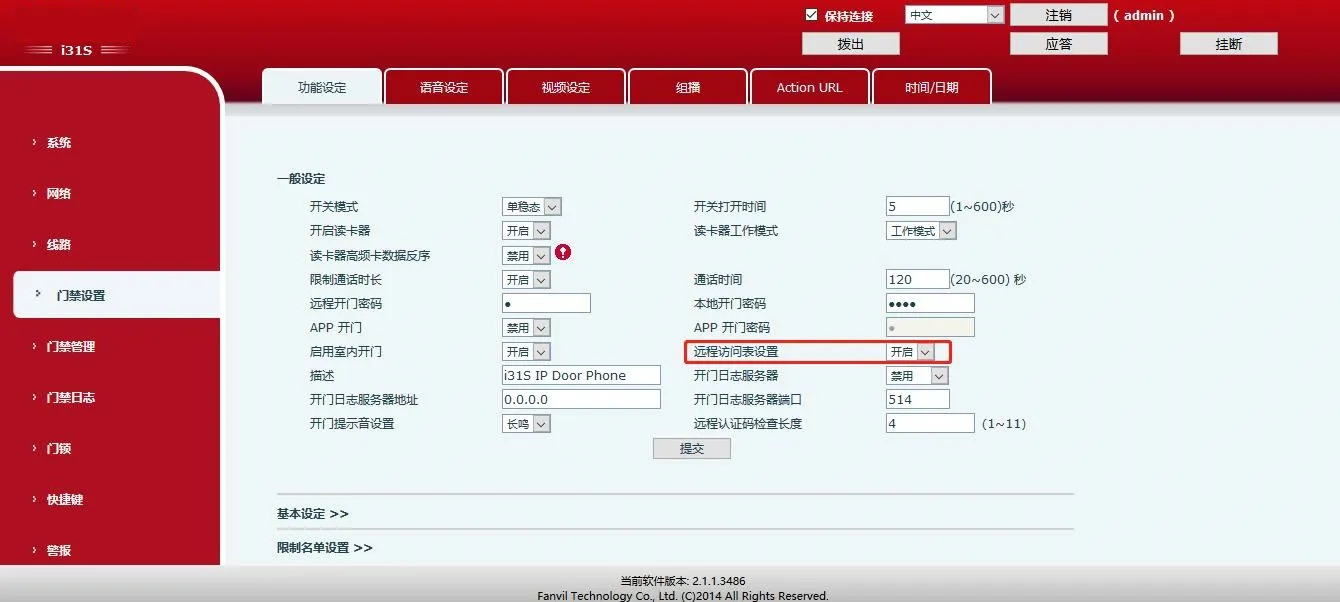
Remote Access List Interface

3.2.5 عن بعد رمز Auth طول

ضبط الطول (1 ~ 11 رقمًا ، الافتراضي: 4). يرسل النظام الرمز فورًا بمجرد مطابقة الطول.

مسار الويب:
Door Settings -> Features -> General Settings
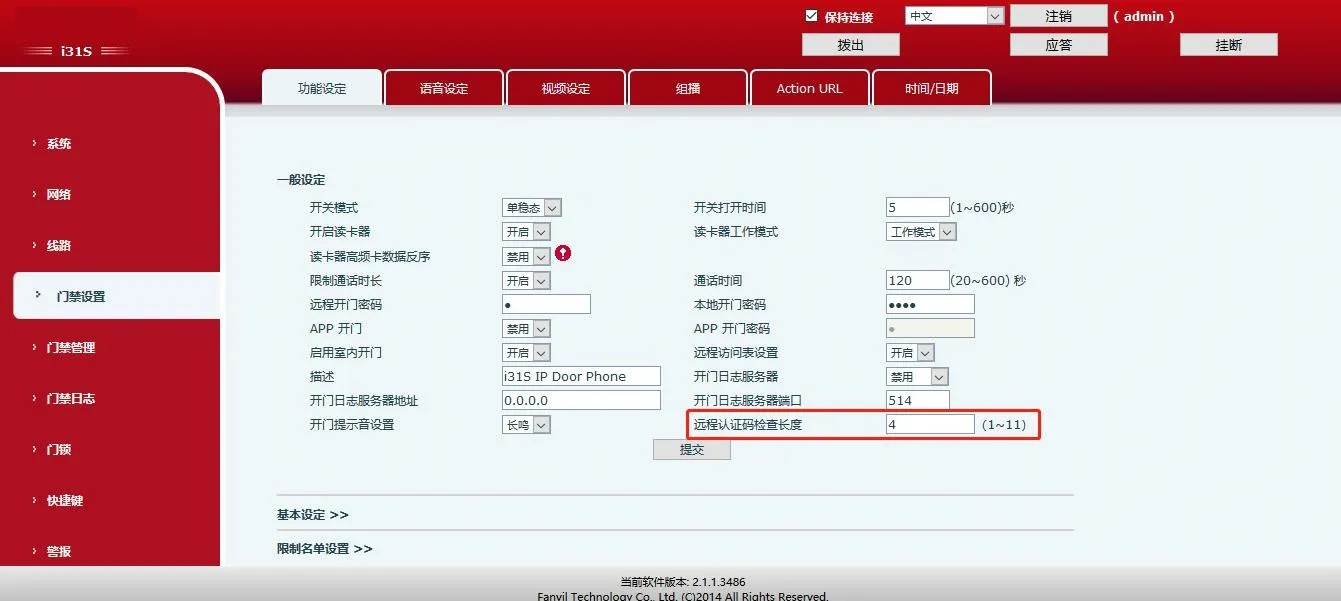
Auth Code Length Settings

3.2.6 الرقم الرئيسي ورمز المصادقة

قم بتعيين رقم SIP للهاتف الداخلي كرقم رئيسي وقم بتعيين رمز إلغاء القفل.

مسار الويب:
Door Management -> Add Access Rule
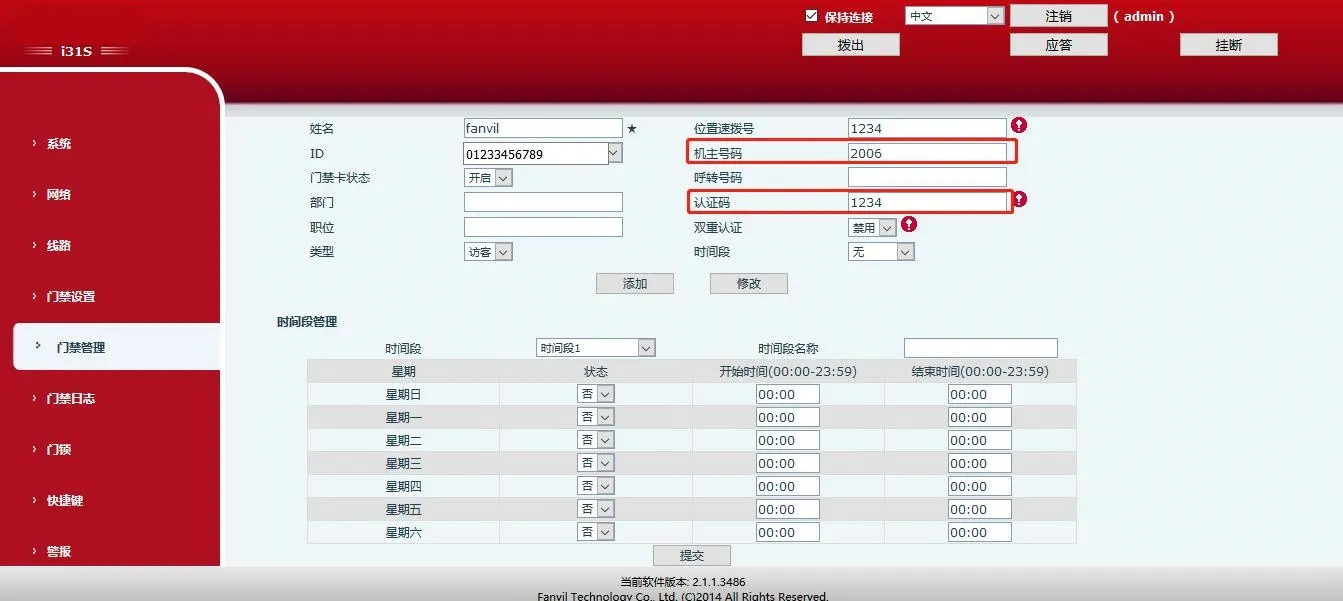
Master Number & Auth Code Interface

3.2.7 الرد التلقائي

تمكين الرد التلقائي مع مهلة. ستقوم محطة الباب تلقائيًا بالرد على المكالمات من الهاتف الداخلي.

مسار الويب:
Door Settings -> Features -> Basic Settings
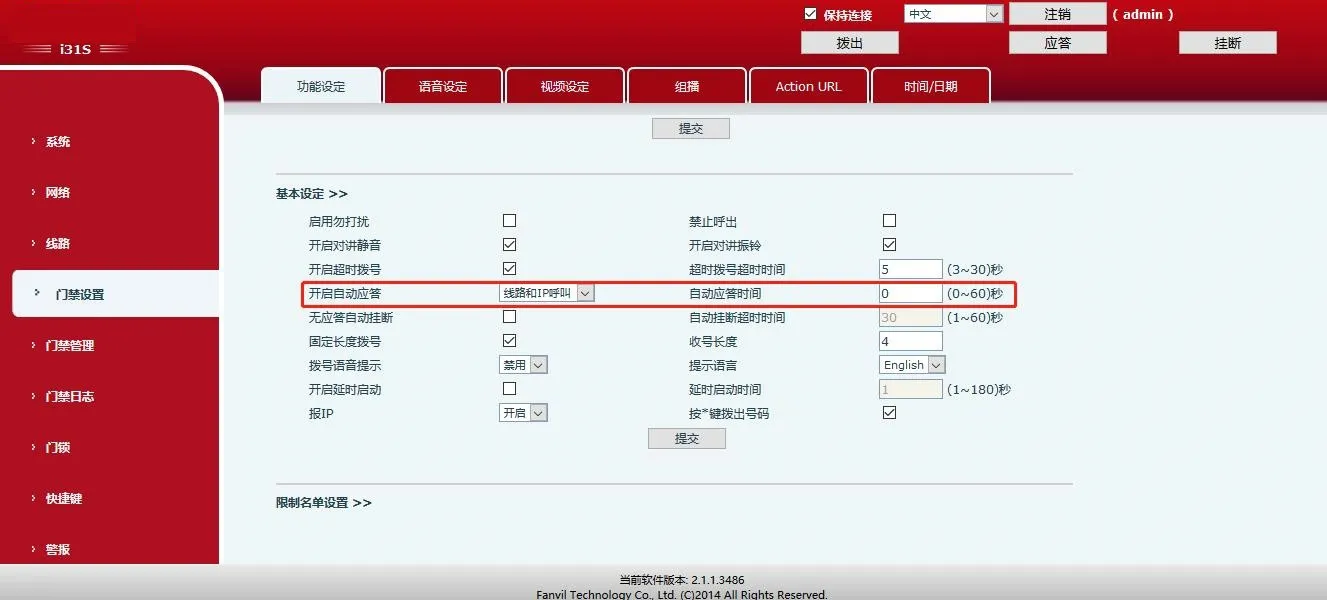
Auto Answer Settings Interface

كتالوج
خدمة العملاء الهاتف
We use cookie to improve your online experience. By continuing to browse this website, you agree to our use of cookie.

Cookies

This Cookie Policy explains how we use cookies and similar technologies when you access or use our website and related services. Please read this Policy together with our Terms and Conditions and Privacy Policy so that you understand how we collect, use, and protect information.

By continuing to access or use our Services, you acknowledge that cookies and similar technologies may be used as described in this Policy, subject to applicable law and your available choices.

Updates to This Cookie Policy

We may revise this Cookie Policy from time to time to reflect changes in legal requirements, technology, or our business practices. When we make updates, the revised version will be posted on this page and will become effective from the date of publication unless otherwise required by law.

Where required, we will provide additional notice or request your consent before applying material changes that affect your rights or choices.

What Are Cookies?

Cookies are small text files placed on your device when you visit a website or interact with certain online content. They help websites recognize your browser or device, remember your preferences, support essential functionality, and improve the overall user experience.

In this Cookie Policy, the term “cookies” also includes similar technologies such as pixels, tags, web beacons, and other tracking tools that perform comparable functions.

Why We Use Cookies

We use cookies to help our website function properly, remember user preferences, enhance website performance, understand how visitors interact with our pages, and support security, analytics, and marketing activities where permitted by law.

We use cookies to keep our website functional, secure, efficient, and more relevant to your browsing experience.

Categories of Cookies We Use

Strictly Necessary Cookies

These cookies are essential for the operation of the website and cannot be disabled in our systems where they are required to provide the service you request. They are typically set in response to actions such as setting privacy preferences, signing in, or submitting forms.

Without these cookies, certain parts of the website may not function correctly.

Functional Cookies

Functional cookies enable enhanced features and personalization, such as remembering your preferences, language settings, or previously selected options. These cookies may be set by us or by third-party providers whose services are integrated into our website.

If you disable these cookies, some services or features may not work as intended.

Performance and Analytics Cookies

These cookies help us understand how visitors use our website by collecting information such as traffic sources, page visits, navigation behavior, and general interaction patterns. In many cases, this information is aggregated and does not directly identify individual users.

We use this information to improve website performance, usability, and content relevance.

Targeting and Advertising Cookies

These cookies may be placed by our advertising or marketing partners to help deliver more relevant ads and measure the effectiveness of campaigns. They may use information about your browsing activity across different websites and services to build a profile of your interests.

These cookies generally do not store directly identifying personal information, but they may identify your browser or device.

First-Party and Third-Party Cookies

Some cookies are set directly by our website and are referred to as first-party cookies. Other cookies are set by third-party services, such as analytics providers, embedded content providers, or advertising partners, and are referred to as third-party cookies.

Third-party providers may use their own cookies in accordance with their own privacy and cookie policies.

Information Collected Through Cookies

Depending on the type of cookie used, the information collected may include browser type, device type, IP address, referring website, pages viewed, time spent on pages, clickstream behavior, and general usage patterns.

This information helps us maintain the website, improve performance, enhance security, and provide a better user experience.

Your Cookie Choices

You can control or disable cookies through your browser settings and, where available, through our cookie consent or preference management tools. Depending on your location, you may also have the right to accept or reject certain categories of cookies, especially those used for analytics, personalization, or advertising purposes.

Please note that blocking or deleting certain cookies may affect the availability, functionality, or performance of some parts of the website.

Restricting cookies may limit certain features and reduce the quality of your experience on the website.

Cookies in Mobile Applications

Where our mobile applications use cookie-like technologies, they are generally limited to those required for core functionality, security, and service delivery. Disabling these essential technologies may affect the normal operation of the application.

We do not use essential mobile application cookies to store unnecessary personal information.

How to Manage Cookies

Most web browsers allow you to manage cookies through browser settings. You can usually choose to block, delete, or receive alerts before cookies are stored. Because browser controls vary, please refer to your browser provider’s support documentation for details on how to manage cookie settings.

Contact Us

If you have any questions about this Cookie Policy or our use of cookies and similar technologies, please contact us at support@becke.cc .