مورد

فهم أفضل الممارسات واستكشاف الحلول المبتكرة وإقامة اتصالات مع شركاء آخرين في جميع أنحاء مجتمع بيكر.

×

نقطة اللمس

نقطة اللمس

بالإضافة إلى الأجهزة الطرفية ، يجب أيضًا مراعاة جميع الموظفين والأماكن والأشياء المتصلة بالشبكة.

تعلم المزيد

مورد

مورد

فهم أفضل الممارسات واستكشاف الحلول المبتكرة وإقامة اتصالات مع شركاء آخرين في جميع أنحاء مجتمع بيكر.

اتصل بنا
مقدمة VLAN وتكوين هاتف SIP الصناعي

نظرة عامة على VLAN

ما هي VLAN

Ethernet هي تقنية شبكة تعتمد على الوسائط المشتركة باستخدام CSMA/CD (الوصول المتعدد بحساسية الناقل / كشف التصادم). يؤدي وجود عدد كبير من المضيفين إلى تصادمات خطيرة وعواصف بث وتدهور الأداء وانقطاع الشبكة. تعمل المحولات على تقليل التصادمات ولكنها لا تستطيع عزل حركة مرور البث.

تحل تقنية VLAN (الشبكة المحلية الافتراضية) هذه المشكلة عن طريق تقسيم شبكة LAN الفعلية إلى نطاقات بث منطقية متعددة. تتواصل الأجهزة داخل VLAN كما لو كانت على نفس الشبكة المحلية؛ لا يمكن لـ VLANs المختلفة التواصل مباشرة، مما يحد من البث.
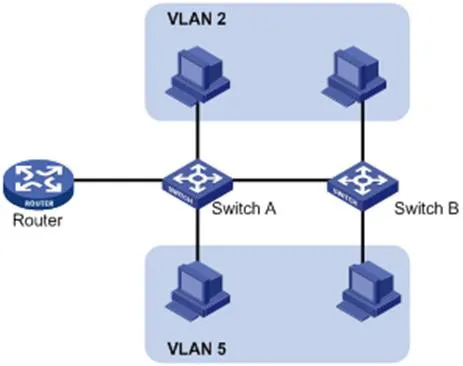
رسم تخطيطي منطقي لربط VLAN

VLANs ليست مقيدة بالموقع الفعلي. يمكن أن تكون الأجهزة على نفس المحول، أو عبر محولات، أو تمتد عبر أجهزة توجيه مع الانتماء إلى نفس VLAN.

مزايا VLAN:

  1. تقييد نطاقات البث، تقليل حمل التوجيه، تقليل زمن الوصول، توفير النطاق الترددي، وتحسين الأداء.

  2. تعزيز الأمان: عزل الطبقة الثانية بين VLANs. يتطلب الاتصال توجيه الطبقة الثالثة.

  3. مجموعات عمل افتراضية مرنة: يمكن تجميع المستخدمين منطقياً دون تغييرات في الأسلاك الفعلية.

مبادئ VLAN

لتحديد إطارات VLAN، تتم إضافة علامة VLAN إلى رأس Ethernet في طبقة ربط البيانات (الطبقة الثانية).

قامت IEEE بتوحيد علامات VLAN باستخدام بروتوكول 802.1Q في عام 1999. وهو يحدد طريقة قياسية لوضع علامات على حزم Ethernet بمعلومات VLAN.

802.1Q يدرج علامة بطول 4 بايت بين عنوان MAC المصدر وحقل EtherType:

  • 2 بايت: TPID (معرف بروتوكول العلامة)

  • 2 بايت: TCI (معلومات التحكم في العلامة)

يتضمن TCI PCP (نقطة رمز الأولوية)، CFI (مؤشر التنسيق الأساسي)، و VID (معرف VLAN).

تنسيق إطار Ethernet التقليدي

الشكل 1-2 تنسيق إطار Ethernet التقليدي

هيكل علامة VLAN

الشكل 1-3 حقول علامة VLAN

حقول علامة VLAN:

  1. TPID: 16 بت، يشير إلى علامة 802.1Q؛ القيمة الافتراضية 0x8100.

  2. الأولوية: 3 بت، 802.1p فئة الخدمة (CoS).

  3. CFI: 1 بت، تنسيق عنوان MAC؛ 0 = قياسي، القيمة الافتراضية 0.

  4. معرف VLAN: 12 بت، يحدد VLAN؛ النطاق الصالح 1–4094 (0 و 4095 محجوزان).

ملاحظة: بالنسبة للإطارات ذات العلامات المزدوجة (QinQ)، يعالج المحول العلامة الخارجية فقط؛ يتم التعامل مع العلامات الداخلية كحمولة.

تطبيقات VLAN

2.3.1 مقدمة إلى LLDP

LLDP (بروتوكول اكتشاف الطبقة الثانية) يسمح للأجهزة بإعلان واستقبال معلومات الجيران عبر الشبكة المحلية. يتم تخزين المعلومات في MIBs ويمكن الاستعلام عنها عبر SNMP (RFC 2922).

يستخدم LLDP هياكل TLV (النوع/الطول/القيمة) لحمل معلومات الجهاز. تشكل TLVs متعددة LLDPDU (وحدة بيانات LLDP).

النوعالطولالقيمة
7 بت9 بت0-511 بايت

الشكل 1-4 هيكل TLV

LLDP-MED (اكتشاف نقاط نهاية الوسائط) هو امتداد لأجهزة VoIP، ويوفر:

  • اكتشاف القدرات

  • تكوين VLAN الصوتية

  • إدارة طاقة PoE

  • إدارة المخزون

  • تحديد الموقع لمكالمات الطوارئ

ملاحظة: لا يمكن تشغيل LLDP و LLDP-MED في وقت واحد على نفس المنفذ.

وظائف LLDP على هواتف IP:

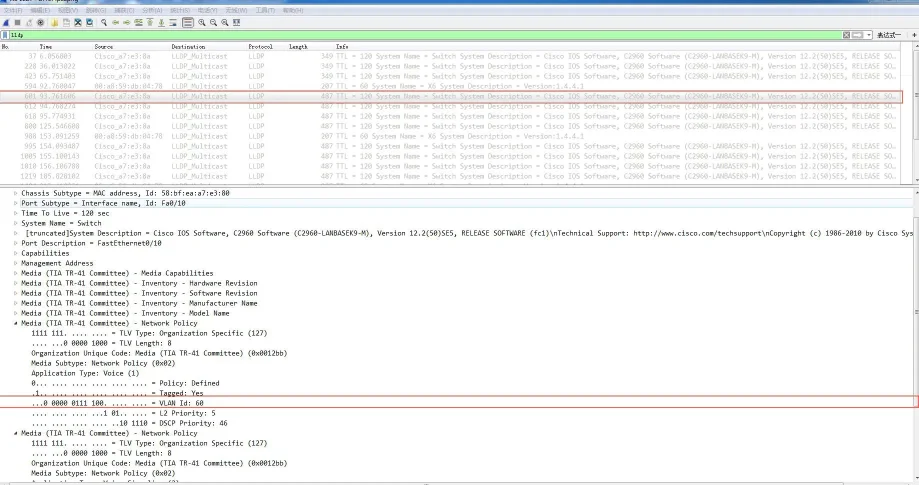
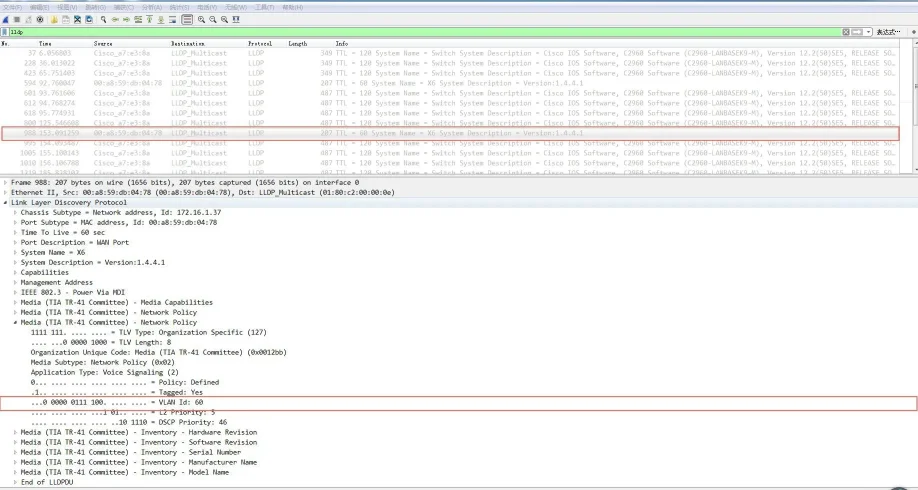
عند تمكين LLDP، يقوم الهاتف بإعلان نفسه بشكل دوري ويستمع إلى المحول. إذا كان نوع التطبيق = صوت، يتعلم الهاتف تلقائيًا معرف VLAN الصوتية من المحول، ويقوم بتحديث تكوينه، ويعيد التشغيل لتطبيق VLAN.

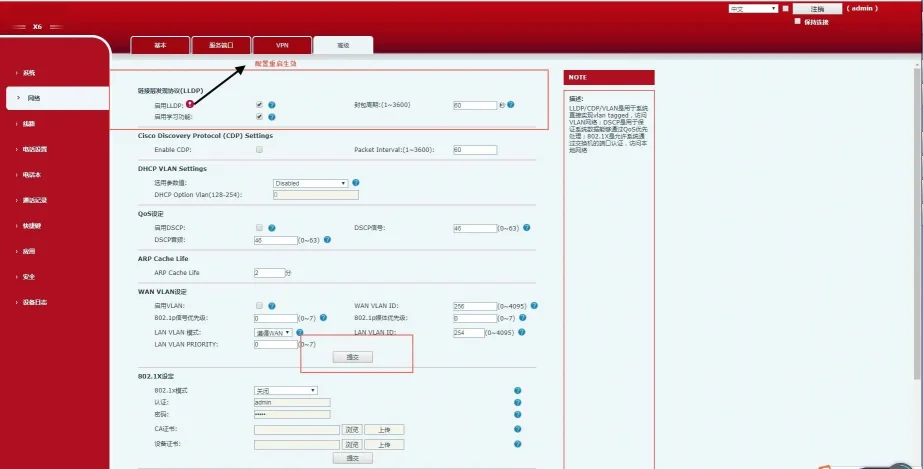
خطوات تكوين LLDP (واجهة الويب):

  1. قم بتسجيل الدخول إلى واجهة الويب باسم admin/admin.

  2. انتقل إلى الشبكة ← متقدم.

  3. قم بتمكين LLDP.

  4. عيّن فترة الإرسال (1–3600 ثانية).

  5. انقر على تطبيق وأعد تشغيل الهاتف.

واجهة تكوين LLDP على الويب

الشكل 1-5 واجهة تكوين LLDP

بعد تمكين LLDP، يقوم الهاتف بما يلي:

  • إرسال حزم LLDP متعددة البث بشكل دوري.

  • استقبال حزم LLDP على منفذ WAN/LAN.

  • دعم تكوين MAC/PHY.

  • الحصول على VLAN من سياسة شبكة TLV (يتجاوز الإعدادات اليدوية).
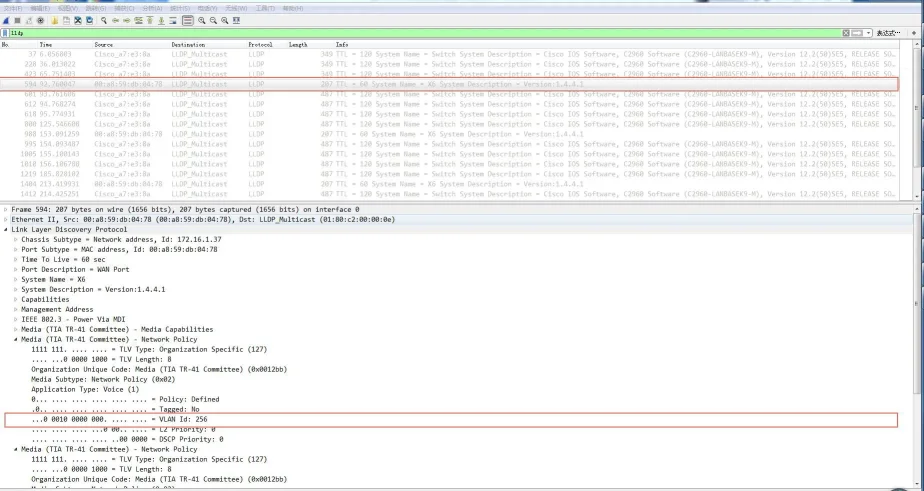
حزمة LLDP مرسلة من الهاتفحزمة LLDP مستلمة بواسطة الهاتفحزمة LLDP مرسلة بعد تعلم VLAN

2.3.2 مقدمة إلى CDP

CDP (بروتوكول اكتشاف Cisco) هو بروتوكول خاص بشركة Cisco من الطبقة الثانية لاكتشاف الأجهزة.

وظائف CDP على هواتف IP:
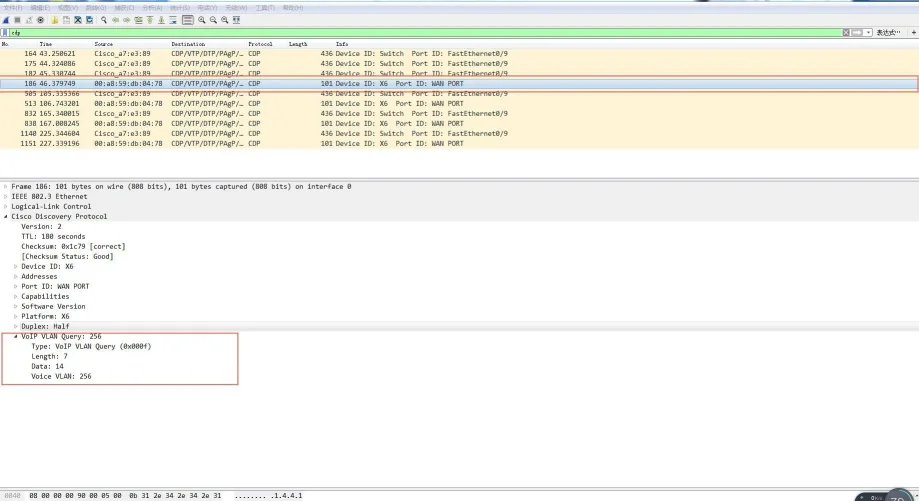
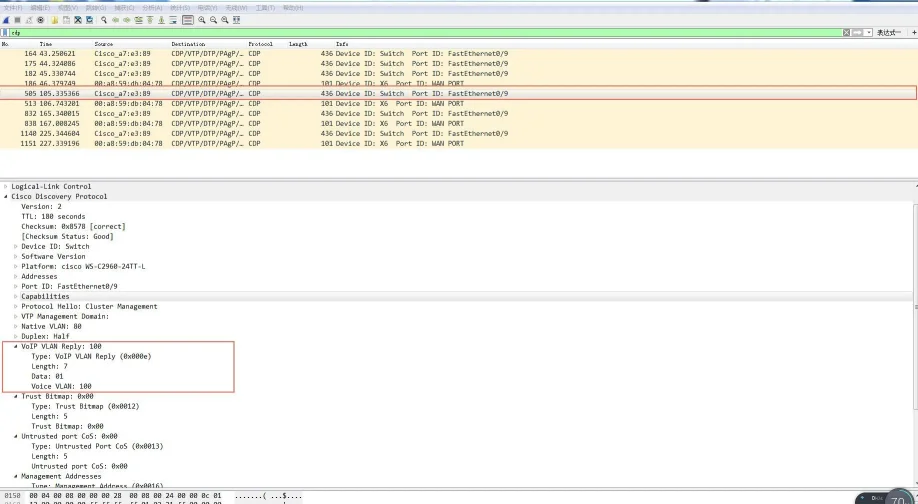
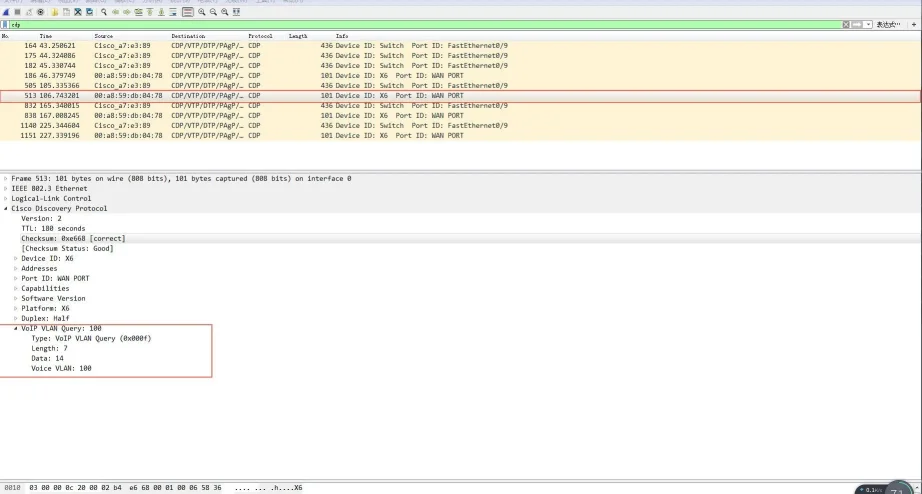
يعلن الهاتف عن نفسه ويستمع إلى حزم CDP من المحول. يتعلم تلقائيًا معرف VLAN الصوتية، ويقوم بتحديث التكوين، ويعيد التشغيل.

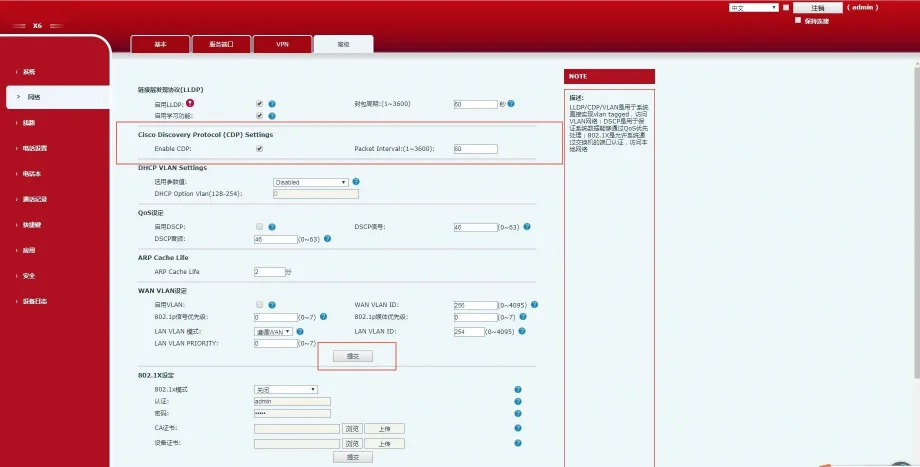
خطوات تكوين CDP (واجهة الويب):

  1. قم بتسجيل الدخول باسم admin/admin.

  2. انتقل إلى الشبكة ← متقدم.

  3. قم بتمكين CDP.

  4. عيّن فترة الرسالة (1–3600 ثانية).

  5. انقر على تطبيق.

واجهة تكوين CDP

الشكل 1-6 واجهة تكوين CDP

حزمة CDP مرسلة من الهاتفحزمة CDP مستلمة بواسطة الهاتفحزمة CDP مرسلة بعد تعلم VLAN

2.3.3 DHCP VLAN

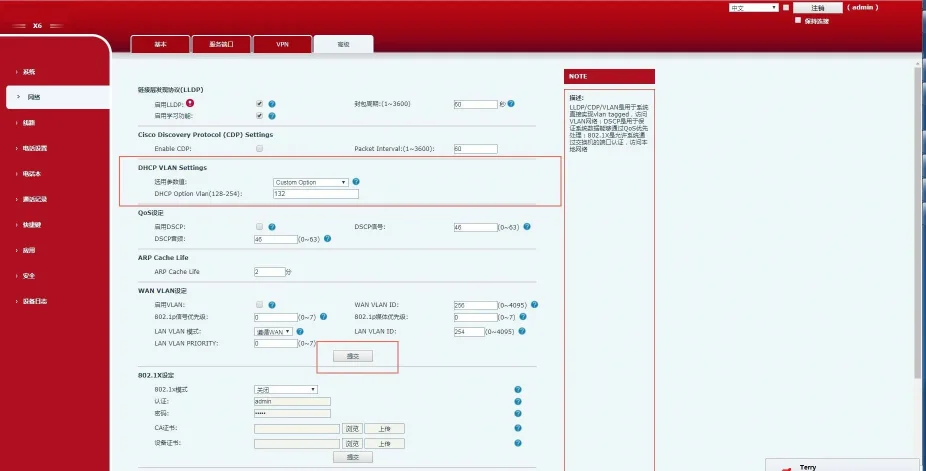
يدعم الهاتف اكتشاف VLAN عبر DHCP. بشكل افتراضي، يستخدم الخيار 132 للحصول على معرف VLAN. يتم دعم ما يصل إلى 5 خيارات DHCP مخصصة.

خطوات تكوين DHCP VLAN (واجهة الويب):

  1. قم بتسجيل الدخول باسم admin/admin.

  2. انتقل إلى الشبكة ← متقدم.

  3. قم بتمكين DHCP VLAN.

  4. أدخل أرقام خيارات DHCP (مثل 132).

  5. انقر على تطبيق.

واجهة تكوين DHCP VLAN

الشكل 1-7 واجهة تكوين DHCP VLAN

سير العمل:

  1. يقوم الهاتف بإرسال بث DHCP Discover.

  2. يرد الخادم بالخيار 132 (معرف VLAN).

  3. يقوم الهاتف بتحرير IP الحالي، ويضع علامة على جميع حركات المرور بمعرف VLAN المتعلم، ويقوم بإجراء DHCP مرة أخرى.
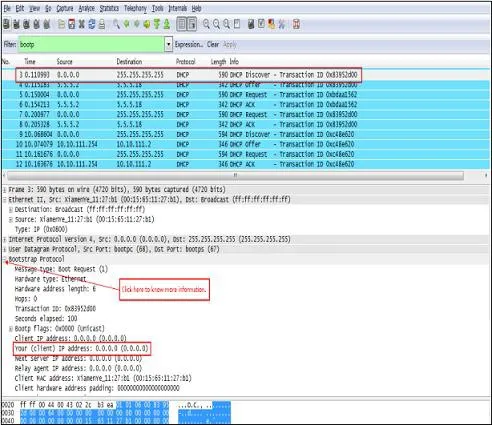
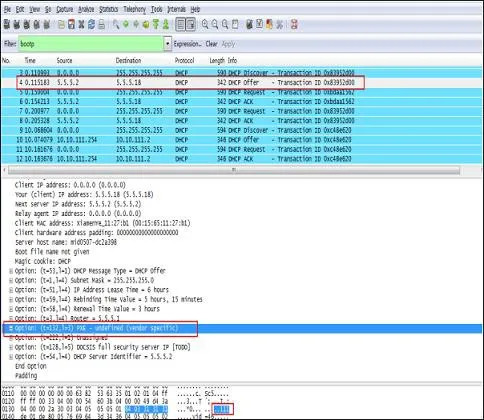
DHCP Discover مرسلة من الهاتفDHCP Offer مستلمة بواسطة الهاتف

2.3.4 التكوين اليدوي لـ VLAN

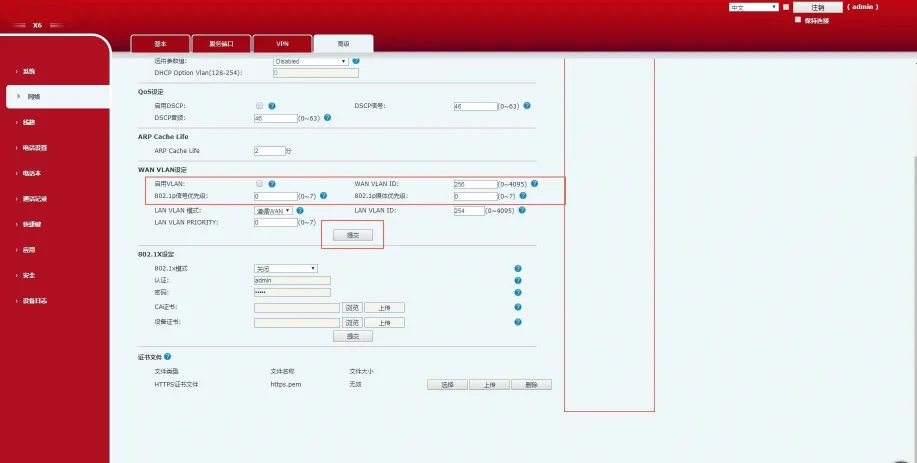
VLAN معطلة بشكل افتراضي. يمكنك تكوين VLAN لمنفذ WAN (الإنترنت) ومنفذ LAN (الكمبيوتر) بشكل منفصل باستخدام معرف VLAN وأولوية 802.1p (0–7، 7 هي الأعلى).

تكوين VLAN WAN (واجهة الويب):

  1. قم بتسجيل الدخول باسم admin/admin.

  2. انتقل إلى الشبكة ← متقدم.

  3. قم بتمكين VLAN.

  4. عيّن معرف VLAN WAN (1–4094).

  5. عيّن الأولوية (0–7).

  6. انقر على تطبيق.

واجهة تكوين VLAN WAN

الشكل 1-8 تكوين VLAN WAN

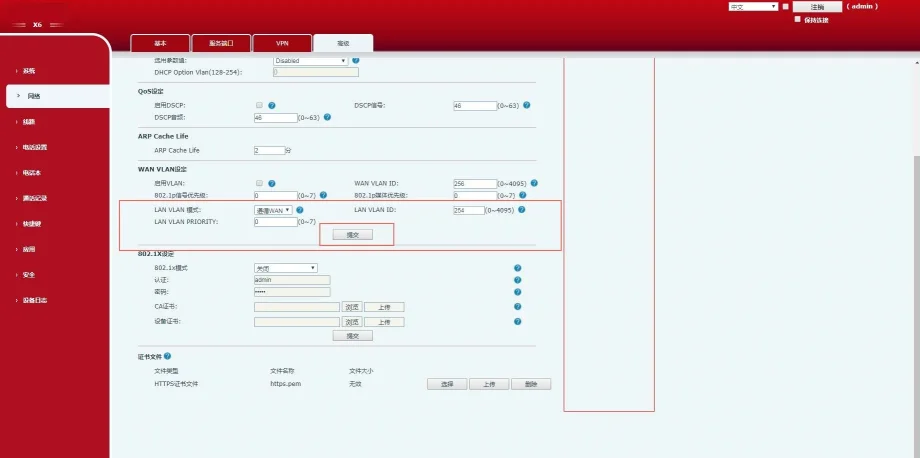
تكوين VLAN LAN (واجهة الويب):

  1. قم بتسجيل الدخول باسم admin/admin.

  2. انتقل إلى الشبكة ← متقدم.

  3. عيّن وضع VLAN LAN ومعرفها.

  4. عيّن الأولوية.

  5. انقر على تطبيق.

واجهة تكوين VLAN LAN

الشكل 1-9 تكوين VLAN LAN

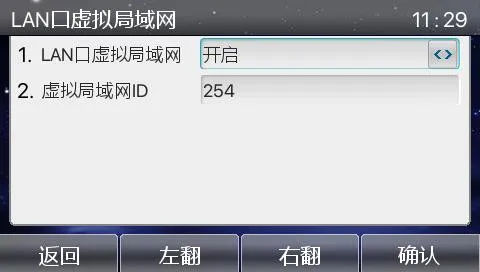
تكوين VLAN عبر شاشة LCD للهاتف:

القائمة ← متقدم (كلمة المرور:123) ← الشبكة ← QoS&Vlan ← WAN VLAN / LAN VLAN
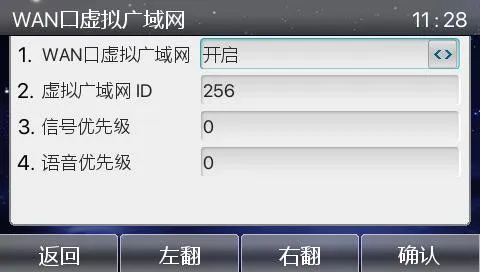
واجهة WAN VLAN على LCDواجهة LAN VLAN على LCD

التحقق من التكوين:
قم بالتقاط الحزم للتحقق من علامات 802.1Q ومعرف VLAN وأولوية 802.1p في إطارات SIP و RTP.
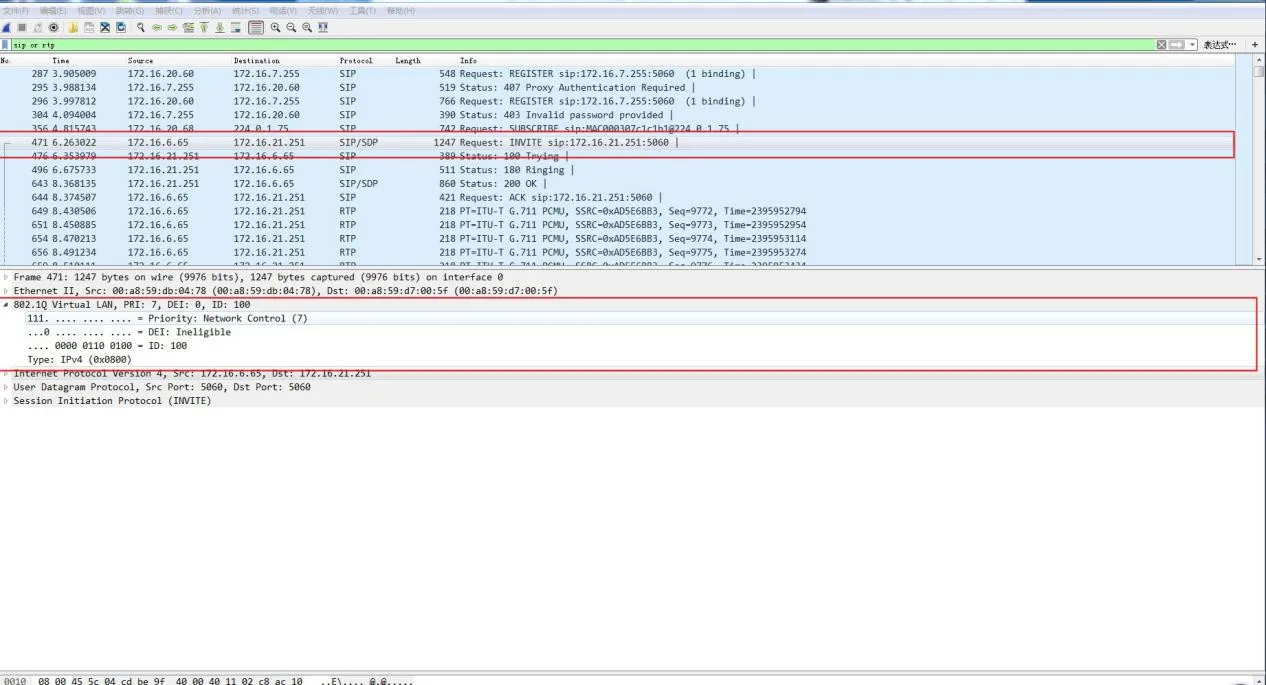
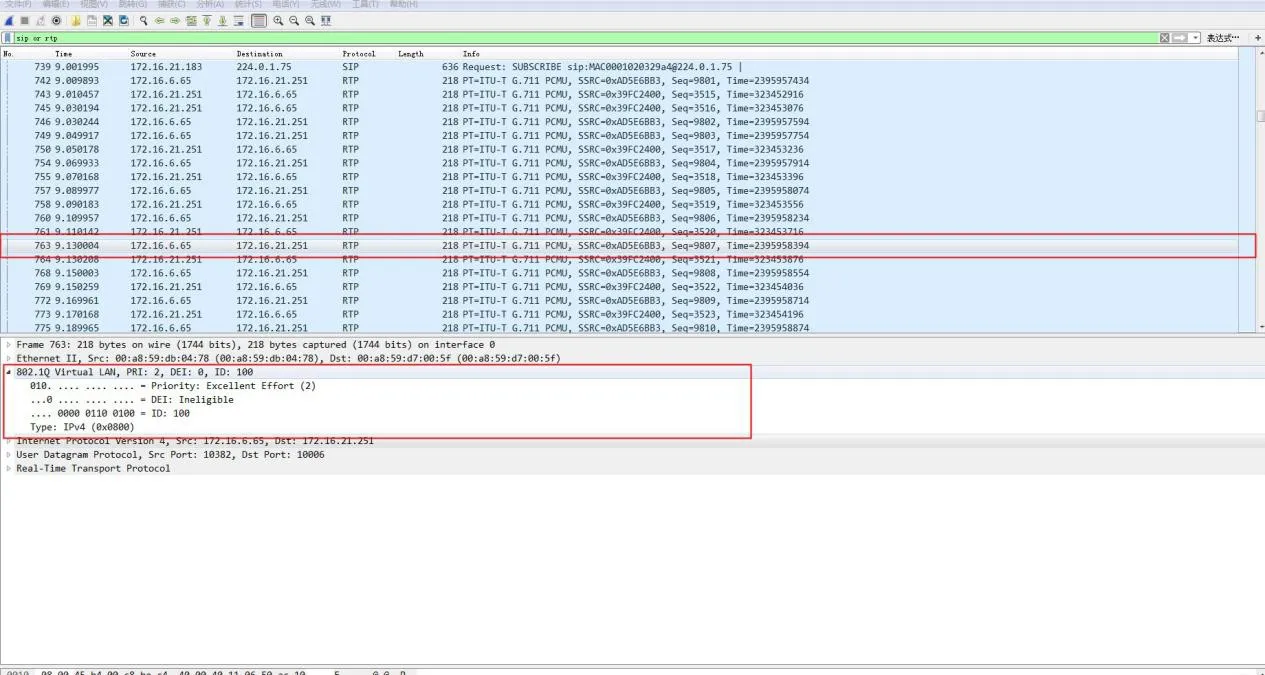
لقطة شاشة لالتقاط الحزملقطة شاشة لالتقاط الحزم

إعدادات VLAN على المحول

فهم Trunk, Access, Hybrid, Tagged, Untagged

تدعم منافذ محول Ethernet ثلاثة أوضاع:

  • Access: ينتمي إلى VLAN واحد؛ يستخدم لنقاط النهاية (أجهزة الكمبيوتر).

  • Trunk: يحمل عدة VLANs؛ يستخدم لربط المحولات.

  • Hybrid: يحمل عدة VLANs؛ يدعم إلغاء العلامات المخصصة عند الإرسال.

القواعد الأساسية:

  • معلم (Tagged): تحتفظ الإطارات بعلامة VLAN 802.1Q عند الإرسال.

  • غير معلم (Untagged): يزيل المحول علامة VLAN قبل الإرسال.

  • PVID (معرف منفذ VLAN): VLAN الافتراضي المخصص للإطارات الواردة غير المعلمة.

نوع المنفذمعالجة الدخولمعالجة الخروج
استقبال إطار غير معلماستقبال إطار معلم
Accessإضافة علامة PVIDتجاهل إذا VLAN != PVIDإزالة العلامة وإعادة التوجيه
Trunkإضافة علامة PVID إذا مسموحقبول إذا كان VLAN مسموحًاإزالة العلامة فقط إذا VLAN = PVID
Hybridإضافة علامة PVID إذا مسموحقبول إذا كان VLAN مسموحًاتعليم أو إلغاء تعليم بناءً على تكوين المنفذ

تكوين VLAN على محول Cisco 2960

إعدادات Ethernet الافتراضية لـ VLAN

المعاملالافتراضيالنطاق
معرف VLAN11–4094
اسم VLANVLANxxxx
MTU15001500–18190
الحالةنشطنشط / معلق

إنشاء أو تعديل VLAN

الخطوةالأمرالغرض
1configure terminalالدخول إلى وضع التكوين العام
2vlan إنشاء أو تحرير VLAN
3name تعيين اسم VLAN
4endالخروج إلى وضع الامتيازات
5show vlanالتحقق من التكوين
6copy running-config startup-configحفظ التكوين

حذف VLAN

الخطوةالأمرالغرض
1configure terminalالدخول إلى وضع التكوين العام
2no vlan حذف VLAN
3endالخروج
4show vlan briefالتحقق من الحذف

تعيين منفذ إلى VLAN (منفذ Access)

الخطوةالأمرالغرض
1configure terminalالتكوين العام
2interface اختيار المنفذ
3switchport mode accessتعيين كمنفذ Access
4switchport access vlan تعيين VLAN
5endالخروج

تكوين منفذ Trunk

الخطوةالأمرالغرض
1configure terminalالتكوين العام
2interface اختيار المنفذ
3switchport mode trunkتعيين كمنفذ Trunk
4switchport trunk native vlan تعيين VLAN الأصلي
5endالخروج

VLANs المسموح بها على Trunk

switchport trunk allowed vlan { add | all | except | remove }

تكوين VLAN الأصلي

switchport trunk native vlan

الأجهزة المتوافقة

محولات Cisco 2960 Series

كتالوج
المهنية الصانع الاتصالات الصناعية ، وتوفير ضمان الاتصالات موثوقية عالية!
مشاورات التعاون
خدمة العملاء الهاتف
We use cookie to improve your online experience. By continuing to browse this website, you agree to our use of cookie.

Cookies

This Cookie Policy explains how we use cookies and similar technologies when you access or use our website and related services. Please read this Policy together with our Terms and Conditions and Privacy Policy so that you understand how we collect, use, and protect information.

By continuing to access or use our Services, you acknowledge that cookies and similar technologies may be used as described in this Policy, subject to applicable law and your available choices.

Updates to This Cookie Policy

We may revise this Cookie Policy from time to time to reflect changes in legal requirements, technology, or our business practices. When we make updates, the revised version will be posted on this page and will become effective from the date of publication unless otherwise required by law.

Where required, we will provide additional notice or request your consent before applying material changes that affect your rights or choices.

What Are Cookies?

Cookies are small text files placed on your device when you visit a website or interact with certain online content. They help websites recognize your browser or device, remember your preferences, support essential functionality, and improve the overall user experience.

In this Cookie Policy, the term “cookies” also includes similar technologies such as pixels, tags, web beacons, and other tracking tools that perform comparable functions.

Why We Use Cookies

We use cookies to help our website function properly, remember user preferences, enhance website performance, understand how visitors interact with our pages, and support security, analytics, and marketing activities where permitted by law.

We use cookies to keep our website functional, secure, efficient, and more relevant to your browsing experience.

Categories of Cookies We Use

Strictly Necessary Cookies

These cookies are essential for the operation of the website and cannot be disabled in our systems where they are required to provide the service you request. They are typically set in response to actions such as setting privacy preferences, signing in, or submitting forms.

Without these cookies, certain parts of the website may not function correctly.

Functional Cookies

Functional cookies enable enhanced features and personalization, such as remembering your preferences, language settings, or previously selected options. These cookies may be set by us or by third-party providers whose services are integrated into our website.

If you disable these cookies, some services or features may not work as intended.

Performance and Analytics Cookies

These cookies help us understand how visitors use our website by collecting information such as traffic sources, page visits, navigation behavior, and general interaction patterns. In many cases, this information is aggregated and does not directly identify individual users.

We use this information to improve website performance, usability, and content relevance.

Targeting and Advertising Cookies

These cookies may be placed by our advertising or marketing partners to help deliver more relevant ads and measure the effectiveness of campaigns. They may use information about your browsing activity across different websites and services to build a profile of your interests.

These cookies generally do not store directly identifying personal information, but they may identify your browser or device.

First-Party and Third-Party Cookies

Some cookies are set directly by our website and are referred to as first-party cookies. Other cookies are set by third-party services, such as analytics providers, embedded content providers, or advertising partners, and are referred to as third-party cookies.

Third-party providers may use their own cookies in accordance with their own privacy and cookie policies.

Information Collected Through Cookies

Depending on the type of cookie used, the information collected may include browser type, device type, IP address, referring website, pages viewed, time spent on pages, clickstream behavior, and general usage patterns.

This information helps us maintain the website, improve performance, enhance security, and provide a better user experience.

Your Cookie Choices

You can control or disable cookies through your browser settings and, where available, through our cookie consent or preference management tools. Depending on your location, you may also have the right to accept or reject certain categories of cookies, especially those used for analytics, personalization, or advertising purposes.

Please note that blocking or deleting certain cookies may affect the availability, functionality, or performance of some parts of the website.

Restricting cookies may limit certain features and reduce the quality of your experience on the website.

Cookies in Mobile Applications

Where our mobile applications use cookie-like technologies, they are generally limited to those required for core functionality, security, and service delivery. Disabling these essential technologies may affect the normal operation of the application.

We do not use essential mobile application cookies to store unnecessary personal information.

How to Manage Cookies

Most web browsers allow you to manage cookies through browser settings. You can usually choose to block, delete, or receive alerts before cookies are stored. Because browser controls vary, please refer to your browser provider’s support documentation for details on how to manage cookie settings.

Contact Us

If you have any questions about this Cookie Policy or our use of cookies and similar technologies, please contact us at support@becke.cc .